



It’s 9:47 on a Tuesday night. A homeowner stands in two inches of water after a supply line bursts under the kitchen sink. She grabs her phone, searches “emergency plumber near me,” and taps the first company with good reviews.
Your company.
The phone rings four times. Then it goes to voicemail.
She hangs up and calls the next plumber on the list. They answer. They get the job, the review, and probably her business for the next ten years.
This guide explains how AI can answer calls when your office is closed, what it can and can’t handle, and exactly how to set it up for an HVAC, plumbing, roofing, or electrical business.
No hype. Just practical steps, common mistakes, and the results you can reasonably expect.
- After-hours calls are often your highest-intent calls. Sending them to voicemail is one of the biggest lead leaks in a service business.
- An AI phone agent answers every call in a natural voice, asks your intake questions, sorts emergencies from routine requests, books appointments, and alerts your on-call tech.
- AI works best as part of a system: clear call rules, safety scripts, a connected CRM or field service software, and a human backup for true emergencies.
- Start with overflow and after-hours calls, review transcripts weekly, and expand only when the data says it’s working.
The After-Hours Problem: Why Missed Calls Are a Leak, Not Bad Luck
Most contractors don’t have a lead volume problem. They have a lead leakage problem.
You pay for leads through your website, Google Business Profile, ads, and referrals. Some of those leads slip away before they become booked jobs.
After-hours calls are one of the biggest leaks because they happen when nobody is watching the phone.
What the data says
Here’s what current research shows (and why it matters for your shop):
- Home service companies miss about 1 in 7 calls. CallRail’s 2025 benchmark report, based on 1.1 million leads, found home services businesses miss 14% of calls. That’s during all hours, not just nights and weekends.
- Most of those callers don’t try again. The same report found that up to 85% of customers whose calls go unanswered won’t call back.
- Emergencies are common, and they’re your trades. HomeServe’s 2025 survey of more than 2,300 U.S. homeowners found almost 81% had a home repair emergency in the past year. Heating and AC repair topped the list at 30%, and blocked or overflowing toilets came in at 26%.
Put those together and the picture is clear. Homeowners have urgent problems. They call. If you don’t answer, they usually move on.
Why after-hours callers are different
A call at 2 p.m. might be someone shopping for a quote. A call at 10 p.m. is usually someone with a problem right now:
- HVAC: No heat on a freezing night, or no AC during a heat wave with an elderly parent in the house.
- Plumbing: A burst pipe, a sewer backup, or a water heater leaking into a finished basement.
- Roofing: A storm just tore off shingles and water is coming through the ceiling.
- Electrical: A breaker that won’t reset, a dead panel, or a burning smell from an outlet.
These callers are ready to buy. Many will pay an after-hours rate. If you solve their emergency, they often become loyal customers, maintenance agreement members, and five-star reviewers.
What most shops do today (and where each one leaks)
Most contractors handle after-hours calls in one of four ways:
- Voicemail. Cheap, but the weakest option. Callers in a hurry don’t leave messages; they call the next company.
- Owner or on-call tech answers. Works until it doesn’t. A tech who just finished a 12-hour day may miss the call, answer groggily, or forget to log the details.
- Human answering service. Covers every hour, but operators usually can’t answer detailed questions about your service area, pricing policy, or what you do and don’t fix. Costs often rise with call volume.
- AI phone agent. Answers every call instantly, follows your rules every time, and hands off to a human when needed.
None of these is perfect on its own. The goal is to build a system where no high-value call goes unanswered, and every caller gets a clear next step.
What Is an AI Phone Agent? (And What It’s Not)
An AI phone agent (also called an AI receptionist or AI answering service) is software that answers your business calls in a natural-sounding voice, understands what the caller says, responds using information you provide, and takes action, such as booking an appointment, logging the lead in your CRM, or transferring an emergency to your on-call technician.
That’s different from the phone systems most people hate.
| Old-school phone menu (IVR) | |
|---|---|
| “Press 1 for service, press 2 for billing” | “Thanks for calling. How can I help tonight?” |
| Follows a fixed tree of options | Understands normal speech and follow-up questions |
| Can’t answer questions | Answers from your approved knowledge base |
| Usually ends in voicemail | Books, logs, texts, or transfers |
| Frustrates callers | Feels like talking to a trained receptionist (when set up well) |
How AI answers calls when your office is closed: the basic mechanics
Here’s what happens behind the scenes:
- Call forwarding. Your business number forwards to the AI agent after hours or whenever a call goes unanswered for a set number of rings. You keep your existing phone number.
- Speech recognition. The AI converts the caller’s words into text in real time.
- Understanding and response. A language model figures out what the caller needs and replies using your knowledge base: services, service area, hours, pricing policy, and safety rules.
- Action. Based on your rules, the AI books a time slot, creates a lead in your CRM or field service management (FSM) software, texts the caller a confirmation, or transfers the call.
- Handoff and summary. Your team gets a text or email summary, often with a recording and transcript, so whoever picks it up in the morning (or at midnight) has everything they need.
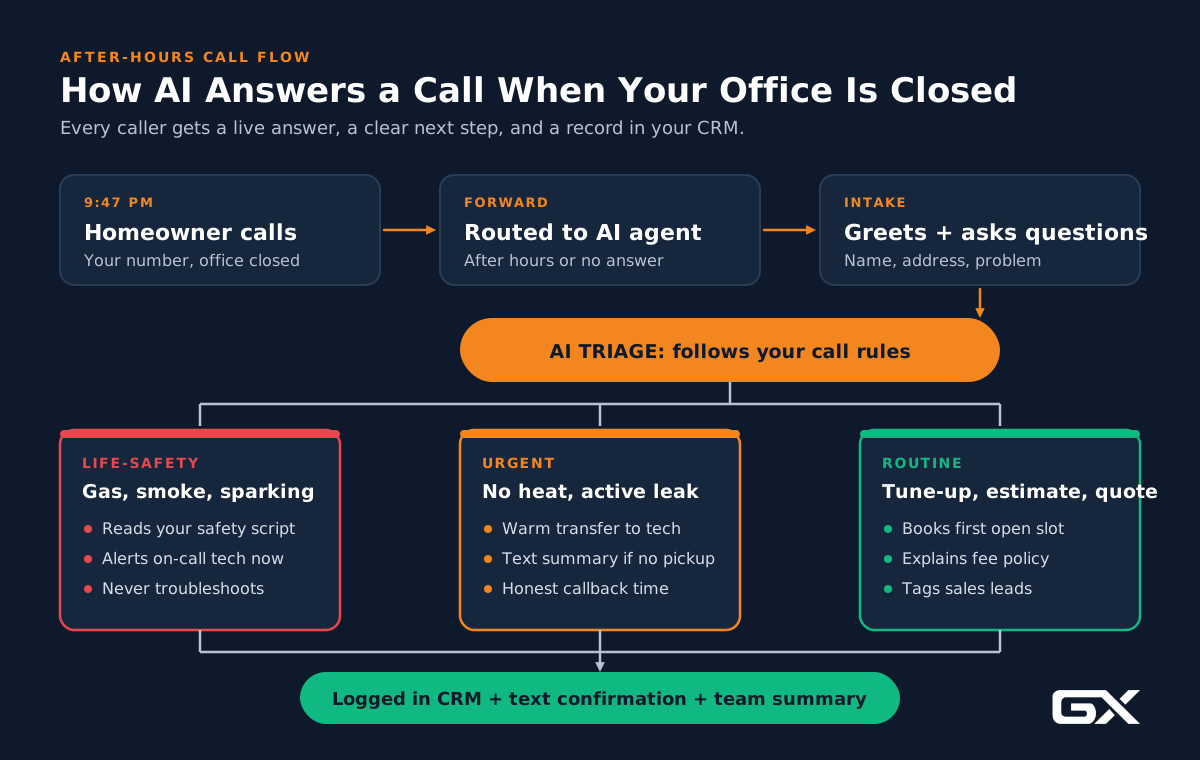
What AI can and can’t handle
Be realistic about this. AI excels at repeatable conversations but is not a licensed technician.
| AI handles well | Keep a human involved |
|---|---|
| Answering every call on the first ring | Diagnosing equipment or giving repair instructions |
| Collecting name, address, phone, and problem details | Gas leaks, sparking, flooding near electrical, or any life-safety risk (AI gives your safety script, then escalates) |
| Confirming you serve the caller’s ZIP code | Angry customers, complaints, and billing disputes |
| Explaining your hours, dispatch fee policy, and services | Complex commercial bids and insurance negotiations |
| Booking appointments into open time slots | Unusual requests your knowledge base doesn’t cover |
| Sorting emergencies from routine requests | Final pricing decisions on large jobs |
| Texting confirmations and follow-ups | Anything where a wrong answer could hurt someone |
Your Four After-Hours Options, Compared
Every shop is different. Here’s how the common options stack up for a typical HVAC, plumbing, roofing, or electrical company.
| Factor | Voicemail | On-call tech answers | Human answering service | AI phone agent + human backup |
|---|---|---|---|---|
| Answers live | No | Sometimes | Yes | Yes |
| Answers several calls at once | No | No | Depends on staffing | Yes |
| Knows your service area and policies | No | Yes | Partly | Yes (from your knowledge base) |
| Books into your schedule | No | Sometimes | Sometimes | Yes (with integration) |
| Handles true emergencies | No | Yes | Takes a message or patches through | Escalates to your on-call tech |
| Consistency | N/A | Varies with fatigue | Varies by operator | Same script every time |
| Cost pattern | Free | Tech time and burnout | Often per minute or per call | Usually a monthly plan, sometimes plus usage |

Our take: For most contractors, the best setup is an AI phone agent with a human escalation path. The AI catches every call and handles routine ones. Your on-call tech only gets woken for calls that actually need a truck tonight.
Real-World Examples by Trade
The examples below are illustrative composites based on common situations in each trade. They show how a well-configured AI agent should behave. They are not specific client case studies.
HVAC: The no-heat call at 11 p.m.
A homeowner calls on a January night. The furnace stopped, and the house is at 58 degrees.
What the AI does:
- Greets the caller by your company name and asks what’s going on.
- Asks your triage questions: Is anyone in the home elderly, an infant, or medically vulnerable? Is there any smell of gas? What’s the indoor temperature?
- If the caller mentions a gas smell, the AI reads your approved safety script (leave the home, then call the gas utility or 911 from outside) and does not try to troubleshoot.
- If it’s a no-heat call with a vulnerable person, it follows your rule: transfer to the on-call tech or page them with a summary.
- If everyone is safe and comfortable with space heaters, it offers the first available morning slot, explains your after-hours or priority fee policy, and books it.
- It can also mention your maintenance agreement if the caller asks how to avoid this next winter.
Why it matters: During a cold snap or heat wave, call volume can spike beyond what one dispatcher can handle. AI can answer multiple calls at once, so no one gets a busy signal.
Related reading: our HVAC marketing guide covers the rest of your HVAC lead generation system.
Plumbing: The burst pipe and the “what do I do right now?” question
A caller says water is spraying from a pipe in the basement.
What the AI does:
- Recognizes “water spraying” and “burst pipe” as an emergency based on your rules.
- Reads only the safety guidance you’ve approved, such as “If you can safely reach it, turn off the main water shutoff valve. If water is near outlets or electrical equipment, stay out of the area.”
- Transfers to the on-call plumber or sends an urgent text with the address and callback number.
- Texts the caller a confirmation that help has been notified, with your company name and number.
What it won’t do: Walk the caller through repairs. That’s a liability risk and not what the caller needs. They need a plumber on the way.
Related reading: plumbing marketing guide for the full plumbing lead generation picture.
Roofing: The storm surge
A hailstorm rolls through on a Saturday evening. Dozens of homeowners call over the next few hours.
What the AI does:
- Answers every call, even when 15 come in at once.
- Asks: Is water coming inside right now? Is anyone hurt? What’s the address? Do you plan to file an insurance claim?
- Flags active leaks for emergency tarping (if you offer it) and sends those to the on-call crew lead.
- Books inspection appointments for the rest, in order of urgency.
- Logs every lead in your CRM with storm tags so your team can follow up Monday morning.
Why it matters: Storm season is when roofing lead generation pays off or falls apart. The shops that answer first usually win the inspection.
Related reading: roofing marketing guide.
Electrical: The burning smell
A caller says an outlet is warm and smells like burning.
What the AI does:
- Treats this as a life-safety situation, every time.
- Reads your approved script: if there’s smoke, fire, or sparking, leave the home and call 911. If it’s safe, turn off the breaker for that circuit.
- Escalates immediately to the on-call electrician.
- Never tries to diagnose the problem.
For routine calls (a new EV charger quote, a panel upgrade, adding outlets), the AI collects details and books an estimate.
Related reading: electrical marketing guide for electricians.
How to Set Up AI Call Answering: 10 Steps
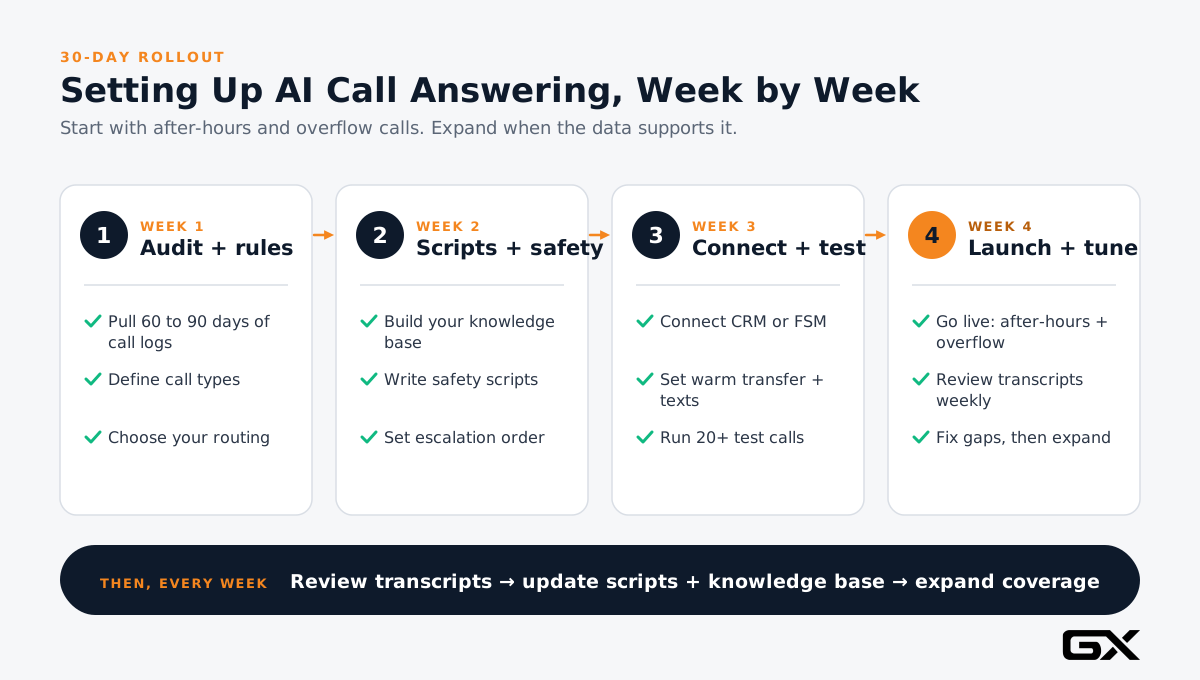
Here’s the process we recommend. Most shops can go from idea to live in about 30 days if they follow it in order.
Step 1: Audit your current after-hours calls
Why: You can’t fix a leak you haven’t measured.
How:
- Pull 60 to 90 days of call logs from your phone provider or call tracking software (such as CallRail).
- Count calls that came in outside business hours, calls that went to voicemail, and calls that were never returned.
- Listen to a sample of voicemails. How many were emergencies? How many were new customers?
- Check how many of those callers eventually booked with you.
Common mistake: Guessing. Owners often underestimate after-hours volume because unanswered calls leave no trace beyond a line in the call log.
Step 2: Define your call types and rules
Why: AI follows rules. If you don’t write them down, it can’t follow them.
How: List every common call type and decide what should happen.
For example:
| Call type | Example | Rule |
|---|---|---|
| Life-safety emergency | Gas smell, sparking, smoke | Read safety script, then escalate immediately |
| Urgent service | No heat with a vulnerable person, active leak | Transfer to on-call tech |
| Next-day service | AC not cooling, slow drain | Book first available slot |
| Estimate request | Replacement, re-roof, panel upgrade | Book estimate, tag as sales lead |
| Existing customer question | Invoice, warranty | Take a message for the office |
| Not a fit | Outside service area, service you don’t offer | Explain politely, offer a referral if you have one |
Best practice: Get your service manager and best dispatcher in a room for an hour. They already know these rules; they just haven’t written them down.
Step 3: Decide your coverage and call routing
Why: You want AI to catch what humans miss, not replace a great dispatcher.
How: Choose one of these routing setups:
- After-hours only: AI answers when the office is closed.
- Overflow: AI answers when no one picks up after a set number of rings, any time of day.
- Full coverage: AI answers every call first and transfers when needed.
Best practice: Start with after-hours plus overflow. It’s the lowest-risk way to stop the leak while your team continues answering during the day.
Step 4: Build your knowledge base
Why: The AI can only answer questions with information you give it. Vague inputs lead to vague answers.
How: Write clear, short answers for:
- Services you offer (and don’t offer)
- Service area by city and ZIP code
- Business hours and after-hours policy
- Dispatch fee or diagnostic fee policy (as you want it stated)
- Brands you service
- Maintenance agreement basics
- Financing availability
- What to expect when the tech arrives
Common mistake: Letting the AI quote job prices. Stick to your fee policies and let technicians price work on site.
Step 5: Write your safety scripts and escalation rules
Why: This is where AI setups go wrong. A caller with a gas leak needs to hear one clear instruction, not a sales pitch.
How:
- Write approved, word-for-word scripts for gas smells, smoke or fire, sparking, flooding near electrical equipment, and carbon monoxide alarms.
- Keep scripts short. The core message is usually “leave the area and call 911 or your utility from a safe place.”
- Have your licensed lead tech (and your insurance agent, if you like) review them.
- Define who gets escalated calls, in what order, and what happens if nobody answers within a few minutes.
Best practice: Test every safety script yourself. Call in and say “I smell gas.” Make sure the AI reads the script and escalates each time.
Step 6: Connect your CRM, field service software, and calendar
Why: An AI that takes messages is a better voicemail. An AI that books into your schedule is a lead capture system.
How:
- Connect the AI to your field service management or CRM platform (common examples include ServiceTitan, Housecall Pro, and Jobber) if the vendor supports it.
- Decide which appointment slots AI is allowed to book, and which need a human to confirm.
- Make sure every call creates a lead record with the caller’s details, transcript, and call recording.
Common mistake: Running AI as a separate tool with no connection to your other systems. That creates a new leak because leads sit in an AI dashboard nobody checks.
Our business automation guide explains how to connect these tools so leads flow without manual data entry.
Step 7: Set up your human handoff
Why: True emergencies need a person, fast.
How:
- Use a warm transfer when possible: the AI stays on the line, gives the tech a quick summary, and then connects the caller.
- If transfer fails, the AI should text the on-call tech the details and tell the caller exactly what happens next (“Our on-call technician has your information and will call you back within X minutes”).
- Only promise callback times you can keep.
Step 8: Automate follow-up texts and emails
Why: A quick confirmation text builds trust and keeps the caller from calling a competitor just in case.
How:
- Send an instant text after every call: what was booked, when, and your company phone number.
- Send a reminder the morning of the appointment.
- For callers who didn’t book, send a short follow-up the next business day.
- Make sure callers can reply STOP to opt out of texts.
Step 9: Handle disclosure, recording consent, and compliance
Why: Trust and legal protection.
How:
- Tell callers they’re talking to an AI assistant.
A simple line works: “Hi, you’ve reached [Company]. I’m the virtual assistant and can help you get service tonight.”Honesty builds trust, and callers are less frustrated when they know what they’re talking to.
- Recording notice. Some states require consent from everyone on a call before it’s recorded.
Include a short recording notice in the greeting.
- Outbound calls are different. In February 2024, the FCC confirmed that AI-generated voices count as “artificial” voices under the Telephone Consumer Protection Act (TCPA), which means outbound calls using them generally need the called person’s prior express consent. (Mayer Brown summary)
Answering inbound calls is a different situation, but if you plan to use AI for outbound callbacks or reminders, talk with your attorney first.
This section is general information, not legal advice.
Step 10: Test, launch in phases, and review weekly
Why: The first version is never the best.
How:
- Test: Have five people on your team call in 20 times using real scenarios.
Include tricky ones such as heavy accents, background noise, a caller who changes their mind, and someone outside your service area.
- Launch: Turn on after-hours and overflow coverage first.
- Review: Read or listen to transcripts every week for the first month.
Look for wrong answers, missed escalations, and questions the knowledge base didn’t cover.
- Improve: Update scripts and the knowledge base based on what you find.
How After-Hours AI Supports Your Local SEO
AI call answering isn’t a ranking factor by itself but protects the value of the local SEO and advertising you already pay for.
It also helps keep your online presence honest.
- Google Business Profile hours: Only list “Open 24 hours” if you can dispatch at all hours.
If AI answers but nobody can come until morning, set accurate hours and mention 24/7 call answering in your business description and posts.
- Click-to-call: Many local searchers tap the call button right on your Google Business Profile. Every unanswered tap is wasted visibility.
- Reviews: Fast, helpful responses lead to better customer experiences, and better experiences tend to lead to better reviews.
Encourage happy emergency customers to mention the quick response.
- Consistency: Your website, Google Business Profile, and directory listings should all describe your after-hours service the same way.
- Ad scheduling: If you run Google Ads, only run “emergency” campaigns during hours when calls get a live answer.
With AI coverage plus an on-call tech, extending those hours may make sense. See our guide to Google Ads for contractors.
- Call tracking: Use call tracking with dynamic number insertion on your website so you can see which channels drive after-hours calls.
For the full picture, see our local SEO guide for service businesses.
Do the Math on Your After-Hours Leak
You don’t need perfect data to see if this is worth doing. Use this simple formula:
After-hours calls per month × % unanswered × % that would book × average ticket = monthly revenue at risk
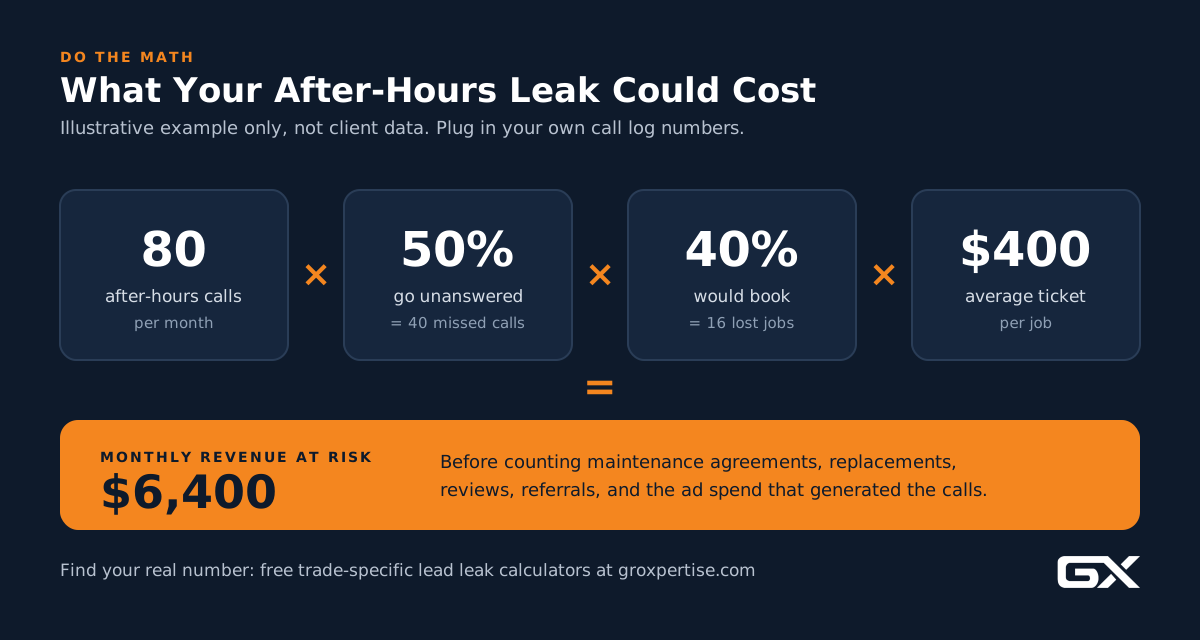
Illustrative example (not a real client):
- 80 after-hours calls per month
- 50% go unanswered or to voicemail = 40 missed calls
- 40% of those would likely book = 16 jobs
- $400 average ticket = $6,400 per month at risk
That doesn’t count maintenance agreements, replacement opportunities, referrals, or reviews from those customers. It also excludes the cost of the leads you paid to generate.
Want your real number? Use our free calculator for your trade:
- HVAC lead leak calculator
- Plumbing lead leak calculator
- Roofing lead leak calculator
- Electrical lead leak calculator
What Results Should You Expect?
Be cautious of any vendor promising a specific revenue jump. Results depend on your call volume, market, pricing, and how well you set up the system.
Here’s what’s realistic to measure:
- After-hours answer rate: This should move close to 100% once AI is live, since every call gets a live answer.
- Booked jobs from after-hours calls: Track these separately in your CRM so you can compare before and after.
- Escalation accuracy: What percentage of true emergencies reached your on-call tech? Aim for every one.
- Caller hang-up rate during AI calls: A high rate usually means the greeting is too long or the AI asks too many questions.
- Morning workload: Your office team should start the day with organized, complete lead records instead of a stack of voicemails.
- Cost per booked job: Compare the AI cost against the revenue from jobs it booked.
When to expect results: You’ll see answer-rate improvements on day one. Booking trends usually become clear after 30 to 60 days once you’ve tuned the scripts.
Common Mistakes to Avoid
- Turning it on without rules. An AI with no call rules will guess. Guessing on emergency calls is dangerous.
- Pretending to be human. Callers usually can tell. Disclose up front and focus on being helpful.
- Letting AI give repair advice. Stick to approved safety scripts. Diagnosis belongs to licensed techs.
- Long greetings. Get to “How can I help?” in one or two sentences.
- No integration. If leads don’t land in your CRM or FSM software, they’ll leak somewhere new.
- Promising callback times you can’t keep. Under-promise and over-deliver.
- Set it and forget it. Weekly transcript reviews in the first month are where real improvements happen.
- Over-booking. Make sure AI only books slots that actually exist and that your team can cover.
- Inaccurate Google Business Profile hours. Don’t claim 24-hour service unless you can dispatch around the clock.
- Choosing on price alone. The cheapest tool that can’t integrate or escalate will cost more in lost jobs.
Expert Tips From the Field
- Script the first 10 seconds carefully. That’s when callers decide whether to stay on the line. Say your company name, say you can help, and ask what is going on.
- Use your dispatcher’s actual words. Pull phrases from your best CSR’s calls. It makes the AI sound like your company.
- Tag every AI call in your CRM. You’ll want clean reporting later.
- Plan for peak events. Before storm season or the first heat wave, review your rules for high call volume and decide who’s on call.
- Train your team on the handoff. Your on-call techs should know exactly what the AI summary text looks like and what to do when it arrives.
- Revisit monthly. Seasons change your call mix. Update the knowledge base regularly.
How to Choose an AI Answering Service for Your Contractor Business
Ask every vendor these questions before you sign:
- Can it integrate with our CRM or field service software? Which ones, exactly?
- How does it handle emergency escalation and warm transfers?
- Can we write and lock our own safety scripts?
- Do we keep our existing phone number?
- Can it answer multiple calls at the same time?
- Do we get recordings, transcripts, and call summaries?
- How is pricing structured (flat monthly, per minute, per call)?
- What happens when the AI doesn’t know an answer?
- Can we customize the voice, greeting, and disclosure?
- Who owns the call data, and how is it stored?
- What’s the contract length, and can we test before committing?
For a broader look at where AI fits in your business, read our complete AI guide for service businesses.
Frequently Asked Questions
How can AI answer calls when my office is closed?
Your business phone forwards calls to an AI phone agent after hours or when nobody answers.
The AI greets callers in a natural voice, asks your intake questions, answers common questions from your knowledge base, books appointments, and escalates emergencies to your on-call technician.
You get a summary, recording, and transcript of every call.
Will customers know they’re talking to AI?
They should. We recommend disclosing it in the greeting. Most callers care more about getting help quickly than whether a person or software answers, as long as the conversation is clear and useful.
Can AI handle emergency calls for HVAC, plumbing, roofing, or electrical?
AI can recognize emergencies based on your rules, read your approved safety script, and immediately transfer or alert your on-call tech.
It should never diagnose problems or give repair instructions. A human should always handle the actual emergency response.
Is an AI answering service better than a human answering service?
It depends on your needs.
AI is more consistent, can handle multiple calls at once, and can integrate to book directly into your schedule. Human services can be better for complex or emotional conversations.
Many contractors use AI for first response and keep a human escalation path.
Do I need to change my phone number?
Usually not. Most AI phone agents work through call forwarding from your existing number. Confirm with your vendor.
How much does an AI receptionist cost?
Pricing varies widely by vendor and features. Common models include flat monthly plans, per-minute pricing, and per-call pricing.
Compare cost against revenue from jobs you’re missing, not just the cost of voicemail.
Can AI book appointments directly into my schedule?
Yes, if the AI connects to your CRM, field service software, or calendar.
Without integration, it can only take messages, which is less valuable.
How long does it take to set up?
A basic setup can be running in a few days. A well-built system with call rules, safety scripts, integrations, and testing usually takes two to four weeks.
Conclusion: Close the After-Hours Leak
Your office closes. Your customers’ emergencies don’t.
Every unanswered call after 5 p.m. is a lead you already paid for walking to a competitor.
AI phone agents give you a practical way to answer every call, sort true emergencies from routine requests, and wake up to booked jobs instead of a pile of voicemails.
The technology is only half of it. The results come from the system around it: clear call rules, approved safety scripts, connected software, reliable human handoff, and weekly reviews.
Start small. Measure your leak. Fix it one step at a time.