



You don’t have a lead problem. You have a leak problem.
Most HVAC, plumbing, roofing, and electrical companies generate more inquiries than they realize — and then watch a huge share of them slip away. A call rings out while you’re under the sink.
A web visitor leaves because nobody answered for three hours. A quote sits half-written for two days. A five-star customer never gets asked for a review. Every one of those is a leak, and every leak is revenue walking out the door.
AI for service businesses is, at its core, leak-sealing technology.
It answers the call you missed, replies to the lead before your competitor does, drafts the proposal while it’s still fresh, and keeps your name showing up where buyers now look for answers. Used well, it doesn’t replace your team — it stops the bleeding so your team can do the work only humans can do.
This guide is written for owners of trades businesses, not enterprise IT departments.
It’s long because it’s complete: what AI actually is, the myths worth ignoring, and sixteen concrete ways to put it to work — each with practical prompts, tool categories to look at, and a realistic implementation example.
At the end, you get a 6-month roadmap, so you know exactly where to start.
The 90-second version
AI is software that reads, writes, listens, and predicts in plain language. For a service business, the biggest, fastest wins are the ones closest to the customer: respond to every lead instantly, never miss a call, answer questions 24/7, and follow up automatically. Start there.
Then use AI to create content, get found in AI search, qualify leads, draft quotes, and answer reviews.
Keep a human reviewing anything a customer sees or anything that carries risk. Move in three phases — crawl, walk, run — and you can be ahead of 90% of your local competitors within a quarter.
Table of contents
- What AI actually is (and what it isn’t)
- The five AI myths keeping contractors stuck
- Where AI plugs the leaks: the opportunity map
- AI for customer service and the missed-call problem
- AI chatbots for your website
- AI for content creation
- AI for SEO and getting found inside AI answers
- AI for advertising
- AI for lead qualification
- AI sales assistants
- AI proposal and estimate generation
- AI for review responses
- AI workflow automation
- AI for analytics and forecasting
- AI voice assistants
- The risks and limits you can’t ignore
- Where this is heading: AI trends for service businesses
- Your AI adoption roadmap
- The bottom line
What AI actually is (and what it isn’t)
Strip away the hype and “AI” — for your purposes — means software that can understand and produce ordinary human language, images, and speech, and make predictions from patterns in data.
The tools getting all the attention (ChatGPT, Claude, Google Gemini, Microsoft Copilot) are built on large language models: systems trained on enormous amounts of text so they can read what you write and respond like a fast, tireless, well-read assistant.
The practical way to think about it: AI is a junior employee who works in seconds, never sleeps, never gets annoyed by the same question twice, has read more about your industry than anyone you’ll ever hire, and occasionally states something wrong with total confidence.
That last part matters, and we’ll come back to it. But the upside is enormous, because most of what drains a service business is language and coordination work: answering, writing, summarizing, scheduling, following up, and explaining. That’s exactly what AI is good at.
What AI is not: it is not magic, it is not a strategy, and it is not a replacement for craftsmanship or judgment. It won’t fix a broken sales process — it’ll just run it faster. It can’t climb on a roof or wire a panel.
And it doesn’t know things the way a person does; it predicts likely words, which is why it needs a human to check anything that matters. Think of AI as a force multiplier on a good system, not a substitute for having one.
A useful distinction as you read on: some AI assists a human (drafting, suggesting, summarizing) and some AI acts on its own (answering a chat, sending a text, booking a slot). Assistive uses are low-risk, so adopt them today. Acting uses are higher-leverage but need guardrails. The whole game is knowing which is which.
The five AI myths keeping contractors stuck
Adoption among trades has lagged, and the reasons are mostly myths. Worth clearing them out before we get practical, because the businesses that move now are getting a genuine first-mover edge.
Myth 1: “AI isn’t relevant to a hands-on business like mine.” This is the single most common reason small firms stay out — the U.S. Census Bureau’s Business Trends and Outlook Survey and SBA research both flag it.
But your business runs on phone calls, quotes, scheduling, reviews, and follow-up — all language and coordination tasks. AI doesn’t need to touch a wrench to save you ten hours a week and recover leads you’re currently losing.
Myth 2: “It’s too expensive and complicated.” Tools that once needed an engineering team now run on a $20-a-month subscription.
Industry analyses in 2026 put a functional small-business AI stack at roughly $200–$500 a month, assembled in pieces starting with the highest-return category. You do not need a data scientist; you need a credit card and a few afternoons.
Myth 3: “AI will make my business sound generic and fake.” It will — if you let it write unsupervised with no input.
Fed your real voice, your service area, your guarantees, and your actual jobs, it sounds like you with a copy editor. The fix isn’t avoiding AI; it’s giving it good instructions and reviewing the output.
Myth 4: “It’s a fad.” The data says otherwise.
The U.S. Chamber of Commerce reported that small-business generative-AI use jumped from 40% to 58% in a single year, and the SBA found the adoption gap between small and large firms shrinking faster than in any prior technology cycle — including broadband. The contractors who win local markets in three years will be the ones who start now.
Myth 5: “AI will replace my people.” For trades, the realistic near-term story isn’t replacement — it’s relief. AI handles the repetitive overflow (the 9 p.m. inquiry, the third identical FAQ, the first draft of a quote), so your office staff and techs can focus on judgment, relationships, and the actual work.
Owners who adopt AI before scaling headcount tend to need fewer new hires to handle the same growth, which is exactly the point.
Where AI plugs the leaks: the opportunity map
Before tools, get the map. Every lead you earn travels the same journey — from getting found, to making contact, to getting a fast response, to being qualified and sold, to being delivered and (ideally) brought back. A leak at any stage costs you the whole job. Here’s where AI seals each one.

Read that map left to right, and you’ll notice something: the most valuable AI wins for a service business aren’t the flashy ones. They’re the boring, reliable ones at the Respond stage — instant replies and answered calls — because that’s where most contractors leak the most money. We’ll spend real time there.
It helps to also see the same opportunity organized by where it lives in your business — marketing, the front office, and the back office. You don’t have to do all of it. Pick the zone where you’re bleeding worst and start with one play.
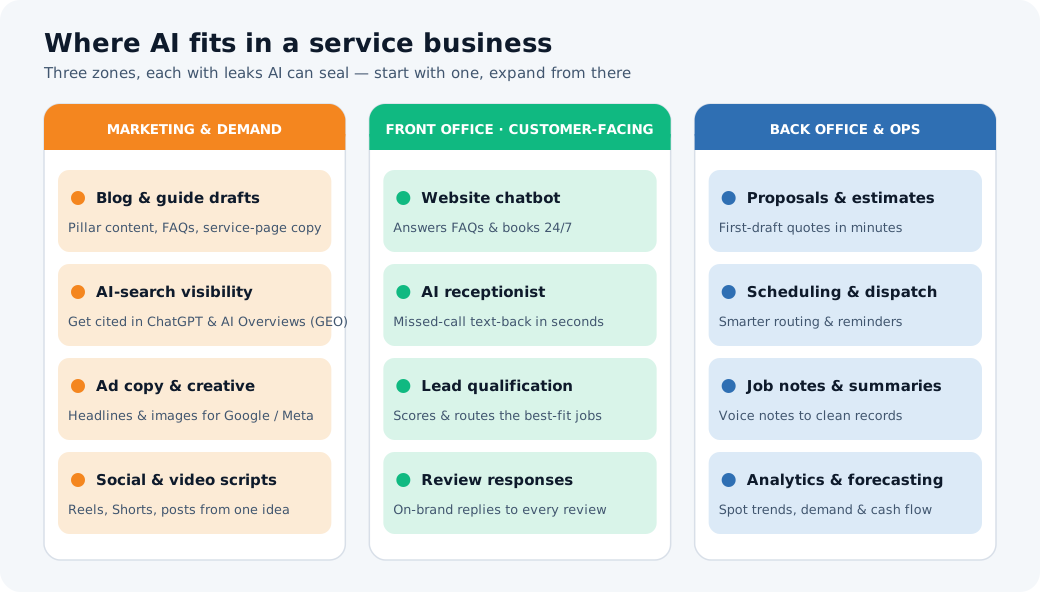
Now let’s walk through each play.
AI for customer service and the missed-call problem
Start here, because this is where the money is. The average small service business misses a large share of inbound calls during business hours — you’re on a job, the line’s busy, it’s after 5. Industry data from call-handling providers consistently shows that missed-call rates for local businesses are around 60% in peak periods.
A missed call from a homeowner with a burst pipe isn’t a voicemail — it’s a competitor’s job.
The reason speed matters so much is unforgiving, and it’s the clearest argument for AI in your whole business:
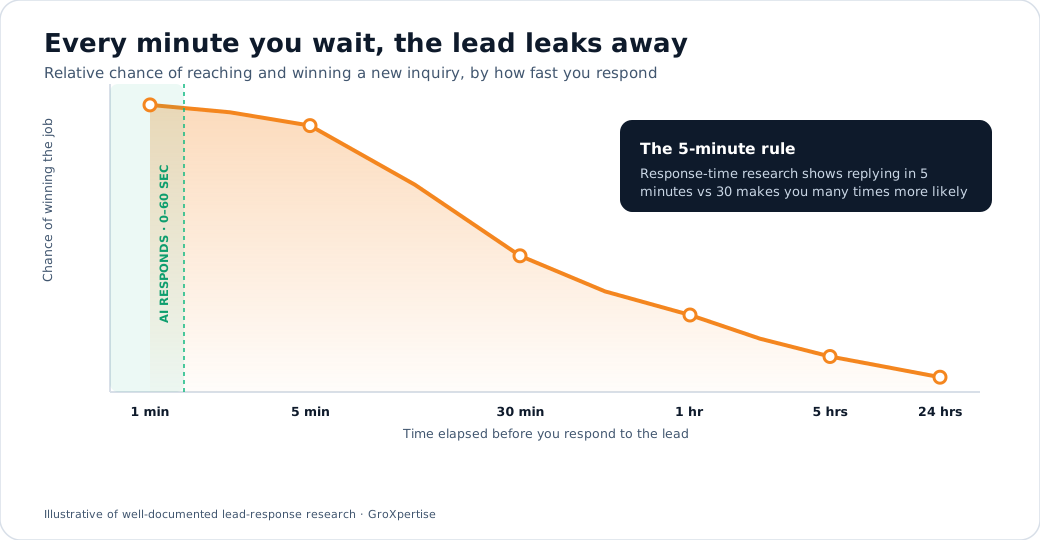
Classic lead-response research (the Lead Response Management study out of MIT and Kellogg) found that contacting a new inquiry within five minutes rather than 30 makes you dramatically more likely to reach and qualify them, many times over.
No human team can hit that consistently while also doing the work. AI can do it every time, day or night.
The highest-ROI customer-service plays, in order:
- Missed-call text-back. The instant a call goes unanswered, an automated text fires: “Sorry we missed you — this is [Company]. What can we help with? Reply here, and we’ll get right back to you.”
This single automation recovers jobs you’re losing today and costs almost nothing.
- 24/7 first response. An AI assistant answers common questions (hours, service area, pricing ballparks, “do you do tankless installs?”) and books or routes the lead at 9 p.m. on a Sunday when your competitors are asleep.
- AI-assisted ticket and email replies. Your office staff can draft responses in one click and edit, instead of writing each from scratch.
Support teams using AI assistance report cutting response and handling times substantially — McKinsey and Salesforce both put the reductions in the 30%+ range.
Prompt to try — build your missed-call text + FAQ answers
“You are the front-desk assistant for a plumbing company in [city]. We do residential repair, water heaters, drains, and repipes. Our hours are 7am–6pm, we offer 24/7 emergency service, and our service call fee is $[X].
Write: (1) a friendly missed-call text-back under 220 characters, and (2) short, on-brand answers to our 10 most common customer questions. Keep it warm, plain-spoken, no jargon. Always end by trying to book or get a callback number.”
Tools to look at: field-service platforms with built-in communication and AI (ServiceTitan, Housecall Pro, Jobber, Workiz); standalone AI receptionists and missed-call text-back tools; help-desk assistants for email/chat. Verify current features and pricing before you commit — this category changes monthly.
AI chatbots for your website
Your website is a 24/7 salesperson that, for most contractors, just stands there. An AI chatbot turns it into one that actually talks. Unlike the dumb scripted bots of a few years ago, modern AI chat understands plain questions and answers in context — and, crucially, knows when to hand off to a human.
For a service business, the bot’s job is narrow and valuable: answer FAQs instantly, qualify the visitor (service, location, urgency), capture their contact info, and book or route.
Chatbot data backs the value up — providers report meaningful conversion lifts, and a large share of chatbot-booked appointments happen outside business hours, which is exactly the demand you’re currently missing.
Visitors who send a high-intent message (“can someone come out tomorrow?”) convert far better than passive browsers, so the bot’s real job is to catch those people the moment they raise their hand.
Two rules keep website chat from backfiring. First, always offer an easy path to a human — buyers are fine with AI for quick answers, but get angry when they can’t escape it.
Second, scope it tightly: feed it your services, service area, guarantees, and FAQs, and tell it to say “let me get a team member” rather than guess on anything it doesn’t know (especially price and scheduling specifics).
Prompt to try — scope your website assistant
“Write the configuration instructions for a website chat assistant for an electrical contractor serving [area]. It should: greet visitors, answer FAQs about our services (panel upgrades, EV chargers, troubleshooting, generators), ask 3 qualifying questions (service needed, address/zip, urgency), and capture name + phone.
It must NEVER quote a firm price — instead, say a licensed estimator will confirm the price. If the question is outside our services or the user seems frustrated, hand off to a human immediately. Tone: friendly, competent, local.”
Tools to look at: AI chat widgets that train on your site content, with human hand-off and CRM integration. Many field-service and website platforms now bundle one. Make sure it can capture leads into wherever you actually work (your CRM or inbox), or it’s just decoration.
AI for content creation
Content is how you get found and build trust — blog guides, service pages, FAQs, emails, social posts, video scripts. It’s also the task owners abandon first because it eats time. AI removes that excuse.
HubSpot’s 2025 marketing research found that AI-using small businesses save somewhere between 5 and 15 hours a week on content work alone.
The trick is to treat AI as a drafting partner, not an author. The pattern that works:
- You provide the substance — the real job, the actual question a customer asked, your opinion, your guarantee.
- AI provides the structure and first draft — fast.
- You edit for truth, voice and specifics — names, prices, local detail.
A few content jobs where this pays off immediately: turning one real service call into a “here’s what we found and how we fixed it” blog post; writing the twenty FAQ answers that win AI-search visibility (more on that next); repurposing one idea into a week of social captions and a short video script; and writing the follow-up email sequence you never get around to.
Prompt to try — one job into a week of content
“Here’s a real job we did: [2–3 sentences — e.g., ‘replaced a 20-year-old AC that kept tripping the breaker for a homeowner in [town]; the real issue was an undersized circuit, not the unit.’]
Turn this into: (1) a 600-word blog post that teaches homeowners the lesson without naming the customer, (2) three social captions in a confident, no-nonsense tone, and (3) a 30-second video script I can film on my phone. Frame us as the company that diagnoses the real problem instead of just selling new equipment. Avoid hype and fake urgency.”
Always frame examples honestly. When you reference results, present them as illustrative composites of typical jobs, not invented client case studies. Made-up numbers destroy the credibility you’re trying to build.
Tools to look at: general assistants (ChatGPT, Claude, Gemini) for writing; Canva’s AI features for quick branded graphics; tools like Descript for turning a phone video into clips with captions. Keep your brand voice notes in a document you paste in every time — it’s the difference between “generic” and “you.”
AI for SEO and getting found inside AI answers
Two shifts are happening at once, and trades businesses need to play both.
Traditional SEO still matters, and AI makes it faster. Use AI to research the questions homeowners actually ask, build out location and service pages, draft optimized FAQs, generate the structured-data markup search engines reward, and audit thin pages.
None of that replaces fundamentals — fast, crawlable, trustworthy pages with real local signals — but it removes the grunt work that keeps small sites from ever getting built out. (If you haven’t nailed the basics, that’s a separate job; pair this with a focused local-SEO push.)
The newer shift is bigger: people now ask AI, not just Google. A meaningful and growing share of searches return an AI-generated answer — Google’s AI Overviews appear on a large portion of queries, and tools like ChatGPT, Perplexity, and Gemini are where more buyers start their research.
Getting recommended inside those answers is its own discipline, often called Generative Engine Optimization (GEO) or AI-search optimization.
And here’s the part that should grab every contractor: research suggests the overlap between who ranks on Google’s first page and who gets cited by AI has dropped sharply — so showing up in AI answers is a separate, winnable game, not an automatic byproduct of ranking.
What actually moves GEO, based on the current research (including the Princeton-led study that formalized it):
- Answer the question in the first ~150–200 words of a page. AI engines weigh the opening heavily and extract clean, direct answers.
- Include statistics, citations, and clear, quotable statements. These measurably increase how often AI cites you.
- Structure for extraction: short paragraphs, clear headings, FAQ-style question-and-answer blocks, tables and lists.
- Build off-site authority: mentions, reviews and citations across the web. Brands referenced on several sites are far more likely to appear in AI answers.
- Keep content fresh and locally specific (“emergency electrician in [city],” not just “electrician”).
Prompt to try — make a page AI-citable
“Here’s the draft of our service page: [paste]. Rewrite it so an AI answer engine would cite it. Open with a direct 2–3 sentence answer to ‘who should I hire for [service] in [city] and what does it cost?’.
Add an FAQ section of 6 real homeowner questions with concise, factual answers. Suggest 3 statistics or specifics we could add to make it more quotable, and flag anything that sounds vague or salesy.”
Tools to look at: Semrush, Ahrefs, and Surfer for SEO research; emerging GEO/AI-visibility trackers (Semrush’s AI tools, Profound, Otterly, and similar) to monitor whether AI engines mention you. The simplest free test: ask ChatGPT, Perplexity, and Google’s AI “who’s the best [trade] in [your city]?” and see if you appear. If you don’t, that’s your to-do list.
AI for advertising
If you run Google or Meta ads, you’re already using AI, whether you know it — the platforms’ bidding and optimization are AI-driven. The question is whether you’re feeding it well and using AI to do the parts it doesn’t do for you.
Where AI helps most in paid acquisition:
- Creative at volume. Generate dozens of headline and description variations for Google’s responsive and AI-powered search campaigns, and image/video concepts for Meta — then let the platform test them. More quality variations are a direct lever on performance.
- Better targeting inputs. Use AI to write tighter audience descriptions, negative-keyword lists (so you stop paying for “DIY” and “salary” searches), and location/service combinations.
- Landing-page matching. AI can spin up service- and city-specific landing copy so the page matches the ad, which lifts conversion and lowers cost per lead.
- Analysis. Paste your search-terms report or campaign export into an assistant and ask what’s wasting money and what to scale.
A note specific to your B2B-style buying reality as a trades owner: be deliberate about channel. Consumer-only ad products aren’t always the right fit for how you actually win and qualify work, and the most expensive mistake in paid is great targeting pointed at a slow response.
Remember the speed-to-lead chart — ad spend only pays off if the lead it generates gets answered in seconds. Plug the response leak before you pour money into the top of the funnel.
Prompt to try — audit ad waste
“Here’s our Google Ads search-terms report for the last 30 days: [paste]. Identify: (1) search terms that are clearly the wrong intent and should be negative keywords for an HVAC company, (2) terms worth their own ad group, and (3) 10 fresh responsive-search-ad headlines (≤30 chars) focused on fast response and trusted local service. Explain your reasoning briefly.”
Tools to look at: Google Ads (Performance Max, AI-powered Search), Microsoft Ads, Meta Advantage+ for the campaigns themselves; a general assistant for creative, negatives, and analysis. Track cost per booked job, not cost per click — AI can optimize toward whatever you tell it to, so tell it the right thing.
AI for lead qualification
Not every lead deserves the same effort. The tire-kicker price-shopper and the homeowner with a flooded basement and a credit card both fill out your form — but they’re worth wildly different amounts of your time.
AI lead qualification automatically sorts them, so your team spends its time where it pays.
In practice this means an AI layer (in your chatbot, your form, or your CRM) that reads each inquiry and scores it on the signals that predict a good job for you: service type, urgency, location in your service area, job size, and how they answered.
High-intent, in-area, high-value leads get flagged for instant human follow-up; low-fit ones get a polite automated response or a self-serve answer.
Chatbot research consistently shows that visitors who send a specific, high-intent message convert several times better than those who don’t — qualification is how you make sure those people reach a human fast.
The payoff is two-sided: you stop wasting senior time on jobs you’d never want, and you stop letting great leads sit in a queue because nobody triaged them.
Prompt to try — design your scoring rules
“Help me build a simple lead-scoring rubric for a roofing company. We make the most money on full replacements and storm-damage insurance work in [counties]; we lose money on small repairs far outside our area.
Based on a lead’s service type, location, urgency, and roof age/issue, create a 1–5 priority score with clear rules, along with the auto-response for each tier. Keep it something my office manager can apply without training.”
Tools to look at: qualification built into your chatbot and CRM; field-service platforms increasingly include lead scoring and routing. The rubric matters more than the tool — get the rules right on paper first, then automate them.
AI sales assistants
Between “lead came in” and “job booked” is a gauntlet of follow-up, and it’s where deals quietly die. The estimate you sent never got a nudge. The “let me think about it” never got a check-in. An AI sales assistant keeps that pipeline warm without anyone having to remember.
Useful sales-assist plays for a service business:
- Automated, personalized follow-up sequences. After an estimate goes out, AI drafts (and can send, with your approval) timed, human-sounding check-ins referencing the actual job — not a robotic “just following up.”
- Call prep and recap. Feed it the lead’s history, and it produces a 30-second brief before you call, then turns your messy notes into a clean record and the next step after.
- Objection handling on demand. Stuck on how to respond to “your quote is higher than the other guy”? AI gives you three honest, value-based responses to choose from in seconds.
- Reactivation. Point it at last year’s customers and have it draft seasonal outreach (“time for your fall furnace tune-up, [name]”) that actually gets opened.
Prompt to try — rescue a stalled estimate
“A homeowner got our $[X] quote for a [job] eight days ago and went quiet. Write three follow-up message options: one short and friendly, one that adds a useful reason to act now without fake urgency, and one that simply asks if they have questions or concerns. Reference that we [specific detail about their job]. Keep each under 90 words and sound like a real person, not a sales script.”
Tools to look at: CRM and field-service platforms with built-in sequences and AI assist; general assistants for prep, recaps, and objection handling. The rule from the risks section applies hard here: a human approves anything that goes to a customer with a name and a price.
AI proposal and estimate generation
Slow quotes lose jobs — the speed-to-lead curve doesn’t stop at first contact. AI compresses the time from “site visit” to “proposal in their inbox” from days to minutes by handling the writing and assembly while you handle the numbers and judgment.
The workflow: you capture the specifics (scope, measurements, materials, your pricing), and AI turns them into a clean, professional, branded proposal — scope of work in plain English, options in good-better-best tiers, what’s included and excluded, your guarantee, and clear next steps.
For repeat job types, you build a template once, and the AI customizes it for each customer. A tiered “good-better-best” presentation, in particular, tends to lift average ticket, and AI makes producing three options as fast as producing one.
Two cautions, both non-negotiable. You set the price — never let AI invent numbers; it should fill in your pricing, not guess at it. And you review every proposal before it is sent , because this is a document with your name, your promise, and a dollar figure on it.
Prompt to try — draft a tiered proposal
“Turn these job notes into a professional proposal for [customer first name] from [Company]. Job: [paste scope, materials, measurements]. My pricing: [paste your figures]. Produce good-better-best options with plain-English scope, clear inclusions/exclusions, our [warranty], and a friendly next step. Don’t change any prices I gave you. Flag anything I left out that a homeowner would want to know.”
Tools to look at: estimating and proposal tools inside field-service platforms; general assistants to draft and format from your notes and pricing. The win is consistency and speed — every customer gets a polished, same-day proposal, not whoever-had-time-that-week quality.
AI for review responses
Reviews are a compounding asset: they win you the next customer and they’re one of the strongest signals for both local search and AI recommendations.
Yet most contractors respond to reviews sporadically or not at all, and ignore the negative ones — the exact moment a thoughtful reply matters most.
AI makes responding to every review effortless and on-brand. For positive reviews, it drafts a warm, specific thank-you (referencing the job, not a copy-paste).
For negative ones, it drafts a calm, professional, non-defensive response that acknowledges the issue and moves the conversation offline — the response future customers will read and judge you by.
The hard rule: AI drafts, a human sends — especially for anything negative. An angry one-star reviewer needs a human’s judgment on tone and facts. Never let AI fire off an unreviewed reply to an upset customer; the damage from one tone-deaf automated response outweighs the convenience.
Prompt to try — handle a tough review
“A customer left this 2-star review: [paste]. Write a calm, professional, non-defensive reply from the owner of [Company], under 80 words. Acknowledge their experience without admitting fault we’re unsure of, show we take it seriously, and invite them to contact [name] directly to make it right. It should read well to future customers, not just the reviewer. Give me two versions.”
Tools to look at: reputation platforms that pull in reviews and draft AI responses (the category includes Podium, Birdeye, NiceJob, and others), or simply a general assistant fed the review text. Pair this with a system that asks every happy customer for a review — drafting replies is only half the job.
AI workflow automation
Everything above gets more powerful when the pieces talk to each other. Workflow automation is the connective tissue: AI and automation tools moving information between your phone, website, CRM, calendar, and inbox so things happen without anyone having to click.
Concrete automations that quietly save trades businesses hours every week:
- New lead from any source → instantly logged in your CRM, scored, and an alert + first response sent.
- Missed call → text-back fires and a task is created for callback.
- Job completed → review request sent automatically a day later.
- Voice note from a tech → transcribed and turned into a clean job record.
- Weekly → AI summarizes new leads, jobs booked, and what needs follow-up, and emails it to you.
The 2026 picture is that the typical AI-using small business now runs several AI tools, not one, and the value comes from connecting them into a system rather than using each in isolation. You don’t need to build all of this at once; each automation is a single leak sealed.
Prompt to try — map your automations
“I run a [trade] business. Today, leads come from [sources], we use [CRM/tools], and my office manager manually [lists tasks]. Map out 5 automations that would save the most time and stop leads from slipping, ordered by impact-to-effort. For each, name the trigger, the steps, and what a human still needs to approve. Assume I’ll use Zapier or my CRM’s built-in automations.”
Tools to look at: Zapier, Make and n8n for connecting tools; your field-service platform’s native automations; AI assistants as the “brain” inside a workflow. Start with the two or three that touch new leads — those protect revenue.
AI for analytics and forecasting
Most owners are sitting on data they never look at — jobs, leads, revenue, seasonality, marketing spend — because turning it into a decision used to require a spreadsheet wizard.
AI removes that barrier. Across small businesses, data analysis is now one of the most common AI use cases precisely because it delivers fast, obvious ROI.
You can paste a CSV of your jobs or leads into an assistant and simply ask questions in plain English: Which services made the most profit last quarter? What’s our true cost per booked job by channel? When does demand spike so I can staff ahead? Which zip codes are most profitable?
The AI does the analysis and explains it in words you can act on. On the forecasting side, AI can spot seasonal patterns (your furnace season ramp, the post-storm roofing surge) so you can order materials, schedule crews, and plan cash flow proactively rather than reactively.
The caution: AI can misread data and still sound confident. Sanity-check the numbers against what you know, and never make a big financial call on an AI summary alone. Use it to surface questions and patterns, then verify.
Prompt to try — find the money in your data
“Attached is a CSV of our last 12 months of jobs (columns: date, service type, city, revenue, lead source, cost). Tell me: our 3 most profitable service types, our most and least profitable lead sources by cost-per-job, any clear seasonal demand patterns, and 3 specific actions you’d take to grow profit. Show the key numbers and flag anything in the data that looks off or incomplete.”
Tools to look at: general assistants with file upload for ad-hoc analysis; Looker Studio or your field-service platform’s dashboards for ongoing reporting. The fastest start is to export one report you already have and ask the AI what it sees.
AI voice assistants
Voice is where this gets striking. AI voice assistants can now answer the phone, hold a natural conversation, answer questions, qualify the caller, and book appointments — in a human-sounding voice, 24/7. For a business that misses most of its calls, this is the missed-call problem solved at the source rather than patched after the fact.
Where voice AI earns its keep for trades: answering overflow and after-hours calls so no inquiry hits voicemail; handling routine inbound (booking, confirming, rescheduling, basic FAQs) so your office staff isn’t interrupted; and outbound reminders and confirmations that cut no-shows.
Analyses of AI receptionist call logs find the most common reasons people call are booking, confirming, and simple questions — exactly the calls AI handles well, freeing humans for the judgment calls.
It’s also the area to deploy most carefully. Voice AI should identify itself as an assistant, escalate smoothly to a human the moment a caller needs one or sounds frustrated, and never improvise on price, liability, or anything safety-related.
Done right, callers get instant help; done carelessly, you frustrate the very people you’re trying to win over. Test it relentlessly on your own real call types before turning it loose.
Prompt to try — script your voice assistant’s boundaries
“Draft the call-handling instructions for an AI phone assistant for a plumbing company. It should: greet callers and identify itself as a virtual assistant; determine whether it’s an emergency (and, if so, fast-track to our on-call line); otherwise, answer basic FAQs and book or schedule a callback; and collect name, address, and issue. It must escalate to a human immediately if the caller is upset, has a complex problem, or asks for a price. Tone: calm, competent, local. List the exact escalation triggers.”
Tools to look at: AI virtual receptionist and voice-agent services, plus voice features increasingly bundled into field-service platforms. Pricing and quality vary a lot, and the tech is moving fast — pilot one on overflow/after-hours calls first, listen to the recordings, and expand only when it’s genuinely good.
The risks and limits you can’t ignore
AI is powerful, not infallible. The owners who get burned are the ones who skip the guardrails. None of these should stop you — they should shape how you adopt.
It makes confident mistakes. Language models sometimes state wrong things — fake details, wrong prices, invented facts — with total assurance. This is the single biggest risk, and the entire defense is keeping a human between AI and anything that matters.
It can sound generic or off-brand without your input, voice and specifics. Garbage in, garbage out.
Privacy and data. Don’t paste customers’ sensitive personal information, payment details, or anything confidential into public AI tools. Use business-grade tools with clear data policies, and write a simple one-page rule for your team on what’s allowed.
Over-automation kills trust. Customers accept AI for speed but resent being trapped by it. Always provide an easy way for a human to reach you. The convenience of full automation is never worth the customer you lose to a tone-deaf bot.
It won’t fix a broken process. AI amplifies whatever system it runs on. Fix the leak first, then automate it.
The practical answer to all of this is one habit — keep a human on the gate:
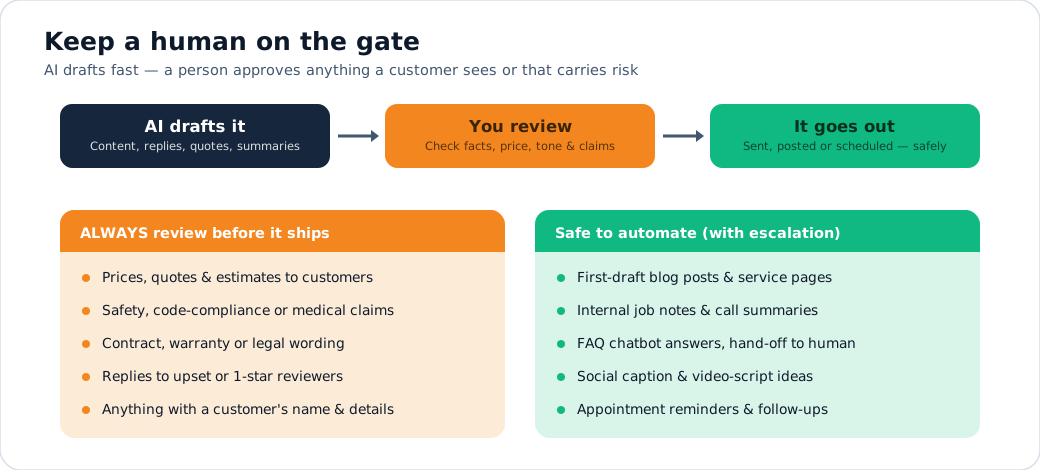
Adopt the left column’s discipline and the right column’s speed, and you get nearly all of AI’s upside with very little of its downside. Pair it with a short written AI policy (what tools are allowed, what data is off-limits, what always needs human review) and you’re ahead of the vast majority of businesses, who, according to 2026 surveys, are using AI with no policy at all.
Where this is heading: AI trends for service businesses
You don’t need to chase every trend, but a few are worth steering toward.
From assistants to agents. AI is shifting from tools that help you do a task to “agents” that complete multi-step tasks on their own — qualifying a lead, booking it, and updating your CRM end-to-end.
Analysts expect a large jump in software with built-in task-specific agents over the next couple of years. For you, that means more of the connective work disappears — under your supervision.
AI search becomes the front door. As more buyers ask AI instead of scrolling Google, the businesses that invested early in being citable will own local recommendations. These compounds, starting now, matter.
It comes built into the tools you already pay for. Your field-service platform, your ad accounts, your inbox — AI features are arriving inside them. Much of your “adoption” will be switching on capabilities you already own, so periodically audit what your existing tools now do.
Voice gets indistinguishable and ubiquitous. Phone handling by AI will become normal for service businesses; the differentiator won’t be having it but configuring it to feel genuinely helpful and knowing when to hand it over to a human.
Multimodal everything. AI that reads photos and video is maturing fast — picture a homeowner texting a photo of a leak and getting an instant, useful triage and booking. The trades will be a natural fit.
The throughline: the advantage isn’t owning the fanciest AI. It’s being the local company that responds instantly, shows up everywhere buyers look, and runs a tight system — with AI quietly doing the heavy lifting.
Your AI adoption roadmap
Here’s how to actually do this without overwhelming yourself or your team. Three phases over six months. Resist the urge to skip ahead — seal the worst leaks first, secure the funds, and prove everything that follows.
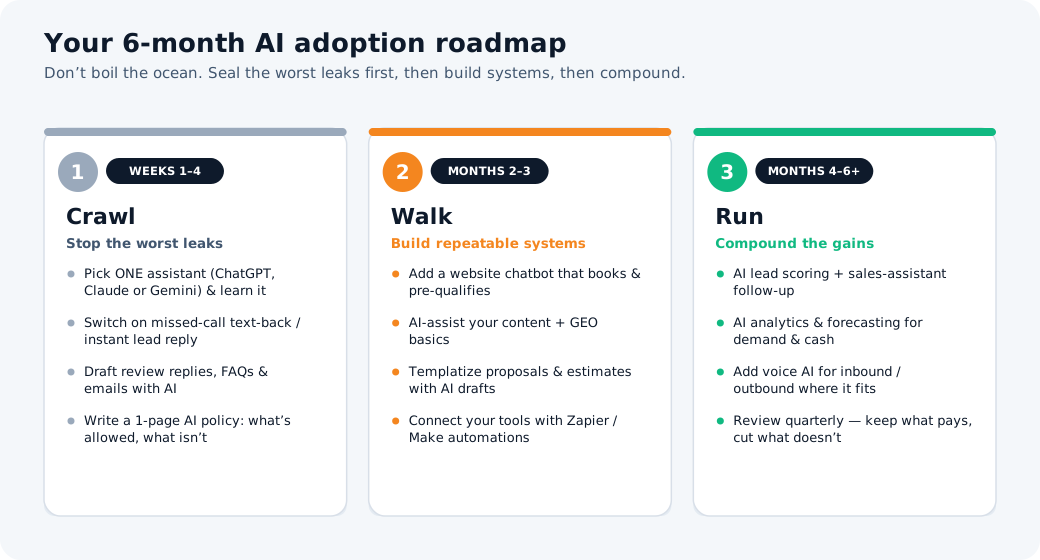
Crawl (Weeks 1–4): stop the worst leaks. Pick one assistant and get comfortable using it daily. Switch on missed-call text-back and an instant lead response — the highest-ROI move in this entire guide. Start drafting review replies, FAQs, and follow-up emails with AI. Write a one-page AI policy.
Goal: stop bleeding leads and build the habit.
Walk (Months 2–3): build repeatable systems. Add a website chatbot that books and qualifies. Use AI to produce content and get your key pages AI-search-ready. Templatize your proposals and estimates. Connect your tools with a couple of automations so leads flow without manual steps.
Goal: turn one-off wins into systems that run without you.
Run (Months 4–6+): compound the gains. Layer in lead scoring and automated sales follow-up. Use AI analytics to find your most profitable services and channels. Pilot voice AI on overflow and after-hours calls. Then review quarterly — keep what pays, cut what doesn’t.
Goal: a self-reinforcing growth system.
Measure as you go. Pick two or three numbers — response time to new leads, percentage of calls answered, leads-to-booked-jobs, reviews per month — and watch them before and after each change. That’s how you know the AI is sealing leaks and not just adding noise.
The bottom line
AI for service businesses isn’t about chasing the future. It’s about stopping the very ordinary, very expensive leaks happening in your business this week — the missed calls, the slow replies, the half-written quotes, the invisible search presence, the reviews you never answered.
Start with one thing: make sure every single lead gets an instant response. That alone will recover jobs you’re losing right now and pay for everything else.
Then work down the map — crawl, walk, run — keeping a human on the gate. Do that, and within a quarter you won’t just be “using AI.” You’ll be the company in your market that answers first, shows up everywhere, and never lets a good lead slip through the cracks.
You don’t have a lead problem. Now you have a way to stop the leak.
GroXpertise builds growth systems for HVAC, plumbing, roofing, and electrical companies — the kind that plug the leaks and keep them plugged.
Want to see exactly where your business is leaking leads (and what it’s costing you)? Try our free Lead Leak Calculator and get a personalized plan to seal the gaps.