


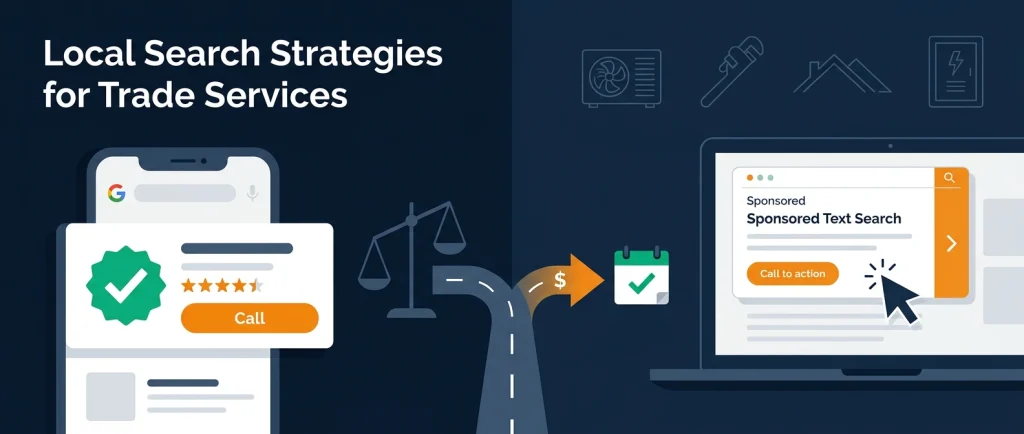
You have a marketing budget, a crew needing steady work, and two Google ad options promising more calls.
Local Service Ads charge per lead. Google Ads charge per click.
Both appear at the top when a homeowner searches “AC repair near me” or “emergency plumber.”
So which one actually makes you more money?
The honest answer: the channel matters less than most owners think. Contractors who win with either one stop leaks between the ad and the booked job.
This guide gives you the numbers, 2026 changes to know, and a step-by-step plan to test both and put your budget where it returns the most.
For most HVAC, plumbing, and electrical companies, Local Service Ads (LSAs) produce a lower cost per lead and a lower cost per booked job for urgent repair calls.
Google Ads (search campaigns) usually win for high-ticket work like system replacements, repipes, panel upgrades, and roof replacements, because you control keywords, landing pages, and targeting.
The best ROI usually comes from running both, measured by cost per booked job, not cost per lead.
What Changed in 2026 (Read This First)
If you read an LSA guide from 2024 or earlier, some parts are now outdated. Three changes matter for your ROI math.
1. Local Services Ads are moving into Google Ads
In July 2026, Google announced that Local Services Ads are moving out of their standalone dashboard and into Google Ads as a new Performance Max campaign type with pay-per-lead goals.
According to Google’s own help documentation, the rollout started in August 2026 with select U.S. home service categories (plumbing, HVAC, electrical, and others), will expand in late 2026, and will reach remaining accounts in 2027.
What stays the same:
- You still pay per valid lead (calls, messages, bookings), not per click.
- Ads still appear only on Google Search and Google Maps, in the same spots as before.
- Campaigns are still keywordless. Google uses your Google Business Profile data to decide when to show you.
What changes:
- Manual bidding goes away. You get one campaign-level Target CPA instead of separate targets per service category.
- Business details sync from your Google Business Profile automatically.
- Historical LSA reports do not transfer. Export them before your account migrates.
Why it matters for ROI: Losing per-category bids means you cannot tell Google “I’ll pay more for AC installs than thermostat calls” in one campaign.
If services have very different values, Google recommends splitting them into separate campaigns.
2. “Google Guaranteed” is now “Google Verified”
In October 2025, Google replaced the Google Guaranteed, Google Screened, and License Verified badges with a single Google Verified badge (Search Engine Journal).
You still need current licenses, insurance, and background checks where your trade requires them.
Action item: If your website, trucks, or yard signs still say “Google Guaranteed,” update them.
3. You can no longer manually dispute bad leads
Since July 2024, Google reviews LSA leads automatically and issues credits for the ones its system decides are invalid. Manual disputes were removed.
Leads marked “job type not serviced” or “geo not serviced” are no longer credited (Search Engine Land).
Why it matters for ROI:
Your service types and service area settings now carry real money. If you accept a job type you don’t want, you pay for those leads.
How Each Channel Works (Plain English)
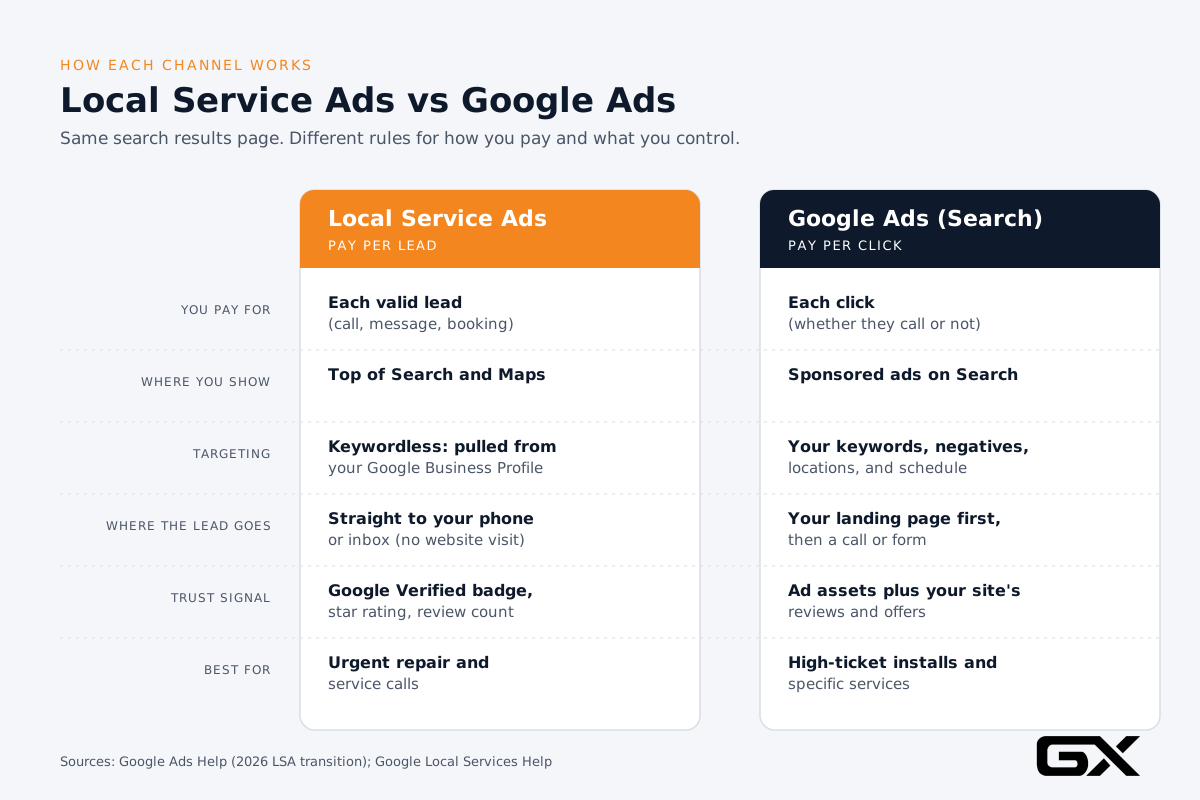
Local Service Ads (LSAs)
LSAs appear at the top of many home service searches.
They show your business name, star rating, review count, hours, and the Google Verified badge.
A homeowner taps “Call” or “Message” and reaches you directly. They never visit your website.
- You pay: per lead (a call, message, or booking Google considers valid)
- Google decides: when you show, based on your profile, service types, and service area
- You control: budget, target cost per lead, service types, service area, hours, and how fast you answer
Google Ads (Search Campaigns)
Google Ads search campaigns are the text ads marked “Sponsored” below the LSA row.
You choose keywords, write the ads, and send clicks to a landing page on your website.
- You pay: per click, whether or not the person calls
- You decide: keywords, negative keywords, ad copy, landing pages, schedules, locations, and bids
- You control: almost everything, which is both the strength and the risk
If you want a full walkthrough of campaign setup, read our guide to Google Ads for contractors.
LSA vs Google Ads at a Glance
| Factor | Local Service Ads | Google Ads (Search) |
|---|---|---|
| You pay for | Valid leads | Clicks |
| Placement | Top of Search and Maps | Sponsored text ads on Search |
| Keywords | None (uses your Google Business Profile) | You choose keywords and negatives |
| Landing page | None; call or message goes straight to you | Your website or a dedicated landing page |
| Trust signal | Google Verified badge, star rating, reviews | Ad extensions, your site’s reviews and offers |
| Best for | Urgent repair and service calls | High-ticket installs, replacements, specific services |
| Setup time | Weeks (verification and background checks) | Days |
| Biggest ROI risk | Missed calls, wrong job types, weak reviews | Wasted clicks, weak landing pages, poor tracking |
What the Numbers Say About Cost
Here is what recent, published benchmark data shows. Treat these as a starting point, not a promise. Your market, season, and service mix will move them.
Google Ads benchmarks by trade
LocaliQ analyzed 3,211 U.S. home services search campaigns (April 2024 to March 2025) and reported these medians (LocaliQ):
| Trade | Avg. cost per click | Avg. conversion rate |
|---|---|---|
| HVAC | $9.68 | 6.56% |
| Plumbing | $10.49 | 7.63% |
| Roofing and gutters | $10.70 | 3.70% |
| Electricians | $12.18 | 9.08% |
Local Service Ads benchmarks by trade
SearchLight tracked about $6.7 million in LSA spend across 888 contractors in February 2026 and reported these costs per lead (SearchLight):
| Trade | LSA cost per lead | $3 |
|---|---|---|
| Electrical | $39 | $3 |
| HVAC | $51 | $3 |
| Plumbing | $57 | $3 |
| Blended average | $53 | $3 |
In the same dataset, SearchLight reported a blended Google Ads cost per lead of $104 ($149 for non-branded searches).
Why cost per lead is not the whole story
On paper, LSAs cost about half as much. But the same SearchLight data shows why you should not stop there:
- Average ticket: LSA leads averaged $1,826 in revenue versus $2,465 for Google Ads leads.
- Cost per paying customer: $233 for LSAs versus $472 for Google Ads.
- Booking rate: LSA leads booked at about 43.9% across trades.
In other words, LSAs bring cheaper customers, but Google Ads customers spend more per job.
Which “wins” depends on your margins and the kind of work you want more of.
A note on these numbers:
The LocaliQ and SearchLight figures come from different companies, time periods, and methods.
Use them to understand the general pattern, not to predict exact costs. Your own tracking will always beat industry averages.
The Real ROI Problem: Leaks, Not Channels
Most owners compare Google Ads vs. Local Service Ads by asking, “Which gives me cheaper leads?” That’s the wrong question.
At GroXpertise, we see the same pattern across HVAC, plumbing, roofing, and electrical companies: the business doesn’t have a lead problem.
It has a lead leak problem. Money leaks between the ad and the invoice, and those leaks hurt ROI more than differences between the two channels.
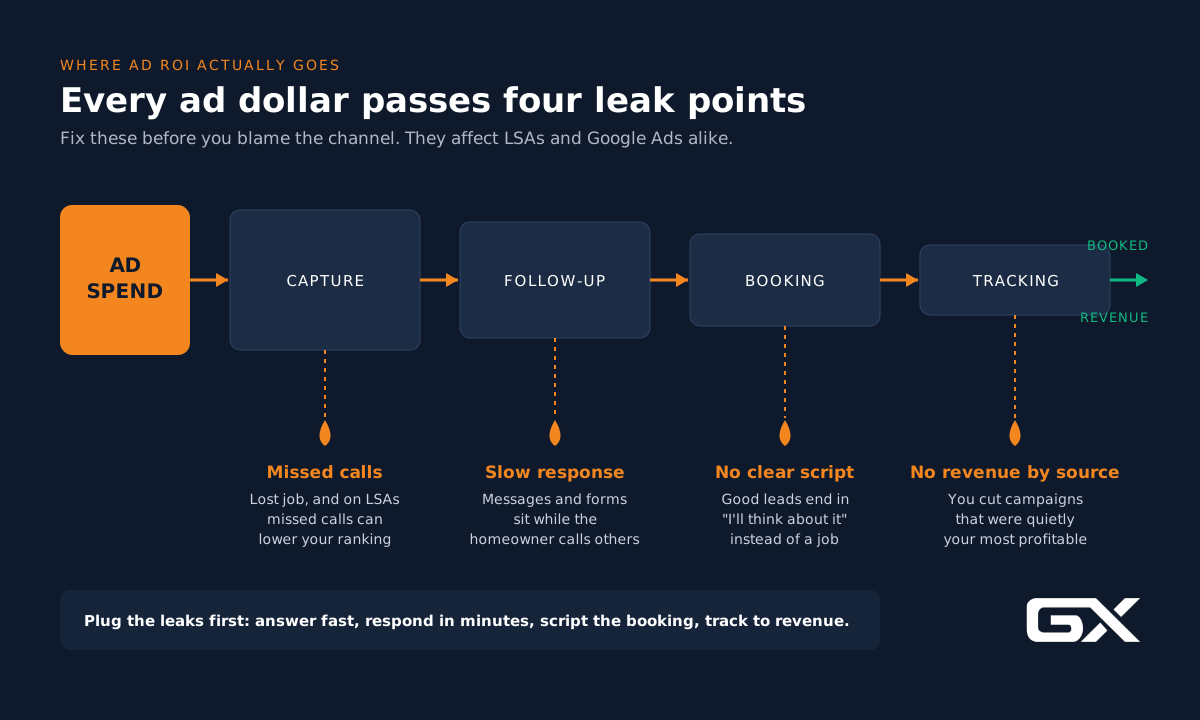
Leak 1: Capture (the phone rings and nobody answers)
This leak hurts LSAs twice. You lose the job, and Google’s help center says responsiveness affects your LSA ranking.
Missed calls can push you down, meaning fewer leads next week too (Google Local Services Help).
With Google Ads, a missed call means you paid for the click and got nothing back.
Leak 2: Follow-up (the lead goes cold)
Form fills and LSA messages sit in an inbox while the homeowner calls the next company.
A Harvard Business Review study found companies contacting online leads within an hour were nearly seven times more likely to qualify the lead than those who waited longer (HBR).
Home service buyers with a broken AC or leaking pipe move even faster.
Leak 3: Booking (the call happens, but no job is scheduled)
CSRs without a script, pricing guidance, or a clear next step turn good leads into “I’ll think about it.”
This is where conversion rate optimization matters as much on the phone as on your website.
Leak 4: Tracking (you can’t see which ad made the money)
If your CRM doesn’t tie booked jobs and revenue to the source, you’re guessing.
Many contractors cut profitable campaigns because they “looked expensive” at the lead level, even though they produced their biggest tickets.
The takeaway: Fix leaks first.
A company that answers every call in under 30 seconds and books most can make both channels profitable.
A company that misses calls will struggle with either.
Want to see what your leaks might be costing you? Try the trade-specific lead leak calculator for HVAC, plumbing, roofing, or electrical contractors.
How to Calculate ROI the Right Way
Before you pick a winner, agree on how to keep score. Here are the three numbers that matter.
1. Cost per booked job
Cost per booked job = total ad spend ÷ number of booked jobs
This is the fairest way to compare LSAs and Google Ads. It includes lead quality and your team’s booking performance.
2. Gross profit per job
Gross profit per job = average ticket − (parts + labor + direct job costs)
Use gross profit, not revenue. A $2,000 ticket with a 50% margin is worth $1,000 to you, not $2,000.
3. Return on ad spend (ROAS) and true ROI
- ROAS = revenue from ads ÷ ad spend
- ROI = (gross profit from ads − ad spend − management costs) ÷ (ad spend + management costs)
Worked example (illustrative)
The numbers below are an illustrative composite to show the math. They are not a real client’s results.
A plumbing company spends $3,000 a month on each channel for a test.
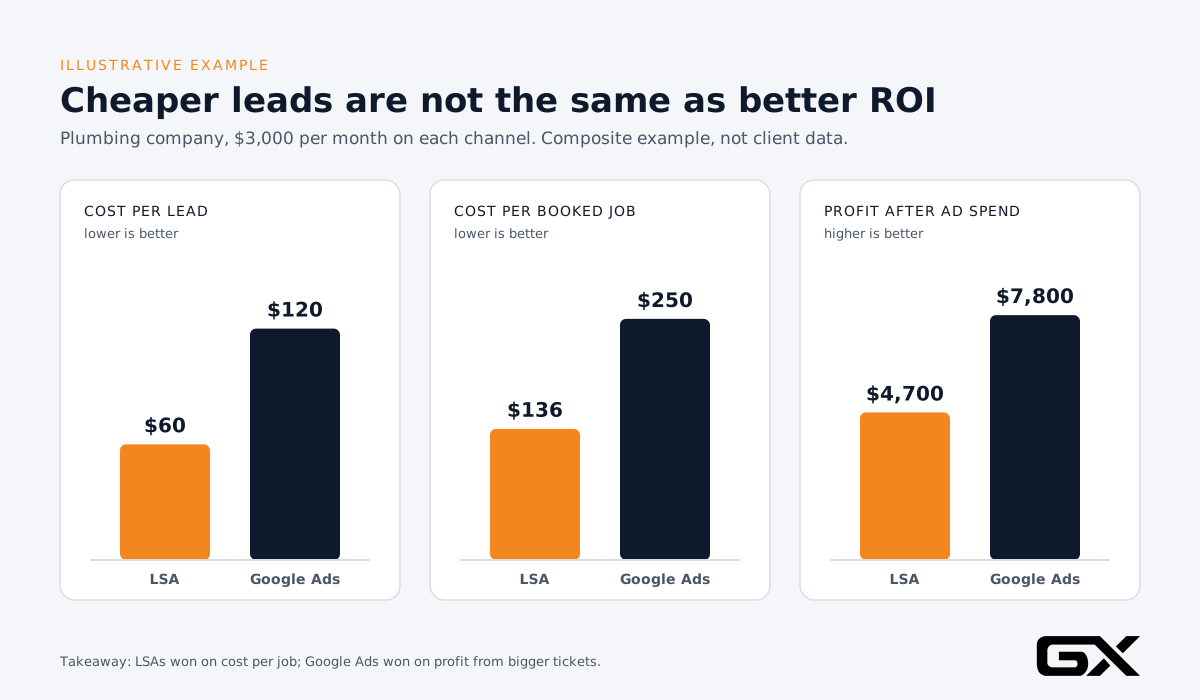
| Metric | Local Service Ads | Google Ads |
|---|---|---|
| Monthly spend | $3,000 | $3,000 |
| Cost per lead | $60 | $120 |
| Leads | 50 | 25 |
| Booking rate | 45% | 50% |
| Booked jobs | 22 | 12 |
| Cost per booked job | $136 | $250 |
| Average ticket | $700 | $1,800 |
| Gross margin | 50% | 50% |
| Gross profit | $7,700 | $10,800 |
| Profit after ad spend | $4,700 | $7,800 |
What this shows:
- LSAs produced more jobs at a lower cost per job.
- Google Ads produced fewer jobs but more profit, because they targeted bigger work (in this example, water heater replacements and repipes).
- Neither number alone tells you to shut the other channel off. Together, they tell you what each channel is good for.
Now imagine this company misses 20% of its calls.
On LSAs, that’s about 10 lost leads a month plus a possible ranking penalty. On Google Ads, it’s about five paid clicks that became unanswered calls.
Fixing that leak can lift profit more than switching channels.
When Local Service Ads Deliver Better ROI
LSAs tend to outperform when:
- The job is urgent. No-heat calls, burst pipes, and power outages.
The homeowner wants to call someone now, and the LSA “Call” button is the fastest path.
- You have strong reviews. Google’s ranking factors include your rating, review count, and response time.
A company with 400 reviews at 4.8 stars has an edge that no bid can buy.
- Your website is weak. LSAs don’t send people to your site, so a dated website hurts less (though it still matters for people who check you out later).
- You answer every call fast. Responsiveness affects ranking, so strong phone coverage compounds over time.
- You want lower management overhead. There are no keywords, ad copy, or landing pages to maintain.
Trade examples:
- HVAC: Summer no-cool and winter no-heat repair calls
- Plumbing: Drain clogs, leaks, water heater failures
- Electrical: Outages, breaker trips, outlet and switch repairs
- Roofing: Leak repairs and storm damage inspections (LSA volume and availability for roofing can vary more by market, so test before you commit big budget)
For more on the trust signals that power LSAs, see our guide to local SEO for service businesses.
Your Google Business Profile now feeds your LSA campaign directly, so the two are more connected than ever.
When Google Ads Deliver Better ROI
Google Ads search campaigns tend to outperform when:
- The ticket is large. System replacements, whole-home repipes, panel upgrades, EV charger installs, generator installs, and full roof replacements.
A higher cost per lead is fine when the job is worth $8,000 to $20,000 or more.
- You want specific work. Keywords let you target “heat pump installation” and exclude “heat pump repair” if you want installs.
LSAs don’t give you that level of control.
- You have a strong landing page. A focused page with reviews, financing, photos, and a clear call to action turns clicks into calls. (See our contractor website design guide.)
- You want to protect your brand. Branded search campaigns keep competitors from sitting on top of your company name.
- You’re new or still getting verified. Google Ads can run within days while LSA verification takes longer.
Trade examples:
- HVAC: “AC replacement cost,” “heat pump installation,” “furnace replacement financing”
- Plumbing: “tankless water heater install,” “whole house repipe,” “sewer line replacement”
- Electrical: “panel upgrade,” “EV charger installation,” “whole home generator”
- Roofing: “roof replacement,” “metal roofing contractor,” “roof financing”
The tradeoff: Google Ads leaks money fastest when setup is sloppy. Broad keywords without negatives, ads pointing to your homepage, and no call tracking are common reasons contractors say “Google Ads doesn’t work.”
Which Should You Start With?
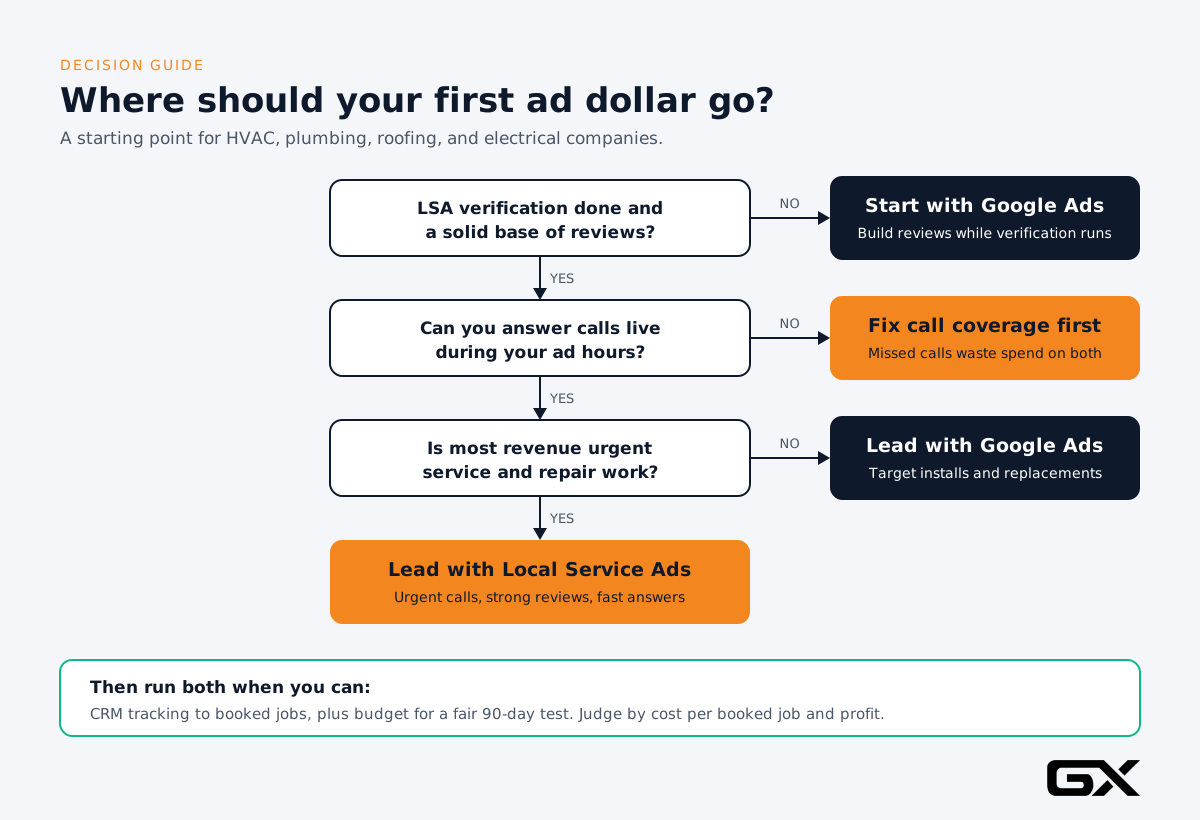
Use this as a starting point:
- Start with LSAs if: you have 50 or more solid reviews, you can answer calls live during your ad hours, and most of your revenue comes from service and repair.
- Start with Google Ads if: you’re still waiting on LSA verification, you want more install and replacement work, or you already have strong landing pages and call tracking.
- Run both if: you have the budget to test both for at least 90 days and a CRM that tracks every lead to a booked job and revenue.
For most established contractors, “both” is the right long-term answer.
LSAs capture urgent demand at the top of the page. Google Ads capture high-value searches that LSAs can’t target as precisely.
Together, they help you take up more of the page when a local homeowner searches.
Step-by-Step: How to Test Both and Find Your Best ROI
Here is the 90-day process we recommend. It works for HVAC, plumbing, roofing, and electrical companies of almost any size.
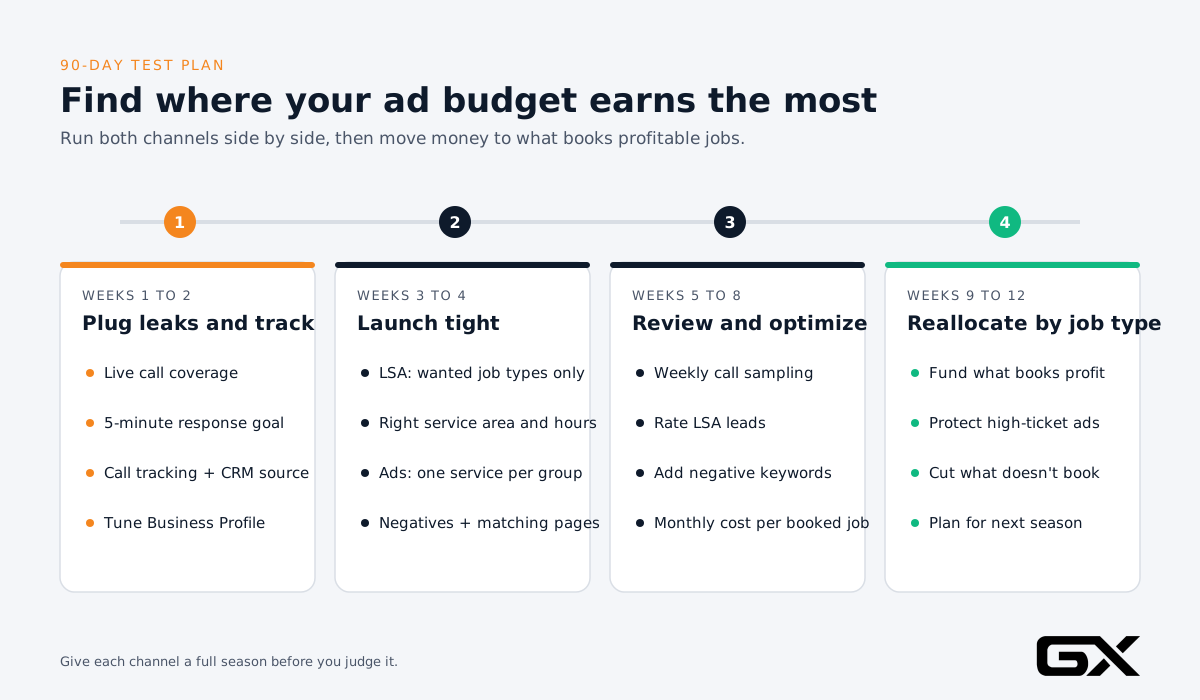
Step 1: Plug the leaks before you spend (Week 1 to 2)
- Call coverage: Make sure a person or a trained answering service answers every call during ad hours.
Consider AI call answering for overflow and after-hours.
- Speed to lead: Set a goal to respond to LSA messages and web forms within five minutes.
- Booking script: Give your CSRs a simple script for the top five call types.
- Missed-call text back: Automate lead follow-up so a missed call triggers an instant text.
Why first: Every leak you fix makes both channels more profitable, and it protects your LSA ranking from day one.
Step 2: Set up tracking you can trust (Week 1 to 2)
- Use call tracking with separate numbers for Google Ads and your website.
- Tag every lead in your CRM with its source: LSA, Google Ads, organic, referral.
- Record booked (yes/no), job type, and invoice amount for every lead.
- For Google Ads, set up offline conversion imports so Google learns which clicks became paying jobs, not just calls.
Common mistake:
Counting every call as a conversion. A 20-second wrong number is not a lead.
Set a minimum call length (often 60 to 90 seconds) and import booked jobs when you can.
Step 3: Get your Google Business Profile in shape (Week 1 to 2)
Because LSA campaigns now pull business details from your Google Business Profile, your profile is part of your ad.
- Confirm your categories, services, hours, and service area match what you want to be paid for.
- Add real job photos (Google’s ranking factors mention high-quality images).
- Ask every happy customer for a review, and respond to all reviews.
Step 4: Launch LSAs with tight settings (Week 3 to 4)
- Only turn on the job types you want. Remember, “job type not serviced” leads are no longer credited.
- Set your service area to where you can actually be profitable (drive time matters).
- Set hours to when you can answer live. Don’t run ads when phones go to voicemail.
- If your account has moved to the new Performance Max pay-per-lead campaign, and services have very different values, split them into separate campaigns so each gets its own Target CPA.
- Export your historical LSA reports before migration. They don’t transfer.
Step 5: Launch Google Ads for high-value services (Week 3 to 4)
- Build tight ad groups around one service each: for example, “AC replacement,” not “HVAC.”
- Add a negative keyword list from day one: jobs, DIY, parts, free, cheap (if you don’t want price shoppers), and services you don’t offer.
- Send each ad group to a matching landing page, not your homepage.
- Use call assets, location assets, and callouts like financing or same-day service.
- Start with a small, focused geography before expanding.
Step 6: Review weekly, decide monthly (Week 5 to 8)
Every week:
- Listen to a sample of calls from each channel.
- Rate LSA leads using Google’s lead feedback option to help improve future lead quality.
- Check search terms in Google Ads and add negatives.
Every month:
- Compare cost per booked job and gross profit by channel and by job type.
- Look at answer rate and response time by channel.
Step 7: Shift budget to the winner, by job type (Week 9 to 12)
Don’t make an all-or-nothing call. Shift budget based on what each channel does best:
- If LSAs produce your cheapest service calls, fund them fully during peak season.
- If Google Ads produce your install and replacement jobs, protect that budget even if the cost per lead is higher.
- Cut campaigns, keywords, or LSA job types that don’t produce booked jobs after a fair test.
Expected results:
After 90 days, you should know your real cost per booked job and profit by channel and job type. That turns your ad budget from a guess into a plan.
Common Mistakes That Kill ROI on Both Channels
- Judging by cost per lead only. Cheaper leads can mean smaller jobs. Always compare cost per booked job and profit.
- Running ads when nobody can answer. This wastes money on both channels and can hurt your LSA ranking.
- Accepting every LSA job type. You pay for leads you don’t want, and some won’t be credited back.
- Sending Google Ads clicks to the homepage. Visitors have to hunt for the right service, and many leave.
- No negative keywords. You pay for clicks from job seekers, DIYers, and people in other cities.
- No CRM tracking to revenue. You can’t cut the losers or scale the winners without it.
- Ignoring reviews. Reviews affect LSA ranking and boost trust for people who click Google Ads.
- Using outdated badge language. “Google Guaranteed” was retired. Update your website and marketing.
- Waiting too long to judge. Seasonality is real. Give each channel at least a full 60 to 90 days, and compare the same season when possible.
- Setting it and forgetting it. Both channels need weekly attention, especially during the LSA move into Google Ads.
Expert Tips From the GroXpertise Team
- Protect your LSA ranking like an asset. Responsiveness and reviews compound.
A company that answers fast and earns reviews every week gets stronger over time.
- Use Google Ads to fill the calendar with the work you want.
If you want more replacements and fewer $89 service calls, Google Ads gives you the controls to do that.
- Share one CRM across channels. When both channels feed the same system with source tags, your weekly review takes minutes, not hours.
- Plan for the season. HVAC demand swings with the weather, and roofing leads spike after storms.
Raise budgets before your busy season, not during it.
- Don’t forget organic. Paid ads rent attention. SEO for contractors and a strong Google Business Profile build visibility you own, and they make your paid ads convert better.
- Get trade-specific. Each trade has its own best keywords and job mix. See our guides to HVAC marketing, plumber marketing, roofing marketing, and electrical contractor marketing.
Frequently Asked Questions
Are Local Service Ads better than Google Ads for contractors?
For urgent repair and service calls, LSAs often deliver a lower cost per lead and cost per booked job.
For high-ticket installs and replacements, Google Ads often deliver more profit per job because you control keywords and landing pages.
Most established contractors get the best ROI by running both and tracking cost per booked job.
How much do Local Service Ads cost per lead?
It depends on your trade and market.
SearchLight’s February 2026 data showed average LSA costs per lead of about $39 for electrical, $51 for HVAC, and $57 for plumbing.
Your costs may be higher or lower based on competition, service area, and job types.
How much do Google Ads cost for HVAC, plumbing, roofing, and electrical companies?
LocaliQ’s 2025 home services benchmarks showed median costs per lead of about $128 for HVAC, $129 for plumbing, $228 for roofing, and $94 for electricians.
Average cost per click ranged from about $9.68 to $12.18 across those four trades.
Are Local Service Ads going away?
No. They’re moving.
Starting in August 2026, Google began moving LSAs into Google Ads as Performance Max campaigns with pay-per-lead goals.
You still pay per lead, and ads still show on Search and Maps.
The rollout continues into 2027.
What happened to the Google Guaranteed badge?
In October 2025, Google replaced the Google Guaranteed, Google Screened, and License Verified badges with one Google Verified badge. You still need to pass license, insurance, and background checks where your trade requires them.
Can I dispute bad Local Service Ads leads?
Not manually.
Since July 2024, Google reviews leads automatically and credits the ones it finds invalid.
You can still rate leads with feedback, which Google says helps improve lead quality over time.
How do I rank higher in Local Service Ads?
Google says ranking depends on your bid, your likelihood of generating a lead, and the health of the overall ad system.
The things you control: answer calls and messages quickly, earn more positive reviews, use quality photos, complete verification, and enable messages or bookings.
Should a new contractor start with LSAs or Google Ads?
If you don’t have many reviews yet or your verification is still pending, Google Ads can get you calls faster.
Once you have steady reviews and reliable call coverage, add LSAs.
Either way, set up call tracking and a CRM first so you can measure what works.
Conclusion: Stop Choosing Channels. Start Fixing Leaks.
The Google Ads vs Local Service Ads debate usually ends the same way: both can deliver strong ROI, and both lose money when leads leak.
LSAs are usually your lower-cost source for urgent service calls, especially if you have great reviews and answer every call.
Google Ads are usually your best tool for high-ticket, targeted work.
The 2026 move of LSAs into Google Ads makes it easier to manage both in one place, but it also means your Google Business Profile, service settings, and tracking matter more than ever.
Here’s the short version:
- Measure cost per booked job and profit, not cost per lead.
- Fix capture, follow-up, booking, and tracking leaks before you raise budgets.
- Use LSAs for urgent demand and Google Ads for high-value work.
- Give each channel a fair 90-day test, then move budget to what makes money.
Get a Clear Answer for Your Business
At GroXpertise, we help HVAC, plumbing, roofing, and electrical companies plan, launch, and manage Google Ads and Local Service Ads, and we connect them to the call handling, CRM, and automation that stop leads from leaking.
That’s what a home service marketing agency should do: tie every ad dollar to booked jobs.
Start here:
- Find your leaks. Use the free lead leak calculator for your trade: HVAC, plumbing, roofing, or electrical.
- Get a plan. Book a free Growth Strategy Session and we’ll review your LSA and Google Ads setup, show you where money is leaking, and recommend how to split your budget for the best return.