


For owners and managers of HVAC, plumbing, roofing, and electrical companies. Last updated September 2026.
Your phone rings while your best tech is in an attic. A homeowner fills out your website form at 9:40 p.m. A roofing estimate you sent two weeks ago sits unopened in someone’s inbox.
None of these feel like emergencies. But each one is a job that can quietly go to a competitor.
Most contractors believe they need more leads. In our work with HVAC, plumbing, roofing, and electrical companies, we usually find a different problem: the business is already paying for leads, but those leads leak out before becoming booked jobs.
Home service business automation plugs those leaks. It does not replace your office team or techs. It handles fast, repetitive steps people forget when the day gets busy, so your team can focus on conversations that actually close jobs.
This guide walks through the seven automations we recommend to nearly every trade contractor, in the order we usually build them. For each one, you will learn:
- Why it matters
- How it works
- How to set it up
- A trade example
- The mistakes to avoid
- What to measure
The Short Answer: 7 Automations to Start With
If you only read one section, read this one. These are the seven automations every home service business should implement:
- Missed-call text-back: Text callers automatically when a call goes unanswered.
- Instant lead response and routing: Reply to every form, chat, and lead-platform inquiry within seconds, then assign it to a person.
- Appointment confirmations, reminders, and on-my-way texts: Keep customers informed so they are home and ready.
- Estimate follow-up sequences: Follow up on every unsold estimate until the customer says yes or no.
- Review requests and review responses: Ask every customer for a Google review after the job, the same way, every time.
- Maintenance plan renewals and seasonal reactivation: Bring past customers back before they call someone else.
- Lead source tracking and CRM sync: Connect every lead to booked revenue so you know which marketing works.
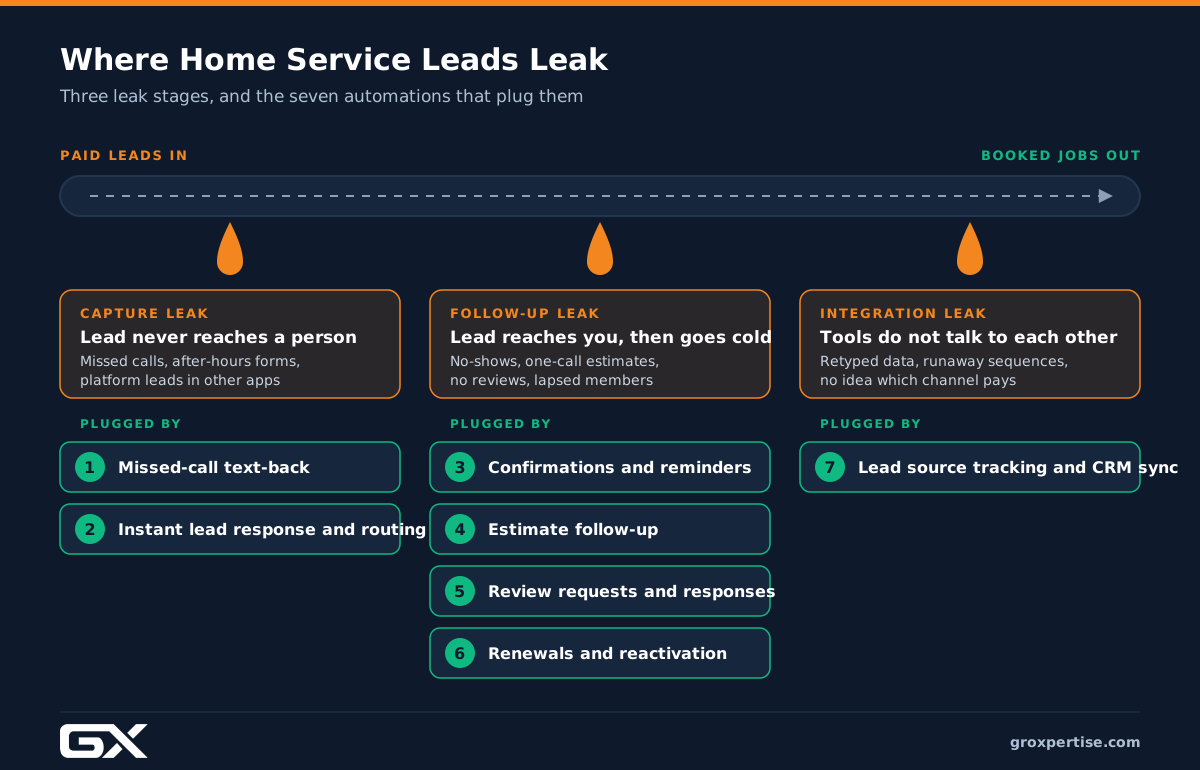
The first two stop capture leaks. The next four stop follow-up leaks. The last one stops integration leaks. Now, let’s look at why those leaks happen.
Why Home Service Businesses Lose Jobs They Already Paid For
Every lead passes through three stages before it becomes revenue. Each stage has its own leaks.
Capture leaks: the lead never reaches a person
A capture leak happens when someone tries to contact you, and nobody responds in time. Common causes:
- Calls ring out while techs are on jobs and the office is on other lines.
- Web forms land in an inbox nobody checks after 5 p.m.
- Leads from Angi, Thumbtack, or Local Services Ads sit in a separate app.
Estimates of how many calls home service businesses miss vary by source. CallRail’s January 2025 analysis of about 1.1 million leads put the missed-call rate near 14 percent, while Invoca’s data puts it closer to 27 percent. Either way, a meaningful share of paid calls go unanswered, and most callers who reach voicemail do not leave a message. They call the next company in the map pack.
Follow-up leaks: the lead reaches you, then goes cold
Speed and persistence matter more than most owners realize. In a well-known 2011 Harvard Business Review study, firms that contacted a lead within an hour were nearly seven times as likely to qualify it as firms that waited one more hour, and more than 60 times as likely as firms that waited 24 hours or longer. Nearly a quarter of the companies in that audit never responded.
An earlier study led by Dr. James Oldroyd with MIT and InsideSales.com found that calling a lead within 5 minutes, rather than 30, made contact dramatically more likely.
These studies are over a decade old and not specific to contractors, so treat the exact numbers as directional. The lesson matches what we see in the field: a homeowner with a leaking water heater usually contacts two or three companies, and the first to respond has a real advantage.
Follow-up leaks also show up later in the process: estimates that get one phone call and nothing more, members whose plans lapse, and past customers who forget your name by next season.
Integration leaks: your tools do not talk to each other
The third leak is quieter. Your phone system, website, CRM, field service software, and ad accounts all hold pieces of the same customer story. When they are disconnected:
- Staff retype information and make mistakes.
- Follow-up sequences keep running after a job is booked.
- You cannot tell which marketing channel produced booked revenue, so you keep paying for channels that do not work.
Why “just try harder” does not fix it
Lazy people do not cause most leaks. Busy people cause them by doing too many things at once. A CSR on a call cannot answer a second line. A comfort advisor running three appointments a day will not remember to send a Day 7 follow-up on every estimate.
Automation works because it does the same small step the same way every time, even on your busiest Monday in July.
The 7 Automations at a Glance
| # | Automation | Leak it fixes | Trigger | Main metric |
|---|---|---|---|---|
| 1 | Missed-call text-back | Capture | Unanswered call | Missed calls recovered |
| 2 | Instant lead response and routing | Capture | New form, chat, or platform lead | Speed to first contact |
| 3 | Confirmations, reminders, on-my-way | Follow-up | Job booked or tech dispatched | Not-home rate |
| 4 | Estimate follow-up | Follow-up | Estimate sent | Estimate close rate |
| 5 | Review requests and responses | Follow-up (and local SEO) | Job complete and paid | Reviews per month |
| 6 | Renewals and reactivation | Follow-up (retention) | Plan expiring or customer inactive | Renewal rate |
| 7 | Lead source tracking and CRM sync | Integration | Every lead, job, and invoice | Cost per booked job by channel |
Automation 1: Missed-Call Text-Back
Why it matters
Phone calls are still the highest-intent leads most contractors get. Someone calling about no heat, a burst pipe, or a sparking outlet wants help immediately. If they reach voicemail, many will call the next company.
A missed-call text-back gives you a second chance. It reaches the caller within seconds while they are still deciding who to call next.
How it works
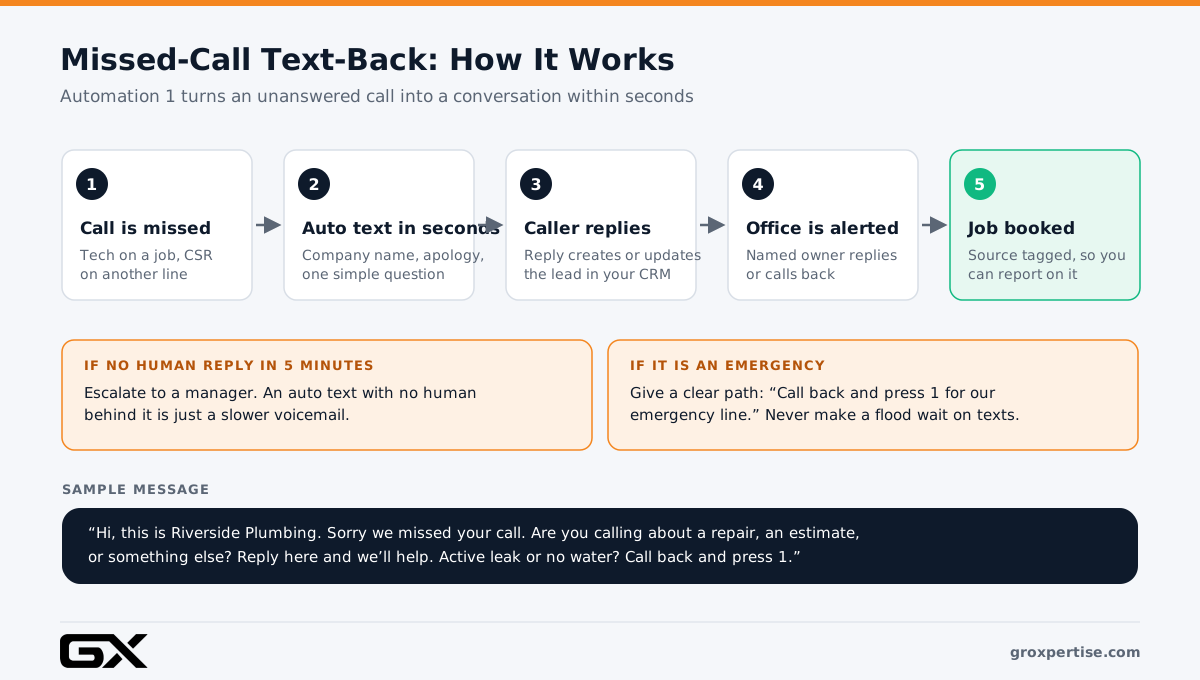
When a call goes unanswered, your phone system automatically texts the caller. For example:
> “Hi, this is Riverside Plumbing. Sorry we missed your call. Are you calling about a repair, an estimate, or something else? Reply here, and we’ll help. If you have an active leak or no water, call us back and press 1 for our emergency line.”
The caller’s reply creates or updates a lead in your CRM and alerts your office team, who pick up the conversation by text or call back.
How to set it up
- Check your phone system. Most VoIP systems, field service platforms, and call tracking tools offer missed-call text-back natively or through an add-on.
- Register your texting number for A2P 10DLC. US carriers block business texts from unregistered 10-digit numbers. Registration requires your business details and EIN and can take several days. Start early.
- Write two versions. One for business hours (“We’ll call you back within a few minutes”) and one for after hours (“Our office opens at 7 a.m. For emergencies, call and press 1”).
- Give emergencies a clear path. Never make someone with water pouring through a ceiling wait for a text conversation.
- Assign an owner. Replies should land in a shared inbox that a named person watches. Add an alert if no human replies within 5 minutes during business hours.
- Exclude the right numbers. Suppress texts to your own staff, known vendors, and spam numbers.
Example (illustrative composite)
An HVAC company with two CSRs gets slammed every Monday morning during a heat wave. Calls pile up, and some callers hang up after a few rings. With text-back in place, those callers get a text immediately. Many reply with a short description (“AC blowing warm, can someone come today?”), and the CSRs book them from the text queue between calls instead of losing them.
Common mistakes
- Sending the text, but nobody answers the replies.
- Writing a robotic message with no company name.
- Forgetting an emergency option.
- Skipping 10DLC registration, so texts silently fail.
A note on AI receptionists
AI voice agents can now answer overflow and after-hours calls, collect details, and book simple appointments. They can work well as a layer on top of text-back. If you use one, set clear handoff rules for emergencies and upset callers, and review call transcripts weekly. We cover this in more depth in our guide to [AI for service businesses](/ai-guide-for-service-businesses).
What to measure
- Missed-call rate (by hour and day)
- Text-back reply rate
- Replies that turn into booked jobs
- Time to first human reply
Automation 2: Instant Lead Response and Routing
Why it matters
Calls are not your only leads. Website forms, chat widgets, Google Ads lead forms, Local Services Ads messages, and lead platforms like Angi all produce inquiries. These leads often wait the longest because nobody “hears” them arrive.
Given the speed-to-lead research above, a form that sits until the next morning is probably lost.
How it works
- A lead arrives from any source.
- The CRM creates a record and tags the source.
- The customer gets an instant text and email confirming receipt of the request, with one or two helpful questions.
- The lead is assigned to a person, with a task to call within 5 minutes.
- If nobody calls within 5 minutes, the system alerts a manager.
- After hours, the customer gets an online booking link or the emergency line instead of silence.
How to set it up
- List every lead source. Include those in separate apps or email inboxes.
- Send them all into one system. Use native integrations first, and a connector tool like Zapier or Make only when needed.
- Write the instant reply. Keep it short. Confirm the request, set an expectation (“You’ll hear from Maria in a few minutes”), and ask one useful question.
- Set routing rules. Route by trade, service type, or territory. Do not route to people who are in the field.
- Add escalation. A lead untouched for 5 minutes should notify someone with authority.
Example (illustrative composite)
An electrical contractor gets panel upgrade requests through its website. Before automation, the owner reviewed forms each morning. Now each request triggers an instant text: “Thanks for reaching out about your panel. If it’s easy, reply with a photo of your panel and its label. That helps us give you an accurate quote faster.” A coordinator calls within minutes, often with the photo already in hand, and schedules the estimate visit on the first call.
Common mistakes
- Relying on the autoresponder alone, with no human follow-up.
- Asking too many questions in the first message.
- Leaving platform leads outside the CRM.
- Measuring “average” response time, which hides the leads that waited overnight. Track the median and the slowest 10 percent.
What to measure
- Median time to first human contact
- Contact rate (percent of leads reached)
- Booking rate by lead source
Want to go deeper on the full lead flow? See our guide to [home services lead generation](/lead-generation-guide-for-service-businesses).
Automation 3: Appointment Confirmations, Reminders, and On-My-Way Texts
Why it matters
A booked job is not revenue yet. When a customer forgets the appointment, is not home, or cannot get the tech into the attic, you pay for a wasted truck roll.
Clear communication also changes how customers feel about you. People who know exactly when and who the tech is, call your office less and leave better reviews.
How it works
- When the job is booked: Send a confirmation with the date, arrival window, what to expect, and simple prep steps (clear space around the water heater, secure pets, ensure someone over 18 is home).
- The day before: Send a reminder that asks the customer to reply to confirm or reschedule.
- When the tech is dispatched: Send an on-my-way text with the tech’s name, photo, and estimated arrival.
- After the job: Send the invoice and a payment link, then hand off to the review request (Automation 5).
How to set it up
- Turn on the built-in notifications in your field service software (ServiceTitan, Housecall Pro, Jobber, and similar platforms include them).
- Rewrite the default templates so they sound like your company.
- Add tech photos and short bios. This builds trust before the door opens.
- Make rescheduling easy. A customer who can reschedule by text is less likely to miss the appointment.
Example (illustrative composite)
A plumbing company adds tech photos to its on-my-way texts. The office notices fewer “Where’s my plumber?” calls, and techs report customers greet them by name. The change takes an afternoon to set up.
Common mistakes
- Sending messages from a “do not reply” number.
- Stale arrival windows because dispatch does not update the board.
- Too many messages. Four well-timed touches beat eight noisy ones.
What to measure
- Not-home and no-show rate
- Reschedules versus cancellations
- Inbound “where’s my tech” calls
Automation 4: Estimate Follow-Up Sequences
Why it matters
For big-ticket work (roof replacements, HVAC system replacements, panel upgrades, repipes, sewer lines), the estimate is where the money is. Homeowners get several bids, talk with a spouse, check financing, and wait for insurance. Many contractors make one follow-up call and move on.
Unsold estimates are often the largest pile of recoverable revenue in a home service business.
How it works
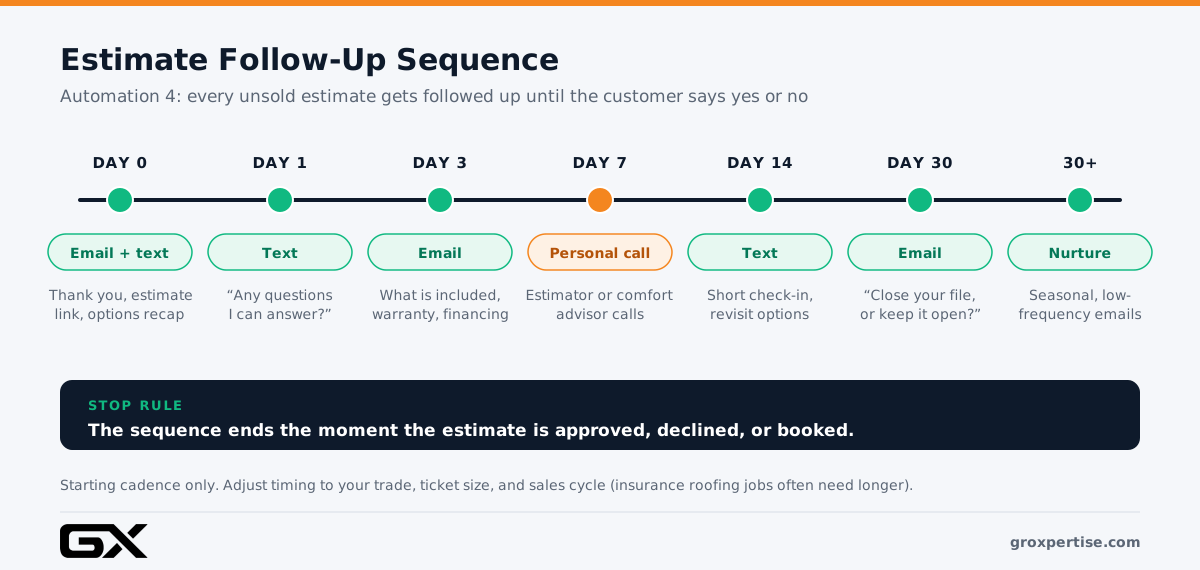
A sequence starts when you send an estimate and stops the moment the customer approves or declines. Here is a starting cadence we often use. Adjust it to your trade and ticket size:
| Timing | Channel | Message focus |
|---|---|---|
| Day 0 | Email and text | Thank you, estimate link, options recap |
| Day 1 | Text | “Any questions I can answer?” |
| Day 3 | What’s included, warranty, financing options | |
| Day 7 | Call task | Comfort advisor or estimator calls personally |
| Day 14 | Text | Short check-in, offer to revisit options |
| Day 30 | “Should I close your file, or keep it open?” | |
| After 30 days | Seasonal, low-frequency nurture |
How to set it up
- Send estimates from your CRM or field service software, not a PDF from personal email. The system needs to know the estimate exists.
- Offer options. Good, better, and best choices give customers a way to say yes without saying yes to the most expensive option.
- Enable e-signature and online approval so a customer can say yes at 10 p.m.
- Build stop rules. An approved, declined, or booked estimate must end the sequence immediately.
- Keep a human in the loop. Automation handles reminders; your estimator still makes the key call.
Example (illustrative composite)
A roofing contractor sends replacement estimates after storm inspections. Many homeowners wait on their insurance adjuster, so a single call a week later rarely lands. The contractor sets up a sequence that includes a short explainer on the claims process and a Day 14 check-in timed to typical adjuster visits. Estimates that used to go quiet now get a clear yes or no.
Common mistakes
- Follow-ups that only say “just checking in.” Every message should help the customer decide.
- Automatic discounts. They train customers to wait.
- Sequences that keep running after the job is booked (an integration leak).
- Skipping the personal call on high-value estimates.
What to measure
- Estimate close rate
- Average days from estimate to approval
- Revenue from estimates approved after Day 7
For page-level fixes that bring in more estimate requests, see our guide to [conversion rate optimization](/conversion-rate-optimization-guide-for-service-businesses).
Automation 5: Review Requests and Review Responses
Why it matters
Reviews shape both who finds you and who calls you.
On the finding side, Google says review count and score factor into local search ranking. On the choosing side, BrightLocal’s Local Consumer Review Survey 2026 reported 97 percent of consumers read reviews when choosing a local business, and 31 percent said they would only use a business rated 4.5 stars or higher. The same survey found a sharp rise in people using AI assistants for local business recommendations, making a strong reputation across platforms even more important.
Most happy customers will leave a review if you ask at the right moment and make it easy. Most contractors do not ask consistently.
How it works
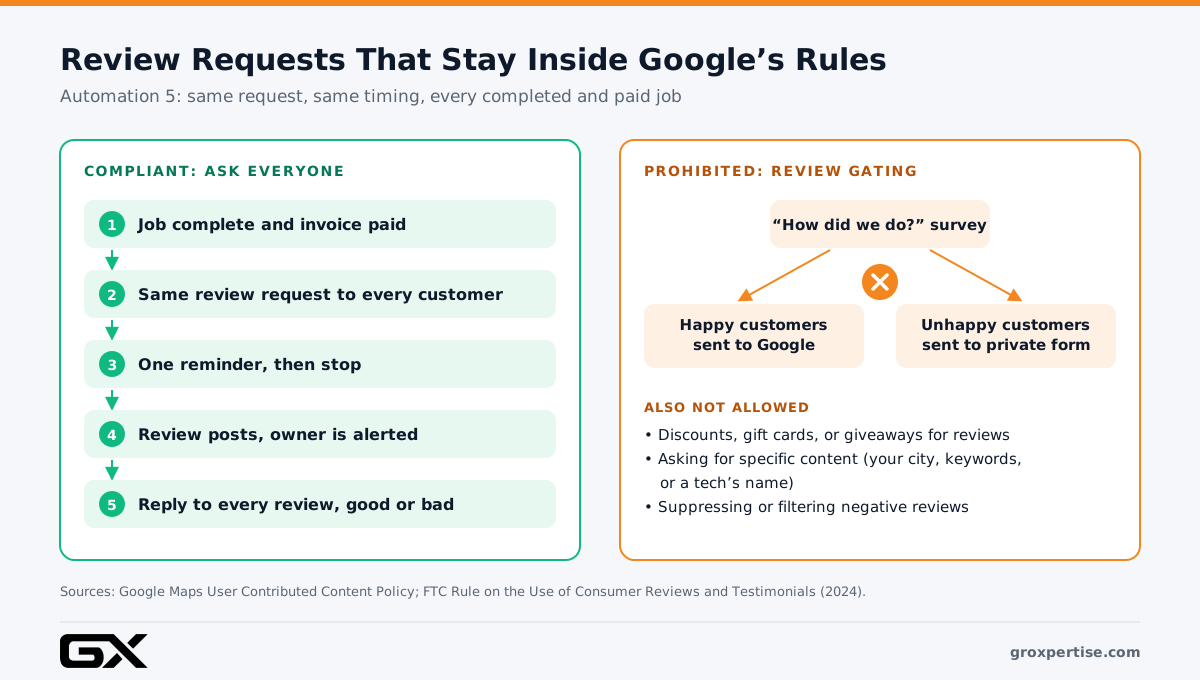
- A job is marked complete, and the invoice is paid.
- One to three hours later, the customer gets a text with a direct link to your Google review form.
- If no review appears, one reminder goes out a few days later. Then the automation stops.
- When any new review posts, the owner or manager gets an alert.
- Negative reviews trigger a task for a manager to reach out and respond publicly within a business day or two.
Stay inside Google’s rules
This is where many review tools get contractors in trouble. Google’s content policy prohibits businesses from:
- Selectively asking only happy customers (often called “review gating”). A survey that sends only 5-star responders to Google is gating.
- Offering incentives such as discounts, gift cards, or giveaway entries in exchange for reviews.
- Asking customers to include specific content, including naming a specific staff member.
That last point matters for local SEO. Do not ask customers to mention your city, service, or keywords. Let them describe the job in their own words. The FTC’s 2024 rule on consumer reviews also prohibits review suppression, so gating is a legal and platform risk.
The safe approach is simple: send the same review request to every completed, paid customer. You can include a line like “If anything wasn’t right, reply here and a manager will call you,” as long as everyone also gets the review link.
Example (illustrative composite)
A roofing company used to ask for reviews when the crew packed up. But the job wasn’t truly finished until the final walkthrough, and some customers still had open punch-list items. The company moved the trigger to “final inspection complete and paid.” Requests now reach customers when they are happiest with the finished roof, and nobody gets asked while a gutter is still loose.
Common mistakes
- Asking before the job is fully complete or paid.
- Sending a link to a Google search instead of the direct write-a-review link.
- Asking in bursts. Steady weekly volume looks natural; sudden spikes can look like manipulation.
- Never responding to reviews, good or bad.
What to measure
- Review requests sent versus reviews received
- New reviews per month and review recency
- Average rating trend
- Time to respond to new reviews
For the full picture on profile optimization and map pack visibility, see our [local SEO guide for service businesses](/local-seo-guide-for-service-businesses).
Automation 6: Maintenance Plan Renewals and Seasonal Reactivation
Why it matters
Your easiest next job usually comes from someone who already trusts you. Maintenance plans (often called memberships or service agreements) also smooth slow seasons that hit every trade.
Yet many companies track renewals in a spreadsheet, and past customers only hear from them when they call.
How it works
Renewals:
- Send reminders at roughly 60, 30, and 7 days before a plan expires.
- Offer easy renewal with a card on file, where the customer has agreed to it.
- Create a task for a CSR to call members who do not renew.
Seasonal visits:
- Automatically remind members to book tune-ups before peak season (spring for cooling, fall for heating).
- Book these visits into your shoulder-season weeks, when schedules have room.
Reactivation:
- Identify customers who have not booked in 12 to 18 months.
- Send offers that match their history, not a generic blast.
Trade-specific ideas
- HVAC: Pre-season tune-up reminders; system age reminders when equipment approaches the age your techs usually see failures.
- Plumbing: Annual water heater flush reminders; drain maintenance for customers with repeat clogs.
- Electrical: Generator maintenance reminders; surge protection check-ins after storm season.
- Roofing: Annual inspection reminders; helpful (not alarmist) check-in offers to past customers after significant storms in your service area.
Example (illustrative composite)
An HVAC company with about 400 members tracked renewals by hand, and plans quietly lapsed every month. After automating renewal reminders and pre-season tune-up scheduling, the office spent time calling the small group that didn’t respond instead of chasing everyone. Tune-ups filled slower weeks in April and October, keeping techs busy between peak seasons.
Common mistakes
- Sending the same offer to your whole list.
- Ignoring service history and equipment data you already have.
- Sending marketing texts without proper consent, or under a texting registration meant for appointment reminders.
- Making it hard to opt out.
What to measure
- Membership renewal rate
- Revenue from reactivated customers
- Shoulder-season booked hours
- Unsubscribe and opt-out rates
Automation 7: Lead Source Tracking and CRM Sync
Why it matters
This automation shows whether the other six are working and where your marketing dollars should go.
Many contractors judge marketing by leads or calls. But a channel that produces many calls from job seekers, vendors, and existing customers is not the same as one that produces booked jobs. Without connected tracking, you cannot see the difference.
How it works
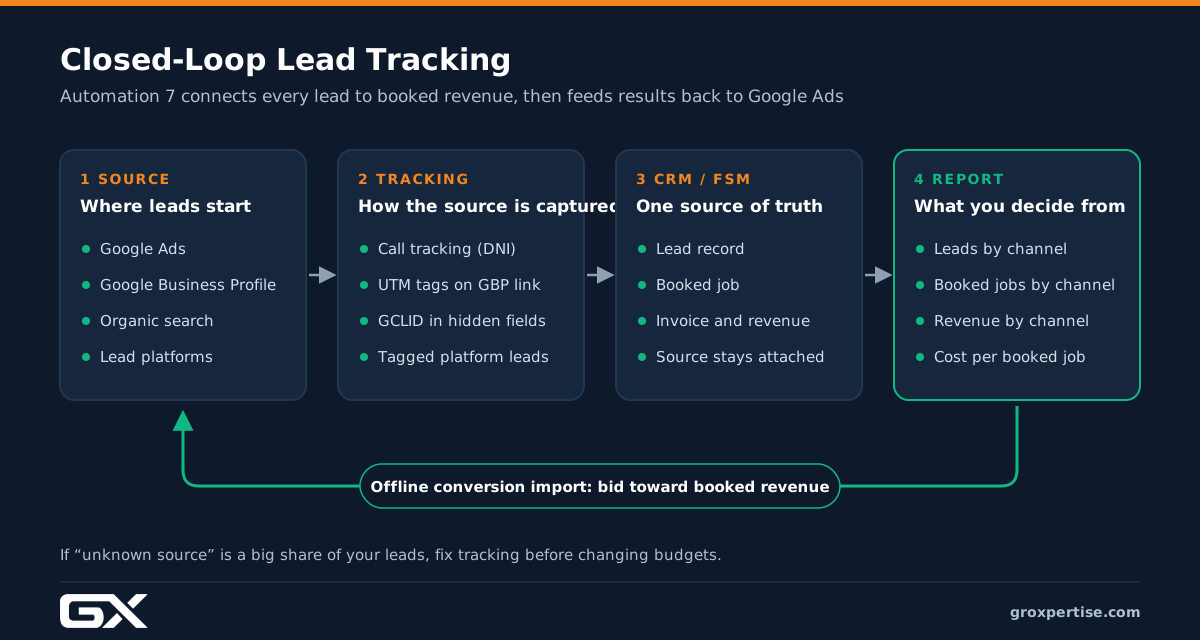
- Call tracking with dynamic number insertion shows a different phone number on your website depending on how the visitor arrived (Google Ads, organic search, Facebook, and so on).
- A dedicated tracking number on your Google Business Profile tells you how many calls come from the profile. Set the tracking number as the primary number and list your main business number as an additional number, which helps protect name, address, and phone (NAP) consistency.
- UTM parameters on your Google Business Profile website link separate profile visits from other organic traffic in analytics.
- Hidden form fields capture the source, campaign, and Google click ID (GCLID) when someone submits a form.
- Your CRM carries the source from lead to job to invoice.
- Offline conversion imports send booked jobs and revenue back to Google Ads, so the ad system learns to find customers who book, not just people who click.
How to set it up
- Choose one system as your source of truth for customers and jobs (usually your field service software).
- Connect your call tracking, website forms, and lead platforms to it.
- Make “lead source” a required field that staff cannot skip.
- Build a simple monthly report: leads, booked jobs, revenue, and cost, by channel.
- Set up offline conversion imports for Google Ads. Our guide to [Google Ads for contractors]({{GOOGLE_ADS_GUIDE_URL}}) explains why this matters for bidding.
Example (illustrative composite)
A plumbing company believed its Google Ads campaign was its best channel because it produced the most calls. After connecting call tracking to its field service software, the owner saw that a large share of those calls were existing customers and vendors, while Google Business Profile calls booked at a much higher rate. The company shifted budget and tightened its ad targeting based on booked revenue instead of call counts.
Common mistakes
- Putting a tracking number on your Google Business Profile without keeping your main number listed.
- Leaving lead platform leads untracked.
- Letting “unknown source” grow to a big share of leads.
- Collecting data that nobody reviews.
What to measure
- Percent of leads with a known source
- Cost per booked job by channel
- Revenue by channel
- Return on ad spend based on booked revenue
How These Automations Support Local SEO
Automation is not a ranking trick. But several of these systems strengthen the signals and behaviors that local search depends on:
- Steady review volume and recency. Automation 5 creates a consistent flow of genuine reviews, which supports your prominence in the local pack.
- Review responses. Prompt, thoughtful replies show searchers (and Google) that the business is active.
- Accurate tracking. Automation 7 shows how much business your Google Business Profile actually produces, which helps you justify the time you spend on it.
- NAP consistency. Setting up call tracking correctly protects the name, address, and phone consistency that local directories rely on.
- Reputation beyond Google. As more people ask AI assistants for recommendations, a strong, consistent reputation across Google, Facebook, Yelp, and your trade’s key directories matters more.
A note on Google Business Profile messaging: Google shut down Business Profile chat in 2024. Your response automations should focus on calls, forms, and texts instead.
If you are working on HVAC SEO or broader SEO for contractors, pair these automations with the profile and website work covered in our trade guides for [HVAC](/hvac-marketing-guide), [plumbing](/plumbing-marketing-guide), [roofing](/roofing-marketing-guide), and [electrical](/electrical-marketing-guide-for-electricians) contractors.
Your 90-Day Home Service Business Automation Plan
Trying to build all seven automations in one week usually ends with half-built systems nobody trusts. Here is the recommended order.
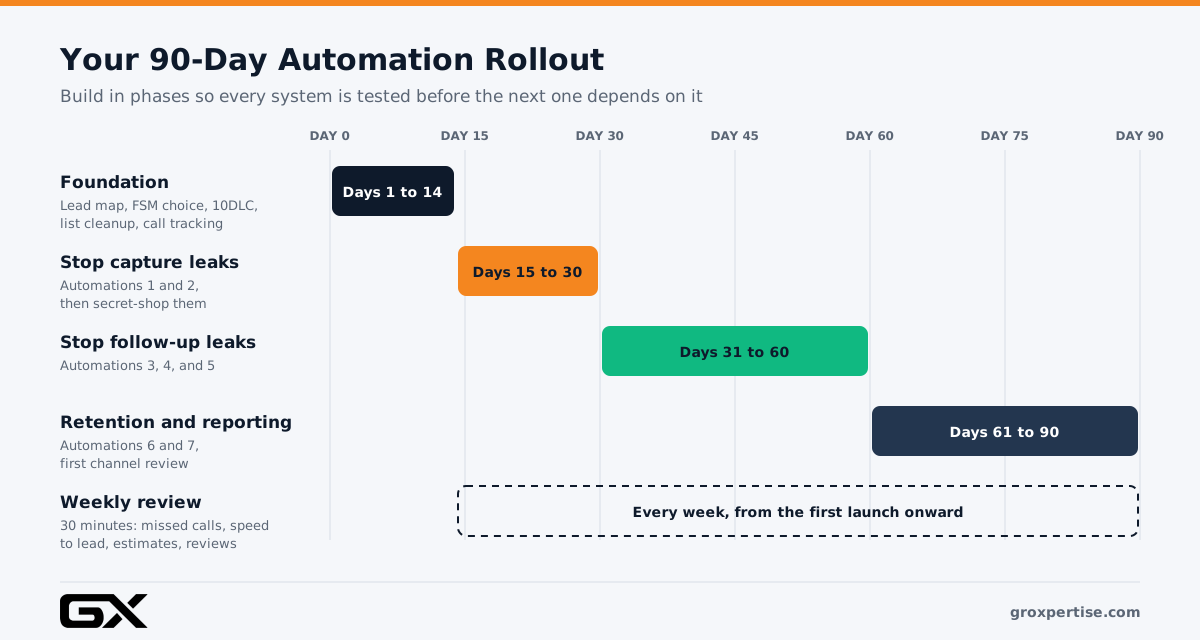
Days 1 to 14: Foundation
- Map how leads enter your business today, source by source.
- Choose your source-of-truth system (CRM or field service software).
- Start A2P 10DLC registration for any number that will send texts.
- Clean your customer list: remove duplicates, fix phone numbers, note opt-outs.
- Set up call tracking and UTM tags.
Days 15 to 30: Stop capture leaks
Days 31 to 60: Stop follow-up leaks
- Customize confirmations, reminders, and on-my-way texts (Automation 3).
- Build the estimate follow-up sequence (Automation 4).
- Launch review requests and review alerts (Automation 5).
Days 61 to 90: Retention and closed-loop reporting
- Automate renewals and seasonal reminders (Automation 6).
- Finish CRM sync and offline conversion imports (Automation 7).
- Hold your first monthly review of cost per booked job by channel.
Every week after launch
Spend 30 minutes reviewing missed calls, speed to lead, open estimates, new reviews, and any automation errors. Automations drift when nobody monitors them.
What You Need in Your Tech Stack
You do not need a dozen tools for home service business automation. Most contractors can run all seven automations with:
- A field service management platform or CRM (for example, ServiceTitan, Housecall Pro, Jobber, or FieldEdge) as the source of truth.
- A phone system with call tracking and texting, registered for A2P 10DLC.
- Review request functionality, often built into your field service platform or phone system.
- An integration layer for anything that does not connect natively.
- Google Ads offline conversion setup if you run paid search.
Rule of thumb: Use native features first. Every extra tool adds cost, logins, and another point where data can break.
Not sure your website is capturing leads cleanly in the first place? Our guide to building a high-converting [contractor website](/website-guide-for-service-businesses) covers forms, click-to-call, and page speed.
Compliance Guardrails to Get Right First
Automation magnifies whatever you build, including mistakes. Get these basics right before you launch. This is general information, not legal advice. Check with your attorney for your state.
- A2P 10DLC registration: Required for business texts from standard local numbers. Register separate campaigns for different message types, such as appointment reminders versus marketing.
- Consent for marketing texts: Federal rules under the TCPA, plus some state laws, govern automated marketing texts. Collect clear consent, keep records, honor STOP requests right away, and respect quiet hours.
- Email rules: Include your business address and a working unsubscribe link in marketing emails.
- Google review policy: Ask every customer, the same way, with no incentives and no requested content.
- FTC review rules: Do not suppress, filter, or fake reviews.
Common Mistakes Across All Seven Automations
- Automating a broken process. If your booking process is confusing, automating it creates confusion faster. Fix the process first.
- Set it and forget it. Phone numbers change, staff leaves, and integrations break. Review monthly.
- No clear owner. Every automation needs one named person responsible for it.
- Sounding like a robot. Write messages the way your best CSR would talk.
- Tool sprawl. Five disconnected apps create new integration leaks.
- Never testing as a customer. Secret-shop your own business every month.
Expert Tips From the Field
- Start with capture. Recovering missed calls and slow leads usually pays off fastest.
- Keep a message library. Store approved templates in one document so every automation sounds consistent.
- Use real names. “This is Maria from Riverside Plumbing” gets more replies than “Riverside Plumbing Notification.”
- Measure the slowest leads, not the average. The lead that waited 14 hours matters more than the average lead of 12 minutes.
- Tie everything to booked jobs. Leads, calls, and clicks are steps. Booked revenue is the result.
- Let people take over. Every automated conversation should have an easy handoff to a human.
What Results Should You Expect?
We will not promise a specific percentage because results depend on your lead volume, market, team, and starting point. Here is what typically changes and roughly when:
- Within the first few weeks: Faster response times and missed calls turning into conversations.
- Within one to three months: Steadier review volume and fewer no-shows.
- Over a quarter: Better estimate close rates, since sales cycles on big jobs take time.
- Over a full season: Higher renewal rates and more shoulder-season work.
- Right away: Clearer data on which marketing produces booked jobs, which improves every budget decision after that.
The fastest way to see what is at stake for your business is to put your own numbers into a lead leak calculator below.
Your Automation Action Checklist
Print this list or copy it into your project tool. Work top to bottom; each line is one concrete task.
Before you build
- List every lead source (phone, website forms, chat, Google Ads lead forms, Local Services Ads, Angi, Thumbtack, referrals).
- Pick one source-of-truth system (your CRM or field service software).
- Submit A2P 10DLC registration for every number that will send texts.
- Clean your customer list: merge duplicates, fix phone numbers, record opt-outs.
- Assign one owner for each automation below.
Automation 1: Missed-call text-back
- Turn on missed-call text-back in your phone or field service system.
- Write a business-hours version and an after-hours version.
- Add an emergency path (“call back and press 1”).
- Route replies to a shared inbox with a 5-minute escalation alert.
- Suppress texts to staff, vendors, and known spam numbers.
Automation 2: Instant lead response and routing
- Connect every lead source to your CRM.
- Write a short instant reply with one useful question.
- Set routing rules by trade, service, or territory.
- Add an escalation alert for leads untouched after 5 minutes.
- Track median response time and the slowest 10 percent.
Automation 3: Confirmations, reminders, and on-my-way texts
- Rewrite default templates in your company’s voice.
- Add tech photos and short bios.
- Send a day-before reminder with reply-to-reschedule.
- Make sure replies go to a monitored number.
Automation 4: Estimate follow-up
- Send every estimate from your CRM or field service software.
- Offer good, better, and best options with online approval.
- Build the Day 0 to Day 30 sequence, with a personal call on Day 7.
- Add stop rules for approved, declined, and booked estimates.
Automation 5: Review requests and responses
- Trigger the request on “job complete and paid” for every customer.
- Use the direct write-a-review link.
- Send one reminder, then stop.
- Remove any satisfaction filter, incentive, or requested wording.
- Set new-review alerts and reply to every review.
Automation 6: Renewals and reactivation
- Schedule renewal reminders at about 60, 30, and 7 days.
- Automate pre-season tune-up reminders for members.
- Build a reactivation list of customers inactive for 12 to 18 months.
- Confirm marketing text consent and a separate texting campaign for promotions.
Automation 7: Lead source tracking and CRM sync
- Set up call tracking with dynamic number insertion on your website.
- Add a tracking number to your Google Business Profile (main number kept as an additional number).
- Add UTM tags to your Google Business Profile website link.
- Capture source and GCLID in hidden form fields.
- Make lead source a required CRM field.
- Set up Google Ads offline conversion imports.
- Review cost per booked job by channel every month.
After launch
- Secret-shop your business: call after hours, submit a form, request an estimate.
- Hold a 30-minute weekly review of missed calls, speed to lead, open estimates, and reviews.
Related GroXpertise Guides
Go deeper on the systems these automations connect to:
- Complete business automation guide: the full framework behind this list.
- Home services lead generation: how leads are generated and where they leak.
- AI for service businesses: AI receptionists, chat, and when AI makes sense.
- Local SEO guide for service businesses: Google Business Profile, reviews, and map pack visibility.
- Conversion rate optimization: turning more visitors into calls and estimate requests.
- Contractor website guide: forms, click-to-call, and page speed.
- Trade playbooks: HVAC marketing, plumber marketing, roofing marketing, and electrical contractor marketing.
Frequently Asked Questions
What is home service business automation?
Home service business automation uses software to handle repetitive steps in your customer journey automatically. Examples include texting missed callers, confirming appointments, following up on estimates, and requesting reviews. The goal is to respond faster and more consistently without adding staff.
Which automation should a contractor set up first?
Start with missed-call text-back and instant lead response. They fix capture leaks, where you lose leads you already paid for, and they are usually quick to set up.
Will automation make my business feel impersonal?
Not if you set it up well. Good automation handles the timing and reminders, while your team handles real conversations. Write messages in your own voice, use real names, and make it easy for customers to reach a person.
Do I need an expensive CRM to automate my business?
No. Many field service platforms at different price points include confirmations, reminders, estimate follow-ups, and review requests. The best system is the one your team will actually use every day.
Is it legal to text customers automatically?
Yes, as long as you follow the rules. Register your texting number for A2P 10DLC, get proper consent for marketing texts, honor opt-out requests, and keep records. Appointment and service messages are treated differently from marketing messages, so keep them separate. Ask your attorney about your state’s specific rules.
Can I automate Google review requests without breaking Google’s rules?
Yes. Send the same review request to every customer after a completed, paid job. Don’t filter customers by satisfaction first, don’t offer incentives, and don’t ask customers to include specific words or staff names.
How long does it take to set up these seven automations?
Most contractors can roll them out over about 90 days by working in phases: foundation first, then capture, then follow-up, then retention and reporting. Rushing all seven at once usually creates errors.
Does automation help local SEO?
Indirectly, yes. Review automation builds steady, recent reviews, which Google says factor into local ranking. Tracking automation shows how much business your Google Business Profile produces. Automation does not replace core local SEO work like profile optimization and location pages.
Should I use AI to answer my phones?
AI receptionists can help with overflow and after-hours calls. Use them with clear handoff rules for emergencies and upset callers, and review transcripts regularly. They work best as a layer on top of a solid follow-up system, not as a replacement.
Conclusion: Fix the Leaks Before You Buy More Leads
More marketing will not fix a business that loses calls, forgets estimates, and never asks for reviews. It just makes the leaks more expensive.
These seven automations close the most common gaps in HVAC, plumbing, roofing, and electrical companies:
- Missed-call text-back
- Instant lead response and routing
- Confirmations, reminders, and on-my-way texts
- Estimate follow-up sequences
- Review requests and responses
- Renewals and seasonal reactivation
- Lead source tracking and CRM sync
Start with capture, build in phases, measure booked jobs instead of clicks, and review your systems every week. Once you seal the leaks, every dollar you spend on HVAC lead generation, plumbing lead generation, roofing lead generation, or electrician lead generation works harder.
For the full framework behind these systems, read our [complete business automation guide](/ultimate-business-automation-guide-for-service-businesses).
Find Out How Much Your Business Is Leaking
Start with the numbers. Our free Lead Leak Calculator shows how much revenue your business may be losing to missed calls, slow follow-up, and unsold estimates. Pick your trade:
- HVAC Lead Leak Calculator
- Plumbing Lead Leak Calculator
- Roofing Lead Leak Calculator
- Electrical Lead Leak Calculator
Then let us build the fix. GroXpertise is a contractor marketing agency that helps HVAC, plumbing, roofing, and electrical companies set up CRM systems, marketing automation, AI tools, local SEO, and Google Ads that work together.
Request a free AI & Automation Assessment (Electrician, HVAC, Plumbing, Roofing), and we will map your lead flow, find your biggest leaks, and show you which of these seven automations to build first.