


Your plumbing website looks fine. It has your logo, a list of services, and a photo of a van. You paid good money for it. But the phone isn’t ringing, and the contact form barely gets used.
You are not alone. Most plumbing websites were built to look professional, not to produce plumbing website leads.
They act like an online business card. And a business card does not answer a homeowner at 11 p.m. when water is pouring through the kitchen ceiling.
Here is the good news. Usually, the problem is not that nobody visits your site. The problem is that the visitors you already have are slipping away.
At GroXpertise, we call these lead leaks.
Once you can see the leaks, you can fix them, often without spending any extra money on ads.
This guide walks you through why most plumbing websites fail, how to diagnose your own site, and exactly how to fix it step by step.
It is written for plumbing company owners and managers, but HVAC, roofing, and electrical contractors will find that almost every lesson applies to them too.
(For the full channel-by-channel picture, start with our plumbing marketing guide.)
- Most plumbing websites do not have a traffic problem. They have a lead leakage problem.
- Leaks happen in three places: when visitors arrive (capture), after they reach out (follow-up), and between your tools (integration).
- The biggest capture leaks are slow mobile pages, buried phone numbers, generic service pages, weak local SEO, and missing trust signals.
- The biggest follow-up leak is slow response. Missed calls and late callbacks hand jobs to competitors.
- Fix the leaks before you buy more traffic. Every extra visitor pours into the same leaky bucket.
When leads dry up, most plumbers assume they need more traffic. They buy more ads or sign up for another SEO package.
Sometimes that helps a little. Often it just makes the leaks more expensive.
Think of it like a plumbing system. If there is a leak in the line, turning up the water pressure does not fix it. You find the leak first.
How big is the leak?
Industry data shows how much room most plumbing sites have to improve.
A 2026 analysis by Astra Results found that the typical plumbing website converts between 1% and 3% of visitors, meaning 97 to 99 out of every 100 visitors leave without calling or filling out a form.
Other agencies report a similar picture, with most plumbing sites landing between 2% and 5%, while well-optimized sites often reach 10% or more.
Benchmarks vary by source and how “conversion” is measured, so treat them as a rough guide.
The point is the gap. Here is what that gap looks like with simple, illustrative numbers:
| Monthly visitors | Conversion rate | Leads per month | Booked jobs (at 50% booking) |
|---|---|---|---|
| 1,200 | 2% | 24 | 12 |
| 1,200 | 4% | 48 | 24 |
| 1,200 | 6% | 72 | 36 |
Same traffic. Same ad spend. Three times the booked jobs. That is why fixing the website usually beats buying more traffic.
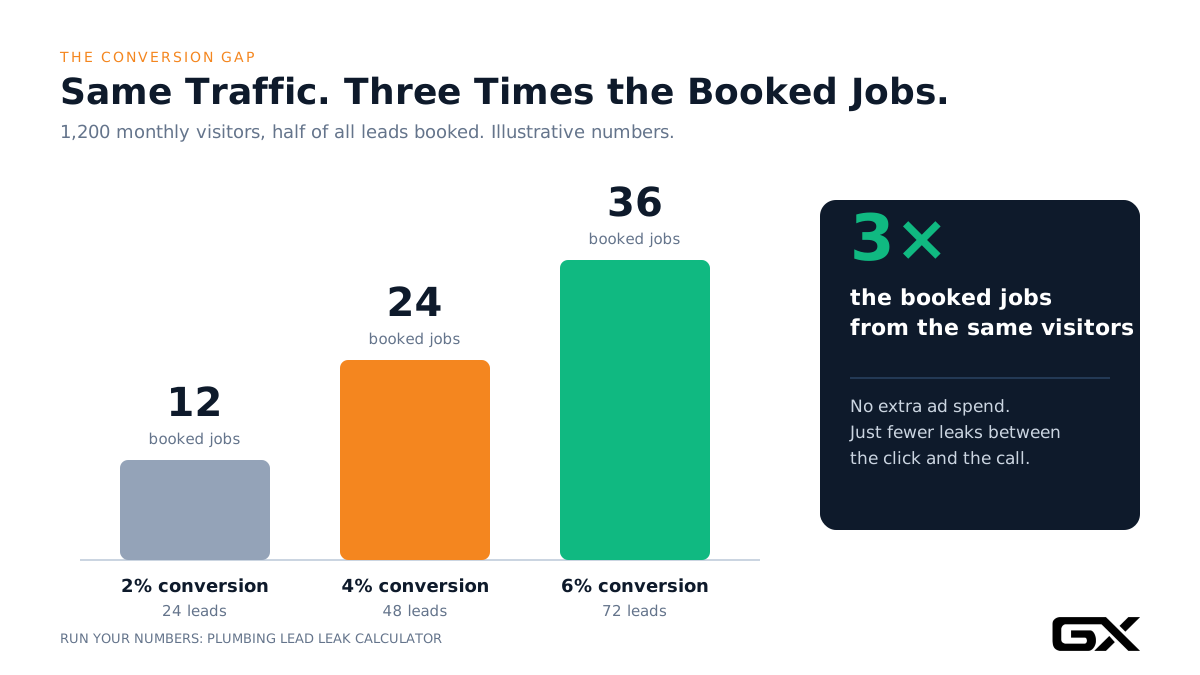
(These numbers are illustrative. Plug your own traffic, booking rate, and average ticket into our Plumbing Lead Leak Calculator to see your real gap.)
The three leak zones
Every lost lead escapes through one of three zones:
- Capture leaks: The visitor lands on your site but never calls, texts, books, or submits a form. Slow pages, confusing layouts, and weak trust signals cause these.
- Follow-up leaks: The visitor does reach out, but nobody answers, or the callback comes too late. The job goes to whoever responded first.
- Tool leaks: Your website, phone system, CRM, and scheduling software do not talk to each other. Leads fall through the cracks between them, and you cannot tell which marketing actually works.
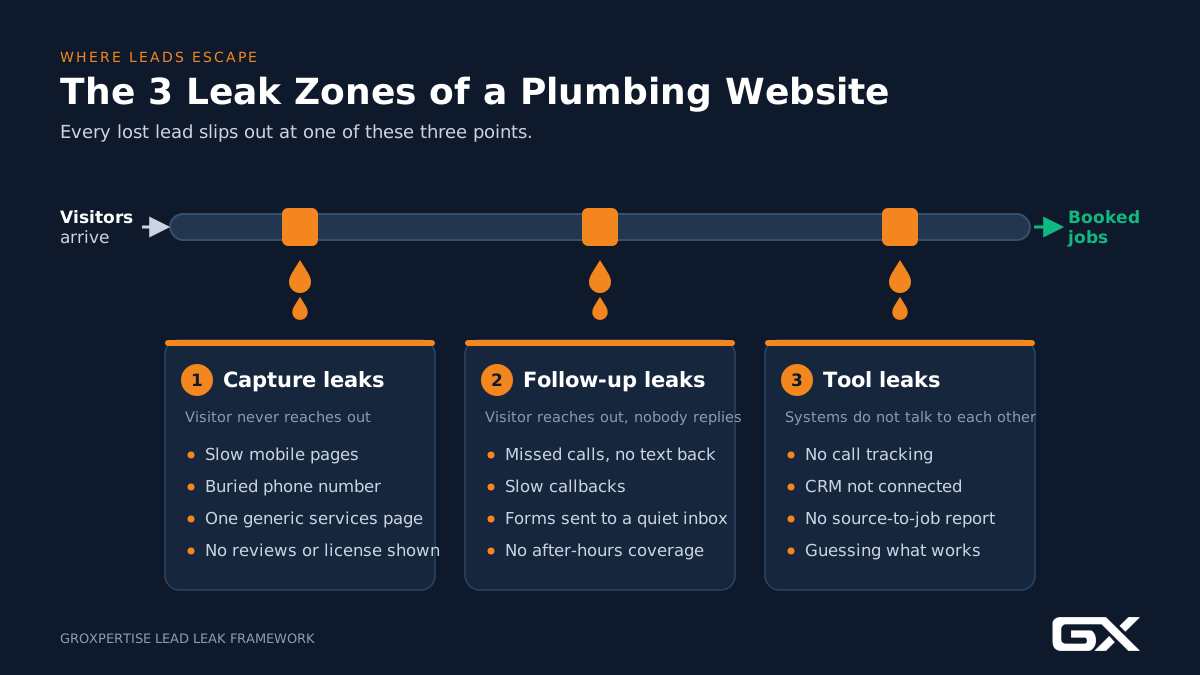
Most “failed” plumbing websites have leaks in all three zones. Here are the most common ones.
Warning Signs Your Plumbing Website Is Failing
Before we dig into causes, check your site against these signs. If three or more sound familiar, your website is leaking leads.
- Most of your calls come from Google Business Profile or referrals, and almost none from the website.
- Your form gets spam but very few real service requests.
- You do not know how many calls your website produced last month.
- Your site takes more than a few seconds to load on your own phone.
- Your phone number is not visible without scrolling on mobile.
- You have one “Services” page that lists everything in a paragraph.
- Customers ask on the phone whether you serve their town, or whether you handle emergencies.
- Your site has not been meaningfully updated in two or more years.
- After-hours calls go to a voicemail that rarely gets checked until morning.
That last sign is not technically “the website.” But from the homeowner’s point of view, it is one experience. If the website works and the phone does not, the lead is still lost.
Your 20-minute leak check (do this today)
You do not need an agency or special software for this first pass. Grab your phone and notepad.
- Open your homepage on your phone, on cellular data. Count the seconds until you can read the headline and tap a button. Write it down.
- Look at the first screen only. Can you see what you do, where you work, a trust signal, and a way to call? Note anything missing.
- Tap your phone number. Does it dial? If not, that is your first fix.
- Search your top service plus your city (for example, “water heater repair [city]”). Does a page on your site that is specifically about that service appear?
- Fill out your own contact form. Time how long it takes for someone on your team to respond.
- Call your business after hours. What happens? Voicemail, answering service, or a text back?
- Open Google Analytics. Can you see how many calls and forms your site produced last month?
Every “no” is a leak. Keep this list; the fixes below are organized around it. The free Plumbing Marketing Checklist goes deeper.
10 Reasons Most Plumbing Websites Fail to Generate Leads
1. The site was built as a brochure, not a lead system
Why it happens:
Many web designers build for looks. They focus on colors, animations, and an “About Us” story.
No one asks the most important question: what should a stressed homeowner do in the first five seconds?
What it costs you:
Visitors have to hunt for how to contact you. Emergency callers will not hunt. They hit the back button and call the next plumber in the list.
How to fix it:
Treat every page as a path to one action. On a plumbing site, that action is usually a phone call, with text and online booking as backups. Every design choice should support that action.
Common mistake:
Putting a large rotating image slider at the top of the homepage. Sliders push the phone number and main message down the page and slow load time.
2. The mobile experience is an afterthought
Why it happens:
Sites are often designed and approved on a desktop screen. The mobile version is whatever the template creates automatically.
Why it matters for plumbers:
Plumbing searches are often urgent. A homeowner standing in a wet basement searches on a phone, with one free hand, under stress.
If your mobile site is hard to use, you lose your highest-value leads: emergency calls.
How to fix it:
- Review and approve the mobile version first, then the desktop version.
- Add a sticky tap-to-call button that stays on screen as the visitor scrolls.
- Make buttons large enough to tap with a thumb.
- Keep the first screen simple: what you do, where you do it, and how to reach you now.
Common mistake:
A mobile menu that hides the phone number behind a “hamburger” icon.

3. The site is too slow
Why it happens:
Oversized photos, heavy page builders, too many plugins, cheap hosting, and extra scripts from chat widgets and tracking tools all add weight.
What the research says:
Google’s mobile speed research found that as page load time goes from 1 to 3 seconds, the probability of a bounce increases by 32%, and from 1 to 5 seconds it increases by 90%.
That study looked across industries, not just plumbing.
But an urgent, impatient plumbing visitor is exactly the kind of person who will not wait.
How to fix it:
- Test your key pages with Google PageSpeed Insights on mobile.
- Compress and resize images (a 4 MB photo of a truck does not need to be 4 MB).
- Remove plugins and scripts you do not use.
- Use quality hosting and caching.
- Watch your Core Web Vitals in Google Search Console.
Common mistake:
Testing speed only on office Wi-Fi. Test on your phone, on cellular data, as your customers do.
4. The phone number and calls-to-action are buried
Why it happens:
Designers often treat the phone number as a minor detail in the header or footer.
Why it matters: For plumbing, the phone call is still king.
Invoca’s home services research reports that phone leads convert at 46%, compared with a 37% cross-industry average.
Phone callers are ready to buy. Make calling effortless.
How to fix it:
- Put a clickable phone number in the top right of every page.
- Add a clear button above the fold on mobile: “Call Now: Plumber Available 24/7” (only if that is true).
- Repeat calls-to-action after every major section of long pages.
- Use action-focused button text such as “Book a Plumber” or “Get Help Now” instead of “Submit” or “Learn More.”
- Offer a second option for people who cannot talk right now: text us, or book online.
Common mistake:
Using a phone number image instead of real, clickable text. Images cannot be tapped to call, and search engines cannot read them.
5. One generic “Services” page instead of real service pages
Why it happens:
It is faster and cheaper to build one page listing “drain cleaning, water heaters, leak detection, repiping, sewer repair.”
What it costs you:
Two things. First, Google struggles to rank one page for ten different services.
Second, a visitor searching “tankless water heater installation” lands on a page that does not speak to their problem.
How to fix it:
Build a dedicated page for each core service that brings you revenue. Each service page should include:
- A clear headline with the service and your main area (“Water Heater Repair and Replacement in [City]”).
- The symptoms the homeowner is experiencing, in plain words.
- How you solve the problem and what the visit looks like.
- How you approach pricing (for example, upfront pricing before work begins, if you offer it).
- Reviews that mention that specific service.
- Photos from real jobs.
- Short FAQs.
- A strong call-to-action.
Start with your highest-margin services: water heaters, sewer line repair, repiping, and emergency plumbing are common choices.
For a deeper framework, see our contractor website guide.
Common mistake:
Writing service pages full of technical jargon. Homeowners search for “water coming up through floor drain,” not “sewer lateral backflow.”
6. Weak local SEO signals
Why it happens:
Many plumbing websites never tell Google clearly where the business operates. The city appears once in the footer, and that is it.
Why it matters: Plumbing is a local business. Your site needs to support your Google Business Profile, not compete with it or contradict it.
How to fix it:
- Make your NAP consistent.
Your business name, address, and phone number should match exactly on your website, Google Business Profile, and major directories. - Build real service area pages.
Create pages for the main cities or neighborhoods you serve. Each one should include genuinely local details: common plumbing issues in that area (older homes with galvanized pipes, hard water, freeze risks), jobs you have done there, and reviews from customers there. - Link your Google Business Profile to the right page.
If you serve one main city, link to the homepage. If you have multiple locations, link each profile to its own location page. - Add LocalBusiness or Plumber schema.
Structured data helps search engines understand your business name, service area, hours, and contact details. - Embed a map and list your service area in plain text on your contact and location pages.
Our local SEO guide for service businesses covers each of these in detail.
Common mistake:
Creating 50 “city pages” that are identical except for the town name. Google sees these as thin, duplicate content. Five genuinely useful local pages beat fifty copies.
7. No trust proof
Why it happens:
Owners assume customers already trust them. But a new visitor has no idea who you are. They are about to let a stranger into their home.
How to fix it: Show proof early and often.
- Your license number and insurance status, displayed clearly.
- Recent Google reviews, ideally embedded or quoted with the customer’s first name and town.
- Real photos of your team, trucks, and completed jobs. Stock photos of smiling models in spotless uniforms hurt trust.
- Guarantees you actually honor, stated plainly.
- Years in business and service area, if they are strengths.
- Clear expectations: how quickly you can arrive, how pricing works, what happens on the first visit.
Common mistake:
Putting all the trust signals on an “About Us” page that few people visit.
Put the most important ones on the homepage and every service page, near the call to action.
8. Forms that create friction
Why it happens:
Someone decided they wanted every detail up front: name, email, phone, address, service type, preferred date, how the customer heard about us, and a long message box.
Why it matters:
Every extra field gives the visitor another reason to quit. Some visitors cannot call right now (they are at work or it is late at night). The form is their only way to reach you.
How to fix it:
- Ask for only what you need to call back: name, phone, and a short description of the problem.
- Add an optional field for ZIP code if service area matters.
- Put a short form on every service page, not just the Contact page.
- Tell people what happens next: “We will call or text you within 10 minutes during business hours.”
- Consider online booking for non-emergency work, like maintenance or estimates.
- Protect forms from spam with a simple, invisible method so real leads do not get buried.
Common mistake:
Sending form submissions to a general inbox that nobody watches closely. That is a follow-up leak disguised as a website feature.
9. Leads leak after the click (slow follow-up and missed calls)
This is the leak most owners never see because the website “did its job.” The visitor called or filled out the form. Then nothing happened fast enough.
What the research says:
The best-known research on response speed comes from a 2007 MIT and InsideSales study.
It found that contacting a lead within 5 minutes instead of 30 made contact about 100 times more likely and qualification about 21 times more likely.
A related Harvard Business Review study in 2011 audited over 2,000 U.S. companies and found an average response time of 42 hours, with 23% never responding.
Those studies covered many industries, not just plumbing. But for a homeowner with a leak, five minutes can feel like forever.
Missed calls are just as costly.
In a 2025 CallRail survey of 1,000 U.S. consumers, 78% said they abandoned a business over an unanswered call, and 82% said they would call a competitor.
The same survey found that only 42% of people say they leave a voicemail, and what people say they do is often more generous than what they actually do.
How to fix it:
- Set a response standard. For example: every web lead gets a call or text within 5 minutes during business hours.
- Use missed-call text back. When a call is missed, an automatic text goes out right away: “Sorry we missed you. This is [Company]. How can we help?”
- Cover after-hours calls. Use an answering service, an on-call rotation, or a well-configured AI voice assistant that books or routes emergency calls.
Our AI guide for service businesses explains where AI helps and where a person should still answer.
- Route form leads to a phone, not just an inbox. Send instant alerts by text to whoever handles dispatch.
- Follow up more than once. One call attempt is not a follow-up process.
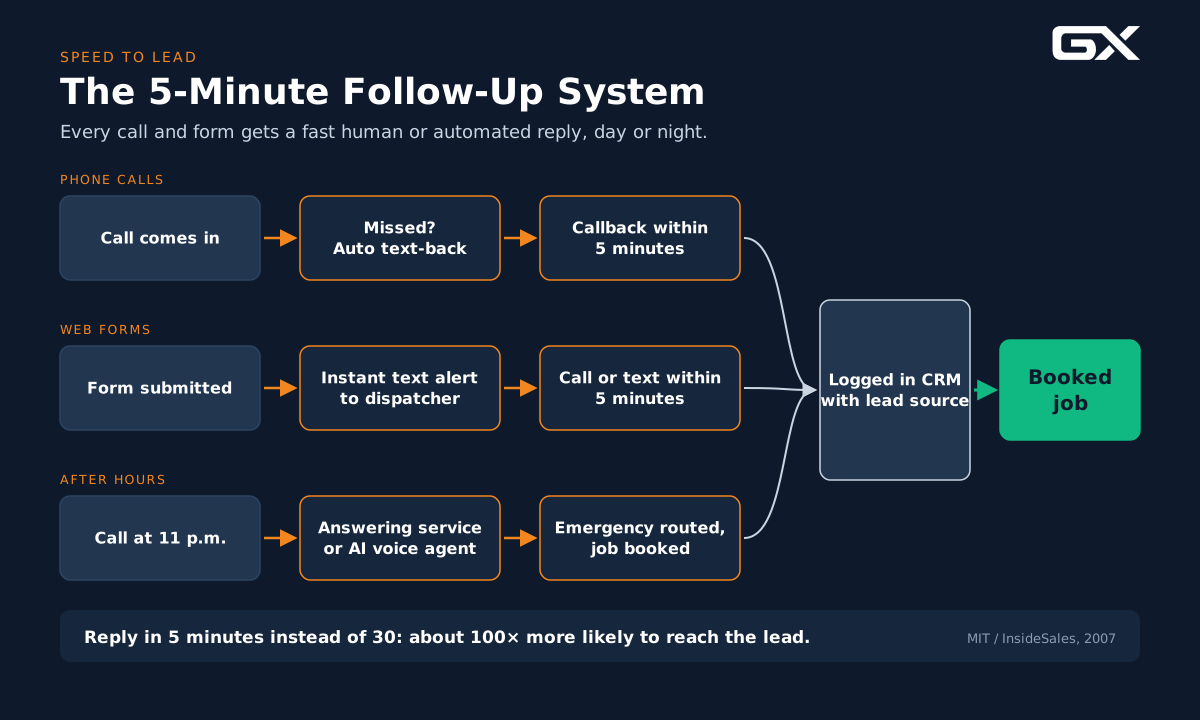
Our business automation guide shows how to automate your follow-up so no lead waits.
Common mistake: Running ads that drive calls into hours when nobody can answer.
Invoca’s home services benchmarks suggest that if you cannot dispatch or book callers during off-hours, consider pausing the paid campaigns that drive calls into those windows.
Our guide to Google Ads for contractors covers ad scheduling in detail.
10. No tracking, so nobody knows what is broken
Why it happens: The site was launched, the analytics code may or may not be installed, and nobody looks at the reports.
What it costs you: You cannot fix a leak you cannot find.
Without tracking, you do not know which pages, services, or marketing channels produce booked jobs.
How to fix it:
- Install Google Analytics 4 and Google Search Console, and confirm they work.
- Track every conversion: phone clicks, calls, form submissions, texts, and bookings.
- Use call tracking with dynamic number insertion so you can see which source produced each call (while keeping your main number consistent for local SEO).
- Connect leads to your CRM or field service software so you can see which leads became booked jobs and revenue.
- Review a simple monthly report: visitors, leads, conversion rate, booked jobs, and revenue by source.
Call tracking also offers a bonus.
Invoca notes that some calls happen only because the website did not answer a basic question, such as service area, pricing, or whether you handle emergencies.
Listening to calls tells you exactly what to add to your site.
Common mistake: Measuring “traffic” instead of booked jobs. Traffic does not equal revenue.
Example: A Before and After Plumbing Website
The example below is an illustrative composite based on common patterns we see. It is not a specific client case study.
The situation:
A plumbing company with six trucks serves a mid-sized city and three suburbs.
Its website gets steady traffic from Google Maps and organic search. The owner feels the site “does not do anything.”
What an audit finds:
- The homepage loads slowly on mobile because of a large video background.
- The phone number is in small text in the header and is not clickable.
- One “Services” page covers twelve services.
- The suburbs they serve are mentioned only in the footer.
- The form has nine fields and sends to an email address the office checks twice a day.
- After 6 p.m., calls go to voicemail.
- There is no call tracking, so nobody knows how many calls come from the site.
What gets fixed (in priority order):
- Tracking installed first, so there is a baseline to measure against.
- Video background removed; images compressed; mobile page speed improved.
- Sticky tap-to-call button and a clear headline added above the fold.
- Form cut to three fields, placed on every service page, with instant text alerts to the dispatcher.
- Missed-call text back and an after-hours answering service set up.
- Dedicated pages built for water heaters, drain cleaning, sewer repair, and emergency plumbing.
- Service area pages written for the three suburbs, each with real job photos and local reviews.
- License number, reviews, and team photos added near every call-to-action.
What a company like this should watch for:
More calls and form leads from the same traffic within the first one to two months (from the capture and follow-up fixes), followed by gradual ranking gains for service and suburb searches over the next several months (from the new pages and local SEO work).
Results depend on the market, competition, and how consistently you maintain the fixes.
Step-by-Step: How to Fix Your Plumbing Website
Here is the order we recommend. It fixes the cheapest, fastest leaks first and saves larger projects for later.

Step 1: Measure your starting point (Week 1)
You need a baseline before you change anything.
- Confirm GA4 and Search Console are installed and working.
- Set up conversion tracking for calls, phone clicks, forms, and bookings.
- Add call tracking.
- Write down last month’s numbers: visitors, calls, forms, booked jobs.
Why first? Without a baseline, you cannot prove what worked, and you cannot spot new leaks later.
Step 2: Fix the first screen on mobile (Weeks 1 to 2)
Pull up your homepage and top service pages on your phone. On the first screen, a visitor should see:
- What you do (“Emergency Plumbing and Drain Service”).
- Where you do it (“Serving [City] and [Suburbs]”).
- Why trust you (reviews rating, licensed and insured).
- How to reach you now (big tap-to-call button, plus text or book options).
Step 3: Speed up the site (Weeks 2 to 3)
Run PageSpeed Insights on your homepage and top three service pages.
Fix the biggest problems first: image sizes, unused plugins, heavy scripts, and hosting.
Aim for pages that load quickly on a phone using cellular data.
Step 4: Plug the follow-up leaks (Weeks 2 to 4)
This step often produces the fastest results because it rescues leads you are already getting.
- Turn on missed-call text back.
- Set up after-hours coverage.
- Send instant text alerts for every form submission.
- Set a written response standard and share it with your team.
- Log every lead in your CRM or field service software.
Step 5: Build or rebuild your core service pages (Month 2)
Start with the three to five services that bring in the most revenue. Use the service page checklist from reason #5 above. Each page should stand alone as a landing page for ads or search.
Step 6: Strengthen local SEO (Months 2 to 3)
- Audit your NAP across your site, Google Business Profile, and top directories.
- Build service area pages for your most important cities, with genuinely local content.
- Add LocalBusiness or Plumber schema.
- Make sure your Google Business Profile categories, services, and hours match your website.
- Build a steady review process, so fresh reviews keep coming in.
Step 7: Add trust proof everywhere (Month 3)
Swap stock photos for real ones. Add reviews to each service page. Show your license number, guarantees, and what customers can expect. Put proof right next to your calls to action.
Step 8: Review monthly and keep improving (Ongoing)
Every month, look at:
- Conversion rate by page.
- Leads and booked jobs by source.
- Response times and missed calls.
- Common questions from recorded calls.
Pick one or two improvements each month. Test headlines, button text, or form layouts. Small, steady fixes add up. Our conversion rate optimization guide shows how to run simple tests.
Does This Apply to HVAC, Roofing, and Electrical Websites?
Yes. The three leak zones are the same across trades. What changes is the type of urgency and the sales cycle.
| Trade | Typical urgency | Biggest website leak to watch | Priority fix |
|---|---|---|---|
| Plumbing | High (leaks, clogs, no hot water) | Slow mobile pages and missed emergency calls | Tap-to-call, speed, after-hours coverage |
| HVAC | Seasonal spikes (heat waves, first cold snap) | Missed calls during peak demand | Call overflow plan, online booking for maintenance |
| Roofing | Mixed (storm damage vs. planned replacement) | Weak trust proof for large, considered purchases | Project photos, reviews, clear estimate process |
| Electrical | Mixed (outages and safety vs. upgrades) | Generic service pages that do not match specific searches | Dedicated pages for panels, EV chargers, generators |
For trade-specific strategy, see our HVAC marketing guide, roofing marketing guide, and electrical marketing guide.
Common Mistakes When Trying to Fix a Plumbing Website
Owners who know their site is underperforming often make one of these moves first. Each can waste time and money.
- Buying more traffic before fixing leaks. More ads into a leaky site means paying more for the same lost leads.
- Redesigning for looks only. A prettier site with the same buried phone number and slow follow-up will fail the same way.
- Starting over without a baseline. If you rebuild without tracking, you will never know whether the new site is better.
- Mass-producing city pages. Thin, copy-paste location pages can hurt more than help.
- Adding a chatbot nobody monitors. A chat widget that collects messages nobody answers is just another leak. It also slows your site.
- Ignoring the phone side. The website and the phone are one customer experience. Fix both.
- Changing everything at once. If you change ten things in one week, you cannot tell which change helped. Change in stages and measure.
Expert Tips From the Field
- Call your own business at 7 p.m. on a Friday. Then fill out your own form and time the response. What you experience is what your customers experience.
- Listen to 10 recorded calls a month. Customers will tell you what your website is missing.
- Write as you talk on a service call. Plain, calm, confident language builds trust faster than marketing slogans.
- Match your ads to your pages. If an ad says “Water Heater Replacement,” send the click to the water heater page, not the homepage.
- Put your best review next to your main button. Proof is most powerful right at the moment of decision.
- Keep your site fresh. Add new job photos, reviews, and FAQs regularly. This helps visitors and signals an active business.
What Results Can You Expect?
Honest expectations matter, so here is how results usually unfold.
- Follow-up fixes (missed-call text back, after-hours coverage, fast form alerts) can show results within weeks, because they rescue leads you already have.
- Conversion fixes (mobile layout, calls-to-action, speed, trust proof) often show measurable changes within one to two months, once enough visitors have come through to compare.
- SEO fixes (new service pages, local pages, schema, reviews) take longer. Expect gradual gains over three to six months or more, depending on your competition.
No one can promise a specific number of leads, and you should be cautious of anyone who does. What you can expect is this: when you stop the leaks, every marketing dollar you already spend works harder.
Frequently Asked Questions
Why is my plumbing website not getting any leads?
Usually, it is because visitors cannot quickly see what you do, where you do it, and how to reach you on their phone.
Slow load times, a buried phone number, generic service pages, weak local SEO, and missing trust proof are the most common causes.
Slow follow-up can also make it seem like the site is failing when leads are actually being lost after they reach out.
What is a good conversion rate for a plumbing website?
Published benchmarks vary widely by source and method. Many agencies report typical plumbing sites converting in the low single digits, with well-optimized sites reaching well above that.
The most useful benchmark is your own: measure your current rate, then work to improve it month over month.
How fast should a plumbing website load?
As fast as possible on a mobile phone.
Google’s research shows bounce probability rises sharply as load time goes from one to three seconds and beyond.
Test with PageSpeed Insights on mobile and focus on how quickly the first screen appears and becomes usable.
Do I need a new website, or can I fix my current one?
Often you can fix your current site. Start with tracking, mobile layout, speed, calls to action, and follow-up.
If your platform is outdated, very slow, or hard to edit, a rebuild may make sense. Either way, measure your baseline first.
How many service pages should a plumbing website have?
Build one dedicated page for each core service that brings in meaningful revenue.
For many plumbing companies, that means five to fifteen pages, starting with the highest-value services like water heaters, sewer repair, drain cleaning, repiping, and emergency plumbing.
Should I create a page for every city I serve?
Create pages for your most important service areas, and make each one genuinely useful and local.
Avoid copy-paste pages that only swap the city name. A few strong local pages are better than dozens of thin ones.
How quickly should I respond to a website lead?
As fast as you can. Research on lead response shows that contacting a lead within five minutes is dramatically more effective than waiting even thirty minutes.
For plumbing emergencies, faster is always better. Automation like instant text alerts and missed-call text back helps you respond in minutes.
Is local SEO or Google Ads better for plumbing lead generation?
They work best together, and both depend on a high-converting website.
Local SEO builds long-term visibility in Maps and organic results. Google Ads can generate calls quickly.
If your website leaks leads, both channels will underperform. Fix the website first, then scale traffic.
Our plumbing lead generation guide explains how the channels fit together.
Related GroXpertise Resources
Keep going with the guide that matches your next fix:
- Full strategy: Plumbing marketing guide
- Website build and structure: Contractor website guide
- Turning visitors into calls: Conversion rate optimization guide
- Ranking in Maps and local search: Local SEO guide for service businesses
- Fast, automatic follow-up: Business automation guide
- AI receptionists and assistants: AI guide for service businesses
- Paid search: Google Ads for contractors
- All lead channels together: Lead generation guide for service businesses
- Working with a partner: Home service marketing agency
- Free tools: Plumbing Lead Leak Calculator and Plumbing Marketing Checklist
Conclusion: Fix the Leaks Before You Turn Up the Pressure
Most plumbing websites do not fail because plumbers picked the wrong colors or fonts.
They fail because they were never built to capture and convert urgent, local, mobile visitors, and because the follow-up after the first click is too slow.
The fix is not mysterious.
- Measure your baseline
- Make the first screen clear on mobile
- Speed up the site
- Make calling effortless
- Build real service and location pages
- Show proof
- And make sure every lead gets a fast response, day or night
When you stop the leaks, you get more booked jobs from the traffic you already have. Then, and only then, it makes sense to invest in more.
For the bigger picture of how your website fits with SEO, ads, reviews, and follow-up, read our complete plumbing marketing guide.
Find Out Where Your Plumbing Website Is Leaking Leads
GroXpertise helps plumbing, HVAC, roofing, and electrical companies turn their websites into lead systems.
We build and optimize contractor websites, improve local SEO and Google Business Profiles, set up call tracking and CRM, and automate follow-up so no lead slips through.
Start with a free Website Performance Audit.
We will review your site’s speed, mobile experience, calls-to-action, local SEO signals, trust proof, and tracking, and show you exactly where leads are leaking and what to fix first.
Get Your Free Website Performance Audit
Not ready to talk yet? Use our free Plumbing Lead Leak Calculator to estimate how much revenue your current site may be leaving on the table, or download the Plumbing Marketing Checklist and score your site yourself.