

Most contractors think they have a traffic problem. They rarely do.
Walk into any HVAC, plumbing, roofing, or electrical shop that’s frustrated with marketing, and you’ll hear the same thing: “We need more leads.”
So they spend more on Google Ads, buy a few more lead-gen subscriptions, maybe redo the website.
The phone rings a little more. The bank account doesn’t move much. And six months later, they’re back to square one, convinced marketing is a money pit.
Here’s what’s actually happening. The visitors are already showing up. The clicks are already paid for.
But, somewhere between landing on the site and a tech rolling up to the driveway, the overwhelming majority of those people quietly slip away: they bounce off a slow page, give up on a clunky form, hit a phone number nobody answers, or get a callback so late they’ve already hired the competitor.
That’s not a traffic shortage. That’s a leak.
Conversion rate optimization (CRO) is the discipline of finding and plugging those leaks.
It’s the single highest-leverage thing most service businesses can do, because every point of conversion you recover is essentially free growth: more booked jobs from the same ad spend, the same SEO, the same referral flow you already have.
This guide is your complete playbook.
We’ll cover what CRO is, the metrics that actually matter, current benchmarks for the trades, the psychology that drives a homeowner to pick up the phone, and a page-by-page, element-by-element teardown of homepages, service pages, landing pages, forms, calls, CTAs, trust signals, reviews, pricing, and offers.
Then we’ll get tactical with A/B testing for low-traffic sites, heatmaps and analytics, mobile, the mistakes that quietly kill conversion, a full audit checklist, and a 30-day plan you can start Monday.
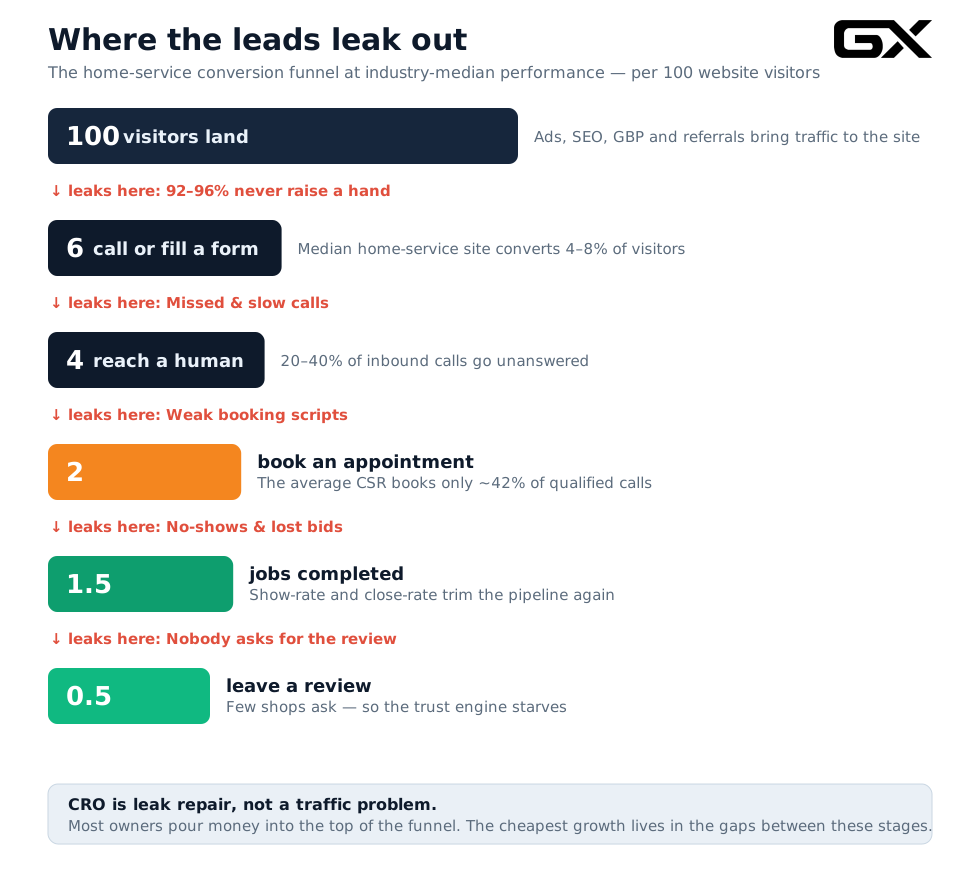
What’s in this guide
- What conversion rate optimization actually is
- The conversion metrics that matter
- Service business conversion benchmarks
- The psychology behind every conversion
- Homepage optimization
- Service page optimization
- Landing page optimization
- Form optimization
- Phone call optimization
- CTA optimization
- Trust signals
- Reviews and testimonials
- Pricing presentation
- Offer creation
- A/B testing on a small-traffic site
- Heatmaps and analytics
- Mobile conversion optimization
- The most common CRO mistakes
- Your CRO audit checklist
- The 30-day optimization plan
What conversion rate optimization actually is
Conversion rate optimization is the systematic process of increasing the percentage of visitors who take the action you want. For a service business, that means calling, filling out a form, booking an appointment, or requesting an estimate.
The core formula is almost insultingly simple:
Conversion Rate = (Conversions ÷ Total Visitors) × 100
If 1,000 people visit your site this month and 50 of them call or fill out a form, your conversion rate is 5%. CRO is the work of moving that number up.
What makes it powerful is that conversion sits in the middle of a chain, and improving it multiplies everything downstream.
Here’s the version of the formula that should be taped to every contractor-owner’s wall:
Booked Jobs = Traffic × Conversion Rate × Answer/Booking Rate × Close Rate
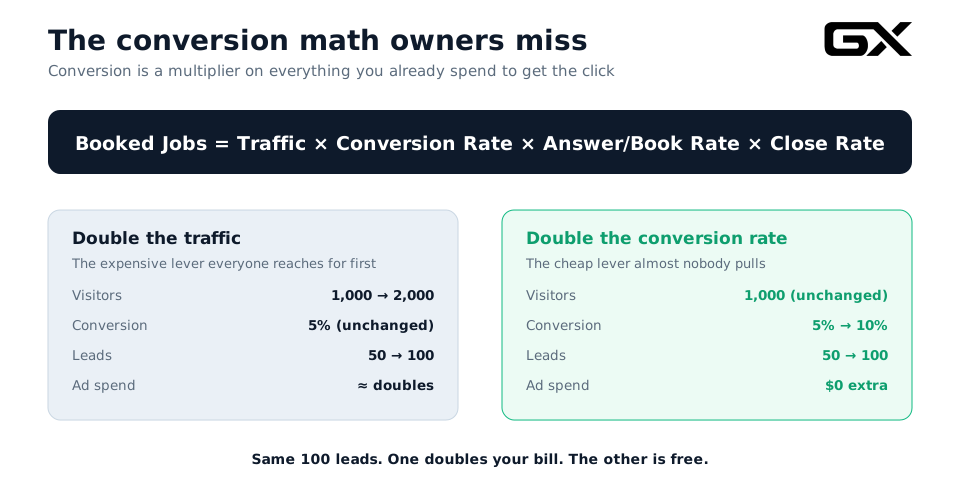
Look at what that multiplier does.
Imagine you’re running 1,000 visitors a month at a 5% conversion rate: 50 leads. You have two ways to get to 100 leads.
→ You can increase your traffic to 2,000 visitors, roughly doubling your ad bill.
→ Or you can double your conversion rate from 5% to 10% for free, same 100 leads.
One option doubles your largest marketing expense; the other is free.
That’s the entire argument for CRO in one breath, and it’s why the smartest operators optimize conversion before they ever scale spend.
There’s a second reason CRO matters more for the trades than almost any other industry: your lead costs keep climbing.
Per LocaliQ’s 2025 home-services benchmark (built on 3,211 contractor search campaigns), cost per lead rose year over year for 69% of advertisers, with an average increase of about 10.5%.
Roofing leads now run well over $180 each in many markets; HVAC and general construction sit in the $90s. When a single lead costs that much, letting it slip through a broken funnel isn’t a minor inefficiency. It’s lighting cash on fire.
One important reframe before we go further. CRO is not about tricking people or stuffing pages with flashing “BUY NOW” buttons.
The best conversion work is mostly about removing friction and building trust. You’re making it easier and less scary for a homeowner with a real problem to say yes to the company that can fix it. Done right, it’s good for them too.
The conversion metrics that matter
You can’t optimize what you don’t measure, and most contractors measure the wrong thing, or nothing at all. Here are the metrics that actually drive booked revenue.
-
Conversion rate (site-wide and by page).
The headline number. Track it for the whole site, but more usefully, track it per landing page and per traffic source. A 3% site-wide rate can hide a homepage converting at 1% and a dedicated landing page converting at 9%. -
Conversion rate by channel.
Paid search, organic, Google Business Profile, Meta, and referral traffic convert at very different rates because they arrive with very different intent.Someone who searched “emergency plumber near me” is a hotter visitor than someone who clicked a Facebook awareness ad—blending them into one average hides where your real leaks are.
-
Cost per lead (CPL) and cost per booked job. CPL tells you what you’re paying for a raised hand.
Cost per booked job
CPL divided by your booking rate tells you what you’re actually paying per unit of revenue. The gap between those two numbers is usually where the money’s hiding. -
Lead-to-booking rate (CSR booking rate).
Of the people who call or fill out a form, how many actually get on the schedule? This is the most underwatched, highest-leverage metric in the trades.Industry data pegs the average customer service rep booking rate at around 42%, while top operators book 65–85% of qualified calls.
That gap, on a few hundred calls a month, is often six figures of annual revenue.
-
Answer rate and speed-to-lead.
What percentage of inbound calls get answered live, and how fast do you respond to form fills?CallRail reports a roughly 14% missed-call rate in home services, and missed calls during lunch, after hours, and peak demand can account for 20–40% of inbound calls.
We’ll come back to why speed is the whole ballgame.
-
Micro-conversions.
Smaller signals that predict a lead: clicking to call, starting a form, scrolling to your reviews, watching a service video.These matter especially on low-traffic sites, where macro-conversions are too rare to test.
-
Bounce rate and engagement.
Not conversions themselves, but leak detectors. A page where 80% of mobile visitors leave within 5 seconds tells you something is broken above the fold.
The discipline is to pick three or four of these, instrument them properly (we’ll cover the tools in the analytics section), and review them on a fixed cadence; at minimum, monthly.
The owners who win aren’t the ones with the fanciest dashboard. They’re the ones who actually look at it.
Service business conversion benchmarks
“Is my conversion rate good?” is the wrong question. The right question is “Is my conversion rate good for my trade, my traffic source, and my funnel stage?”
Conversion rates vary enormously, and comparing your plumbing site to a generic e-commerce benchmark is meaningless.
Here’s the current lay of the land.
Across home services, WebFX’s 2026 benchmark data puts the blended industry conversion rate at around 7.8%, but that average masks a wide spread by trade.
High-urgency, high-volume services like plumbing and pest control convert strongest, often 12–16% on emergency-intent traffic.
That’s because the homeowner has a burst pipe right now and books the first credible company.
Considered high-ticket trades like roofing and remodeling sit lower, often 3–7%, because homeowners collect multiple quotes over days or weeks before deciding.

A critical distinction trips people up here: the ad-campaign conversion rate (click-to-lead on a tightly targeted paid landing page) runs much higher than the whole-website conversion rate (any visitor who fills out a form).
On paid search with strong landing pages, plumbing campaigns can convert north of 15%, and even construction lands around 3.65%.
But the typical contractor website, the one whose only conversion path is a “Contact Us” form buried in the menu, often limps along with just 2–3% of visitors converting.
That 2–3% figure is the one most shops are unknowingly living with, and it’s the easiest to fix.
Use these as orientation, not gospel.
The honest move is to compare like with like: plumbing landing page against plumbing landing page, roofing site against roofing site, paid traffic against paid traffic.
Then set your own internal baseline and beat it quarter over quarter.
A roofing site going from 3% to 5% has done more for the business than an HVAC site sitting smugly at 9% that could be at 14%.
A rough rule of thumb for a contractor website (not a single paid landing page):
- Under 2%, something is structurally broken. Start the audit today.
- 2–4%, typical, lots of upside. This is most contractor sites.
- 5–8%, solid. You’re ahead of the pack.
- 9%+, excellent. Now protect it and push the post-click stages (answer rate, booking rate).
The psychology behind every conversion
Before we touch a single button or headline, you have to understand what’s happening in a homeowner’s head.
Every conversion is a small act of trust in the face of uncertainty, and a handful of well-documented psychological forces govern whether they say yes.
Anxiety is the default state.
A homeowner reaching out to a contractor is nervous. They’ve heard the horror stories: the no-show, the surprise invoice, the “$8,000, take it or leave it” estimate.
Your job on every page is to lower anxiety, not to hype.
Trust signals, guarantees, transparent pricing ranges, and real reviews all work because they reduce the perceived risk of being burned.
Cognitive load kills decisions (Hick’s Law).
The more choices you put in front of someone, the longer they take to decide; and the more likely they freeze and do nothing.
A page with “Get Quote,” “Call Now,” “Schedule,” “Learn More,” and “Download” all shouting at once gives the brain permission to pick none of them.
One clear primary action converts better than five competing ones.
Urgency and loss aversion. People are wired to avoid loss more than they’re motivated by gain.
“Same-day service — slots filling fast” outperforms “we offer great service” because it activates the fear of missing out on a fix they need now.
For emergency trades, this is enormous; for considered purchases, use it gently and honestly (seasonal pricing, limited install windows), or it reads as sleazy.
Social proof. We look to others to decide what’s safe.
Reviews, star ratings, “trusted by 2,000 local homeowners,” and recognizable neighborhood names all tell the visitor’s lizard brain other people like me chose this and didn’t regret it.
The momentum of small commitments. Once someone takes a tiny action (clicking to call, starting a form, picking a time slot) they’re far more likely to complete the bigger one.
This is why multi-step forms that open with an easy question often outperform a wall of fields, and why “Start your free estimate” beats “Submit.”
Every tactic in the rest of this guide is really just one of these principles applied to a specific page.
Keep them in mind, and you’ll be able to invent your own optimizations long after you’ve finished reading.
Homepage optimization
Your homepage is rarely your best converter. Dedicated landing pages almost always win. But the homepage carries disproportionate weight because it’s where brand searches, Google Business Profile clicks, and referrals land.
Most contractor homepages waste the most valuable real estate on the internet: the area above the fold.
Lead with the outcome, not your name.
The headline a homeowner sees first should answer “are you what I need, and can I trust you?” in under three seconds.
“Reliable AC Repair in [City] — Same-Day Service, Upfront Pricing” beats “Welcome to Smith & Sons Heating and Air, Established 1998.” Nobody woke up wanting to learn about your company. They woke up with a problem.
Put the phone number and a primary CTA above the fold.
On mobile, especially, a sticky tap-to-call bar should be visible the instant the page loads. The hero section’s number-one job is to make the next step obvious and effortless.
Add a trust strip immediately.
Right under the headline: licensed, insured, years in business, star rating, service area. Five seconds of credibility before they’ve scrolled an inch.
Show, don’t tell.
Real photos of your real trucks, team, and completed work convert far better than stock images of generic smiling models. Homeowners can smell stock photography, and it quietly erodes trust.
One primary path.
Pick the single action you most want, usually “call” for emergency trades, “get a free estimate” for considered ones. Then make it the loudest element on the page. Secondary options can exist, but they should be visually quieter.
A useful test: pull up your homepage on your phone, glance at it for three seconds, then look away.
Can you say what the company does, where it serves, why it’s trustworthy, and what to do next? If not, neither can your visitors.
Service page optimization
Service pages are where a huge share of high-intent organic and paid traffic actually lands: your dedicated “AC Repair,” “Water Heater Installation,” “Roof Replacement,” “Panel Upgrade” pages.
Someone searching “water heater replacement [city]” who hits a thin, generic page is a lead you paid for and lost.
A high-converting service page has a predictable anatomy:
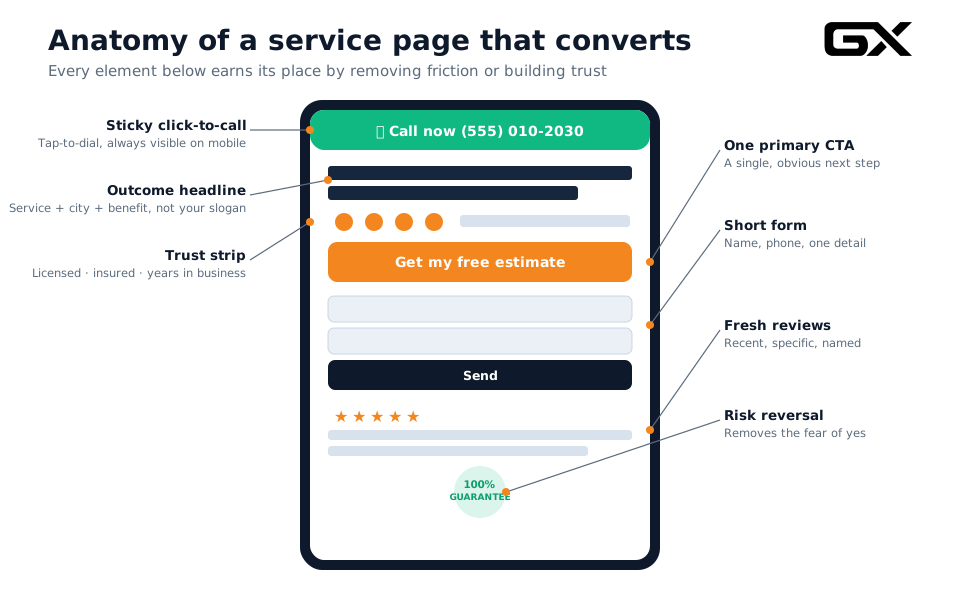
- A specific, outcome-driven H1 that includes the service and the city.
- A sticky click-to-call that follows the visitor down the page on mobile.
- A trust strip near the top: licensing, insurance, warranty, rating.
- A short benefit section answering “what do I get and what does it cost-ish?” — not a wall of corporate text.
- One primary CTA repeated at natural intervals (after the intro, after the process, after the reviews) so the visitor never has to scroll back up to act.
- A short form as a secondary path for people who won’t call.
- Fresh, specific reviews tied to that service (“they replaced our 40-gallon unit same day”).
- A risk-reversal element, satisfaction guarantee, warranty, and “no surprise pricing, to dissolve the fear of saying yes.
- An FAQ that handles the objections your CSRs hear all day (cost range, timeline, financing, mess, warranty).
The single biggest service-page leak is treating these as SEO filler—pages written for Google with no thought for the human who arrives.
Every service page should be able to convert a ready-to-buy visitor with zero further clicks. If yours can’t, that’s your first weekend project.
Landing page optimization
A landing page is a single-purpose page built for a single campaign and action, with navigation and distractions stripped away.
For paid traffic in particular, sending clicks to your homepage instead of a dedicated landing page is one of the most expensive mistakes in the trade.
The principles that make landing pages convert:
Message match. The landing page headline should echo the ad that got them there. If the ad said “Emergency Drain Cleaning — 60-Minute Response,” the page better say the same thing in the hero.
Mismatched messaging is a leak that shows up as a high bounce rate and wasted ad spend.
Remove the navigation. No menu, no footer links to “About” and “Careers,” no escape hatches.
The data is consistent: removing navigation from a landing page can meaningfully increase conversions (some analyses put it at around 15%) because every link is a chance to wander off.
One offer, one CTA.
Landing pages with a single call to action consistently outperform pages with competing CTAs; studies put the lift around 30%. Pick the one action and commit to it.
Above-the-fold conversion.
The form or call button should be visible before any scrolling on both desktop and mobile. Make the next step the most obvious thing on the screen.
Match the offer to the traffic temperature.
Cold prospecting traffic (Meta) wants a low-commitment offer — a checklist, a price guide, a free inspection.
Hot search traffic (“emergency electrician now”) wants the phone number and a fast response. Don’t ask a panicking homeowner to download a PDF; don’t ask a curious researcher to commit to an in-home visit.
This is exactly the logic behind purpose-built assets like a Lead Leak Calculator (for high-intent search) versus a Local Lead Checklist (for cooler prospecting traffic) — different temperatures, different offers, different pages.
Form optimization
The form is where motivated visitors go to give up quietly.
Roughly 98% of website visitors never identify themselves at all, and for those who try, every unnecessary field is a chance to lose them.
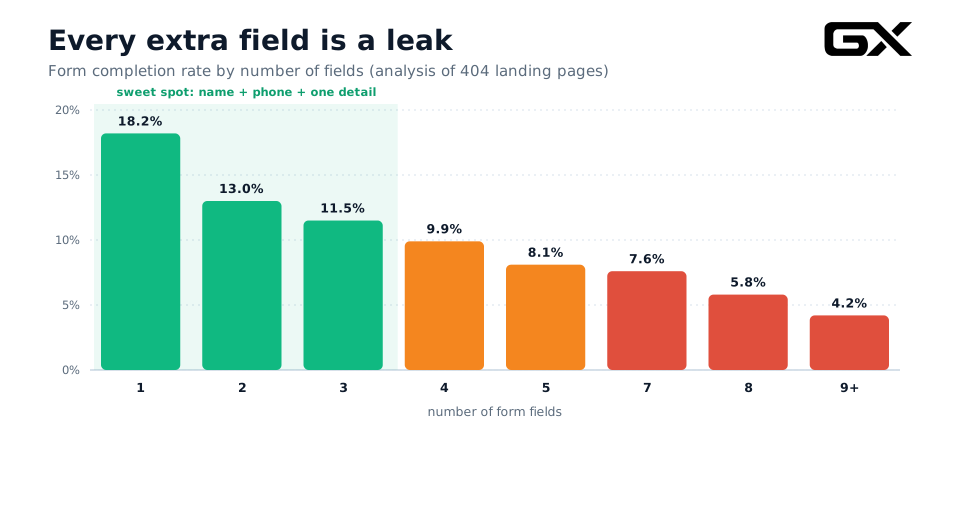
The data here is striking.
Analysis of hundreds of landing pages shows that completion rate falls steadily as fields pile up: a one-field form might complete around 18%, a three-field form around 11–12%, a five-field form around 8%, and a nine-plus-field form around 4%.
The steepest losses happen right after the first couple of fields. For a service business, the math is almost always in favor of fewer.
But here’s the nuance most “shorter is always better” advice misses: the relationship isn’t perfectly linear.
Field count is a saturated lever: you can’t optimize your way to greatness on field count alone.
A few field-reduction tests have actually hurt conversion, because a form that feels too short can read as low-commitment or suspicious (“what’s the catch?”).
The goal isn’t the absolute minimum. It’s the right minimum for the job.
Practical rules for contractor forms:
-
Start with three fields: name, phone, and one detail (service needed or zip). That’s your default. You can qualify further on the call.
-
Use a multi-step form for bigger jobs. Open with an easy, low-stakes question (“What service do you need?”) with clickable buttons, then ask for contact info in step two.
The small first commitment creates momentum, and people who start are far more likely to finish.
-
Make phone optional vs. required deliberately. Phone is your fastest path to a booked job, but it’s also a higher-friction field.
For emergency trades, require it. For top-of-funnel offers, email alone may capture more leads that you can then nurture.
-
Single column, mobile-first, big tap targets, real-time validation. Multi-column forms and tiny fields tank mobile completion.
-
Set expectations at the beginning. “Get my free estimate — we’ll call within 15 minutes” converts better than a naked “Submit,” because it tells the anxious homeowner exactly what happens next.
And remember: a form is only as good as what happens after someone hits send.
A flawless form feeding a lead nobody calls back for six hours is still a leak, which brings us to the most important section in this guide.
Phone call optimization
For the trades, the phone call is still where jobs are won and lost.
Invoca’s analysis of tens of millions of calls found the majority of callers want to speak with a real person, and a large share of phone leads convert during the call itself.
Two things determine whether that call turns into revenue: how fast you respond, and how well you handle the conversation.
Speed-to-lead is the single biggest lever you have.
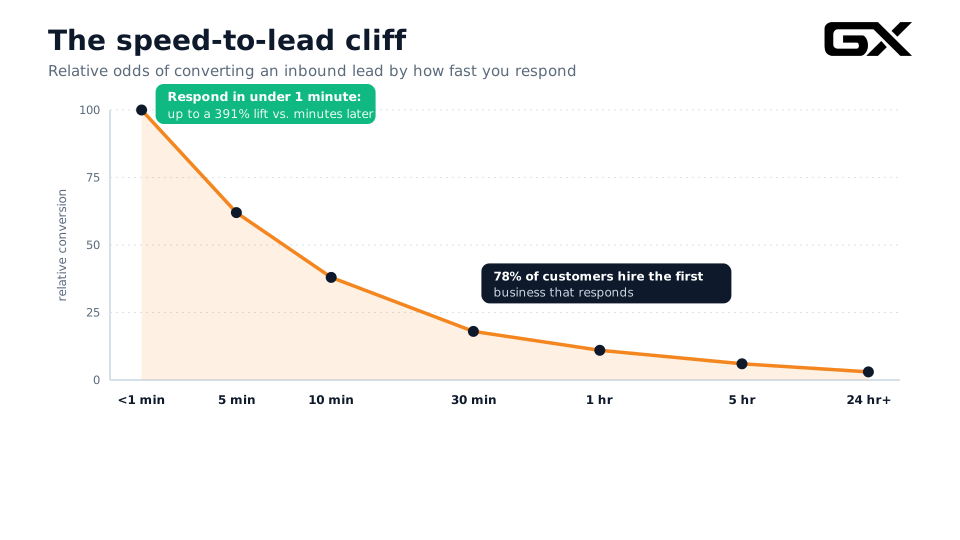
The research is overwhelming, and it all points in the same direction.
Responding to a new lead within five minutes makes you dramatically, by some studies 21 times, more likely to qualify it than waiting 30 minutes.
Push the response within 1 minute, and some data shows conversion lifts of nearly 391% compared to waiting just a few minutes longer.
And the kicker: roughly 78% of customers hire the first business that responds.
Meanwhile, the average business takes the better part of two days to respond, and a huge share of leads are never contacted at all.
For home services, this is even more brutal, because a homeowner with a burst pipe or a dead AC in July is filling out three or four forms at once and booking whoever calls back first.
By the time you respond an hour later, the job is gone.
Practical fixes:
-
Answer the phone live, every time, during business hours.
A missed call at a $180-per-lead cost isn’t a missed call — it’s $180 walking out the door.
If your team can’t always pick up, use an answering service or an AI receptionist to catch overflow, after-hours, and peak demand.
-
Respond to form fills in seconds, not hours. Automate an instant text and callback.
“Thanks [name], we got your request for [service] — calling you right now,” sent within 60 seconds, keeps you in the running.
-
Build a follow-up sequence. Most reps give up after one or two attempts; it often takes six to eight touches over a couple of days to connect.
A simple automated cadence of calls, texts, and emails dramatically lifts contact rates without anyone remembering to do it manually.
Then handle the call well. Speed gets you the conversation; a good intake process wins it.
Train your CSRs (or script your AI) to lead with empathy, ask qualifying questions, book the appointment on the call rather than promising to “have someone call you back,” and capture the lead source.
Moving an average 42% booking rate toward the 65–85% top operators hit is, on a few hundred calls a month, frequently the most valuable single project a contractor can run.
CTA optimization
Your call to action is the hinge on which the whole conversion swings. Small changes here produce some of the most reliable lifts in CRO.
Make it specific and outcome-focused.
“Get My Free Estimate” beats “Submit.” “Book Same-Day Service” beats “Contact Us.”
The button should describe what the visitor gets, in their words, not what your database does.
One primary CTA per page. Back to Hick’s Law: every competing button dilutes the others.
Choose the single most important action, make it the loudest element, and let everything else be visually secondary.
Contrast over color superstition. There’s no magic “buttons should be green” rule.
What matters is that the CTA contrasts sharply with everything around it, so the eye lands on it instantly.
On a slate-navy page, a bright amber button pops; on a light page, a dark one does.
Visual hierarchy wins, not a specific hue.
Repeat it at decision points. Place the CTA after the hero, after you’ve explained the service, after the reviews, and at the end.
People decide at different moments; don’t make them scroll back up to act.
Size it for thumbs. On mobile, tap targets should be large and properly spaced. The mobile platform guidelines suggest minimum sizes of 44–48px.
Buttons that are too small or crowded create mis-taps that quietly kill mobile conversions.
Match the CTA to the search language.
“Get Emergency Plumbing Service Now” for someone who searched “emergency plumber near me” converts better than a generic “Learn More,” because it mirrors the words already in the visitor’s head.
CTA copy is also the cheapest and fastest thing to test.
Even on a small site, you can alternate between two versions and see which one earns more calls.
Trust signals
Trust is the currency of the home-services sale.
A homeowner is about to let a stranger into their house and hand over hundreds or thousands of dollars, and they’re scared of getting burned.
Every trust signal you add is anxiety you remove; and anxiety removed is conversion gained.
Adding credibility elements, such as trust badges, has been shown to lift conversions by 7–12%.
The trust signals that matter most for the trades:
- Licensing and insurance, stated plainly and early. “Licensed, bonded, and insured” with the actual license number for the believers.
- Years in business and jobs completed. “Serving [County] since 2004 — 12,000+ jobs” is concrete and reassuring.
- Star rating and review count, pulled in live where possible. A 4.8 from 300+ reviews does more than any adjective you could write.
- Recognizable affiliations and certifications relevant to the trade (manufacturer certifications, BBB, industry associations, Google Guaranteed for the channels where it applies).
- Real faces and real trucks. Photos of the actual team and branded vehicles signal a real, accountable local business — not a fly-by-night.
- Guarantees and warranties, displayed as badges. A craft warranty or satisfaction guarantee is a powerful risk-reversal trust signal (see the offers section for more).
- Local proof. Service-area maps, neighborhood names, and locally specific reviews tell the visitor “we work right here, near you.”
A note on placement: trust signals work best near the point of decision.
A trust strip under the hero, star ratings beside the form, and a guarantee badge next to the CTA do more than a wall of badges buried on an “About” page nobody visits.
Reviews and testimonials
Reviews are the most powerful trust signal of all, so important that they deserve their own section.
The 2026 consumer research is unambiguous: the vast majority of people read reviews before choosing a local business, a large and growing share always do, and most simply won’t consider a business below roughly four stars.
Reviews don’t just influence the decision. For many homeowners they are the decision.
What the current data tells contractors to focus on:
Recency beats volume.
Consumers increasingly discount older reviews and place greater weight on the most recent ones; many consider reviews older than a few months stale.
A steady trickle of fresh reviews beats a big pile from three years ago. Build a system that asks every happy customer, every week.
Star threshold is real. Crossing and holding above 4.0, ideally 4.5+, is close to a gating requirement.
There’s even research suggesting tiny rating improvements produce outsized conversion gains. Protect your average actively.
Volume still builds confidence.
While expectations have loosened somewhat, most consumers still want to see a meaningful body of reviews, commonly in the 20-to-99 range, before they trust the average.
You need enough to look established.
Respond to reviews; all of them.
A large majority of consumers expect businesses to respond, and a thoughtful reply to a negative review can rebuild trust more than a wall of five-star ratings.
Responsiveness signals an accountable business.
Google is the center of gravity, but not the only platform.
Google reviews are read first and most, but consumers now check multiple sources before deciding.
A presence on the platforms your customers actually use matters.
For your website specifically: pull reviews onto the page near the CTA and on the relevant service page, use real names and specifics, and prefer recent ones.
A generic “Great service! — A Customer” does almost nothing.
“Replaced our furnace the same day we called, tech was clean and explained everything — Maria, [neighborhood]” does a lot.
Frame composite or paraphrased examples honestly as illustrative; never invent a testimonial, because the moment trust is discovered to be fake, you lose all of it.
Pricing presentation
“How much will this cost?” is the question on every homeowner’s mind, and the contractors who handle it well convert dramatically better than those who treat price like a state secret.
Hiding pricing entirely creates anxiety and selects for tire-kickers; the right approach is transparency calibrated to your trade.
Give a range, even when you can’t give a number. “Most water heater replacements run $1,400–$2,800 depending on size and type.”
This reduces anxiety and pre-qualifies the lead so your estimates are with serious buyers. It doesn’t lock you in; it builds trust.
Anchor with options. When you can present tiers — good / better / best, or basic repair vs. full replacement — most people gravitate to the middle.
Three options also shift the question in the buyer’s head from “should I do this?” to “which one?” — a far better question for you.
Show financing prominently.
For high-ticket trades (roofing, HVAC installs, panel upgrades), “as low as $89/month” reframes a scary lump sum into a manageable decision and is one of the strongest conversion levers available.
Surface it early, not buried in the fine print.
Be transparent about fees. Diagnostic fees, trip charges, and “we waive the fee if you book the repair” should be stated clearly.
Surprise fees discovered later are a top driver of cart abandonment and negative reviews.
Justify premium pricing with value, not apology.
If you charge more, say why: warranty, licensed master techs, same-day service. No surprise billing.
Price objections are usually disguised value-communication failures.
The goal isn’t to be the cheapest. It’s to remove the uncertainty around price, because uncertainty is what makes a homeowner close the tab and keep shopping.
Offer creation
The offer is the single most underrated conversion lever in the trades.
A strong, specific offer can lift conversion more than any button color or headline tweak, because it changes the actual value proposition rather than just its packaging.
The anatomy of an offer that converts:
Make it specific and concrete.
“$89 AC tune-up (reg. $149) — book this week” beats “great seasonal deals.” Specificity is believable; vagueness isn’t.
Lower the first step.
The best top-of-funnel offers cost the prospect almost nothing to accept: a free inspection, a free estimate, a no-obligation diagnostic, a downloadable price guide, or a checklist.
You’re buying the relationship and the conversation, not the sale, on the first interaction.
Reverse the risk.
Guarantees do heavy lifting: satisfaction guaranteed, on-time or it’s discounted, craft warranty, “no surprise pricing.”
Risk reversal directly addresses the homeowner’s core fear of getting burned and pairs naturally with your trust signals.
Add honest urgency.
Seasonal timing, limited install windows, expiring rebates, “only a few same-day slots left.”
For emergency trades, urgency is built in; for considered ones, keep it real.
Manufactured countdown timers on a roof replacement read as gimmicky and erode the trust you’re working to build.
Bundle to raise value and margin.
“Tune-up + filter + priority scheduling for $X” or maintenance plans that lock in repeat revenue.
Bundles also help justify a higher price point against cheaper competitors.
Match the offer to the temperature of the traffic, just as with landing pages: cold-prospecting traffic wants a free, low-commitment offer; hot search traffic wants speed and a clear price.
Build a small library of offers and rotate them by season and channel.
A/B testing on a small-traffic site
A/B testing, showing two versions of a page and measuring which converts better, is the gold standard of CRO.
But there’s a trap that snares almost every contractor who tries it: most service-business sites don’t have enough traffic to run a valid A/B test.
Here’s the problem.
To detect a real difference between two versions with statistical confidence, you typically need hundreds of conversions per variation.
A site doing 50 leads a month would take many months to reach significance on a single test; by which point the season has changed, and the result is meaningless.
Owners then chase “ghost wins”: they see the new headline “lifted conversion 15%” when the honest number is something like +15% give or take 22%, which is to say, noise.
Acting on noise is worse than not testing at all.
So what should a low-traffic contractor do?
- Use sequential (before/after) testing on 30-day windows.
Run version A for a month, change one thing, run version B for a month, and compare; accepting that it’s directional, not lab-grade.
Honest and useful beats rigorous and impossible.
- Test big swings, not tiny tweaks.
A small site can’t detect a 3% button-color lift, but it can feel the difference when you add a sticky call bar, cut a 9-field form to 3, or add a strong offer.Go for changes large enough to move the needle visibly.
- Test on your highest-traffic asset.
Concentrate experiments on the one page or campaign that gets the most volume, where you’ll reach a verdict fastest. - Lean on best practices and qualitative data.
When you can’t test statistically, apply the well-established principles in this guide and validate with heatmaps, session recordings, and call tracking rather than waiting for significance that will never come. - Pool data across similar pages where it makes sense (e.g., all four trade landing pages built from the same template) to reach meaningful sample sizes faster.
For most contractors, disciplined sequential testing, heatmaps, and call data are the right program.
Save formal A/B testing for the rare high-traffic page where the math actually works.
Heatmaps and analytics
You can’t fix a leak you can’t see. The instrumentation below turns “I think the page is fine” into “I can see exactly where people drop off.”
Conversion analytics (GA4 + call tracking).
Set up proper conversion events in GA4 — form submissions, clicks-to-call, booking starts — and segment by traffic source and device.
Crucially, track phone calls, not just form fills.
For the trades, the phone is the primary conversion path, and a site that looks like it converts at 2% on forms might be doing 8% once calls are counted.
Call-tracking software (dynamic number insertion) ties calls back to the campaign and keyword that drove them, exposing which spend books jobs actually.
Heatmaps.
Click maps show where people tap (and where they tap things that aren’t links — a sign of confusion).
Scroll maps show how far down the page people actually get; if 70% never reach your reviews or your form, that content might as well not exist. Move your conversion elements up.
Session recordings.
Watching real (anonymized) visitors navigate your site is the single most eye-opening CRO activity.
You’ll see the rage-clicks on a broken button, the form field everyone abandons, the mobile menu nobody can find. A handful of recordings often reveals more than a month of guesswork.
Form analytics.
Field-level tracking shows exactly which form field causes drop-off. If everyone bails at “address,” you’ve found a leak you can plug today.
The discipline: look at the data, form a hypothesis (“people aren’t reaching the form because it’s too far down”), make one change, and measure.
The tools are cheap or free; the bottleneck is almost always the habit of actually reviewing them. Block 30 minutes a month. The leaks reveal themselves fast.
Mobile conversion optimization
The majority of home-services traffic is now mobile. A homeowner standing in a flooded basement is not opening a laptop.
Yet most contractor sites are still quietly optimized for desktop, and the gap is costing them jobs.
Mobile-optimized pages convert meaningfully better than non-optimized ones. Some analyses put the lift at 26% or more, and mobile-friendly sites broadly outperform clunky ones by 30–45%.
The mobile essentials:
- Speed is non-negotiable.
Over half of mobile visitors abandon a page that takes more than three seconds to load, and every additional second of load time measurably drops conversions (roughly 4–7% per second in many studies).Compress images, kill bloated plugins, and test your real-world load time on a phone, not on your fast office Wi-Fi.
- Sticky tap-to-call.
A persistent, thumb-friendly call button is the highest-impact mobile element for the trades. Make it impossible to lose. - Single-column, thumb-first layout.
No pinch-zooming, no horizontal scrolling, no tiny links clustered together.Big tap targets (44–48px minimum), generous spacing, large readable text.
- Short, mobile-native forms.
Everything from the form section applies double on mobile. Use the correct input types (numeric keypad on the phone), autofill where possible, and keep it to a few fields.Sticky CTAs on mobile have been shown to lift conversions on their own.
- Test on real devices.
The single best mobile QA is to pull the site up on a few actual phones, an older Android, a recent iPhone, over a normal cellular connection and try to convert as a customer would.The leaks become obvious immediately.
The most common CRO mistakes
After auditing enough contractor sites, the same handful of mistakes keep showing up. Avoid these, and you’re ahead of most of your competition.
Optimizing the lowest-impact stage.
The classic error: spending $7,000 on a shiny new website to nudge the visitor-to-lead rate by a point, while a 42% CSR booking rate downstream leaks five times more revenue.
Always start with the booked-job formula and attack the stage with the largest gap versus the benchmark first. The biggest leak is usually not the homepage CTA — it’s missed calls, slow response, and weak booking.
Measuring only form fills.
GA4 says the site converts at 4.2%; the owner declares victory. Meanwhile, a third of leads never reach a human, and half of answered calls never get booked.
If you only measure the top of the funnel, you’re blind to where the money actually leaks. Measure the whole chain.
A/B testing without the traffic to support it.
Chasing statistically meaningless “wins” on a 50-lead-a-month site. Use sequential testing and big swings instead, as covered above.
Too many choices.
Five competing CTAs, a cluttered hero, a mega-menu — all of it raises cognitive load and lowers conversion. Simplify ruthlessly.
Slow response time.
The best website in the world, feeding leads nobody calls back for hours, is a sieve. Speed-to-lead is foundational; fix it before you polish anything else.
Hiding price and contact info.
No pricing guidance, a phone number buried three clicks deep, a contact form as the only path. Every one of these is friction you can remove this week.
Stock photos and generic copy.
“We provide quality service with integrity” tells the homeowner nothing and signals “template.”
Specificity and real photos build trust; generic everything erodes it.
Set-and-forget.
CRO isn’t a project you finish. Markets, seasons, competitors, and consumer expectations shift.
The businesses that win treat conversion as an ongoing habit, reviewing the data and making one improvement at a time, indefinitely.
Your CRO audit checklist
Run through this once on every key page. Each unchecked box is a probable leak. You don’t need to fix everything at once — score yourself, then prioritize by impact.
Above the fold
- Outcome-driven headline with service + city, readable in 3 seconds
- Phone number and primary CTA visible without scrolling (desktop and mobile)
- Sticky tap-to-call on mobile
- Trust strip (licensed, insured, rating, years) near the top
Trust and proof
- Star rating and review count displayed prominently
- Fresh, specific, named reviews near the CTA
- Real photos of team, trucks, and completed work (no stock)
- Guarantee or warranty badge visible
- Licensing/insurance stated plainly
- Local proof (service area, neighborhoods)
Conversion mechanics
- One clear primary CTA, repeated at decision points
- CTA copy is specific and outcome-focused (“Get my free estimate”)
- Form is 3 fields by default (name, phone, one detail)
- Multi-step form for high-ticket services
- Button states expectation (“we’ll call within 15 minutes”)
- Pricing guidance or range present; financing surfaced for big-ticket
- A specific, concrete offer with risk reversal
Speed and response (the leaks that matter most)
- Calls answered live during business hours; overflow/after-hours covered
- Form fills get an automated instant text/callback (under 60 seconds)
- A multi-touch follow-up sequence exists and runs automatically
- CSR booking process is scripted; booking rate is tracked
Mobile and speed
- Page loads in under 3 seconds on a real phone/cellular
- Single-column, thumb-first layout, 44–48px tap targets
- No pinch-zoom, no horizontal scroll, readable text
Measurement
- GA4 conversion events for forms, calls, and booking starts
- Call tracking installed (dynamic number insertion)
- Heatmaps and session recordings running on key pages
- Conversion reviewed monthly, segmented by source and device
The 30-day optimization plan
You don’t need a six-month consulting engagement to move the needle.
Here’s a focused, sequential month that attacks the biggest leaks first. Work it in order; the early weeks fix the leaks that cost the most.
Week 1 → See the leaks (measure before you touch anything).
Install or verify GA4 conversion events for forms and calls. Add call tracking.
Turn on heatmaps and session recordings on your top three pages. Pull last month’s numbers: visitors, leads, answer rate, and booking rate.
Map your funnel against the benchmarks in this guide and circle the stage with the worst gap. Resist the urge to redesign anything yet— diagnose.
Week 2 → Fix the response leaks (the highest-ROI work).
This is almost always where the biggest, cheapest wins live. Make sure every call is answered live during business hours, and set up overflow/after-hours coverage (an answering service or AI).
Build an automated instant text + callback for form fills, targeting under 60 seconds. Write a simple 6- to 8-touch follow-up sequence and automate it.
Script your CSR intake to book on the call and start tracking booking rate. None of this requires touching your website.
Week 3 → Fix the page leaks (friction and trust).
Now the site.
On your homepage and top service/landing pages: rewrite the hero to an outcome headline, add a sticky tap-to-call, drop in a trust strip, and fresh reviews near the CTA.
- Cut every form to 3 fields, or convert to a multi-step form for big jobs.
- Add one specific offer with a guarantee.
- Add pricing ranges and surface financing on high-ticket pages.
- Make one primary CTA the loudest thing on each page.
Week 4 → Mobile, measure, and lock in the habit.
Pull up every key page on real phones and fix what’s clunky: load times, tap targets, form usability.
Review your heatmaps and recordings: where are people still dropping off?
Make one more high-impact change based on what you see. Then compare this month’s funnel to Week 1’s baseline.
Finally, and this is the part that compounds, put a recurring 30-minute “CRO review” on the calendar for the same day next month.
CRO isn’t a sprint you finish; it’s the habit that quietly turns the same traffic into more booked jobs, month after month.
Plug your biggest leak first.
If you do nothing else from this guide, do this: measure your whole funnel, find the stage with the worst gap relative to the benchmark, and fix that one thing.
For most contractors, it’s not the website at all; it’s the leads leaking out between the form fill and the booked job. That’s where the cheapest growth in your business is hiding right now.
That’s exactly the problem GroXpertise was built to solve: finding the leaks in a service business’s growth system and plugging them, so the leads you already pay for actually turn into booked work.